
Messages & Language
Editing the built in messages, and adding a translation of your own alongside English.
DialogForge ships three language files under lang/: en.yml, es.yml and fr.yml.
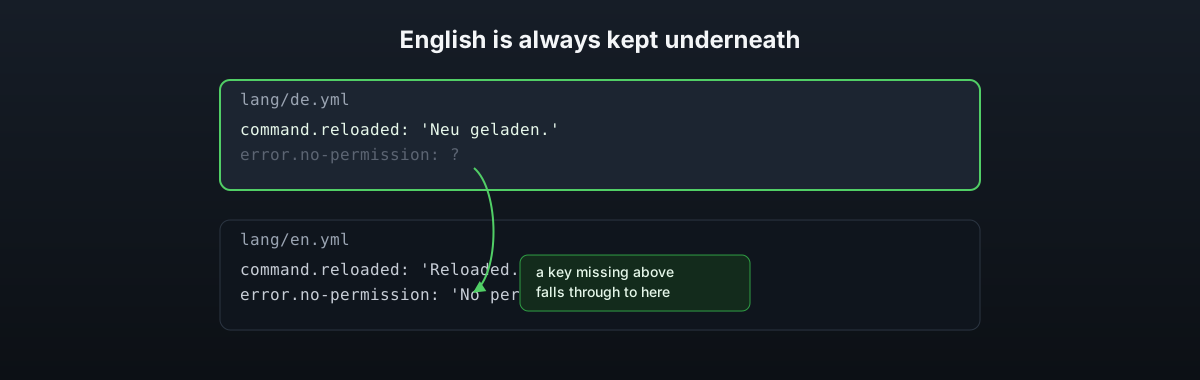
English is always kept loaded as a fallback underneath whichever one you pick, so a key
missing from your file, or from a translation you write yourself, still shows something
rather than a raw key name.
# config.yml
language: en
Point language at any file name in lang/ without the .yml part. Drop your own
lang/de.yml in and set language: de to use it, with nothing else to register.
What is in a language file
The console strings, the admin command's responses, and the built in messages a menu falls
back to when it does not set its own text: menu.requirement for a require: block with
no require-message, and the lock message shown when lock.message is not set.
Placeholder replacements in a language string use MiniMessage's unparsed placeholder form, so a player name or an error message that happens to contain an angle bracket cannot turn into a tag by accident.
Menu text is not the language file
Everything a player reads inside a menu, category labels, content lines, button labels,
tooltips, lives in the menu's own YAML file under menus/, not in lang/. A server running
menus in more than one language would keep a separate menu file per language and point
different commands or permissions at each, since DialogForge has no per-player language
switch of its own for menu content.
Writing a translation
Copy lang/en.yml to lang/xx.yml, translate the values, leave the keys alone, and set
language: xx. Anything you have not gotten to yet falls back to the English line
underneath it, so a partial translation never breaks the plugin, it just shows English for
the keys you have not reached.