
Menus & Pages
The structure of a menu file, from the top level keys down to a single button.
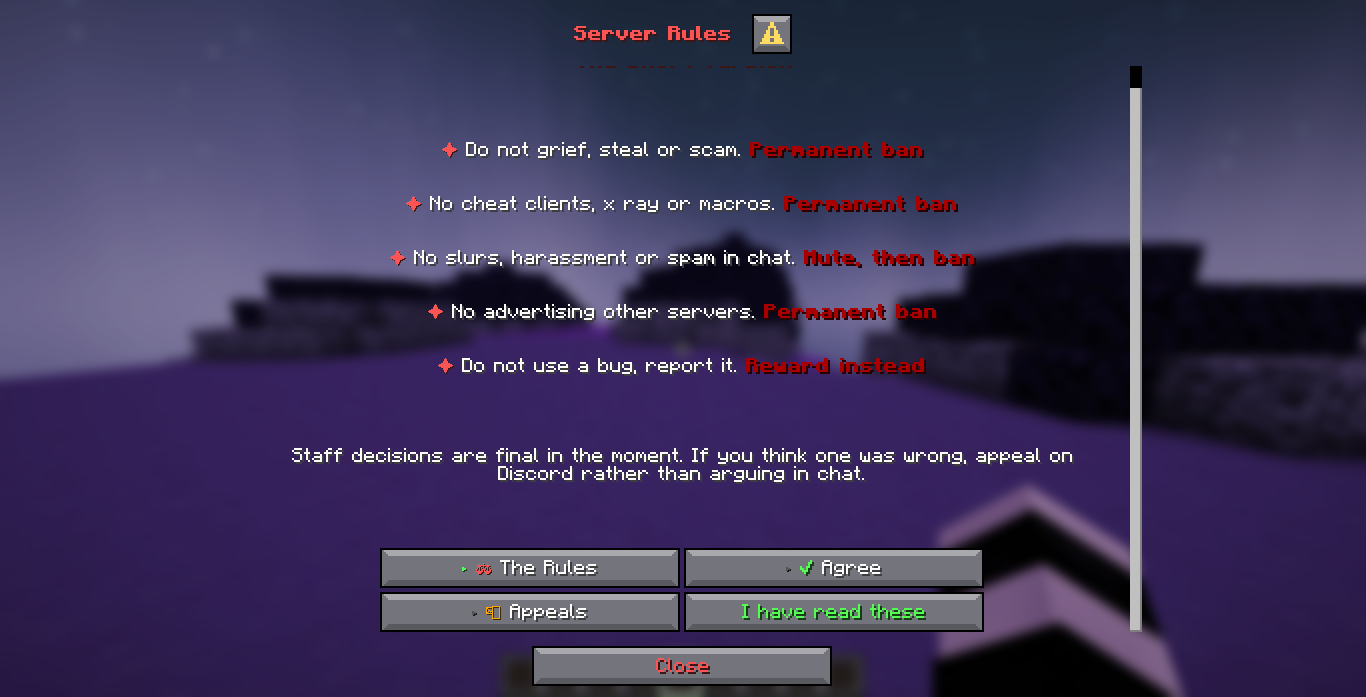
A menu is one YAML file under menus/. The file's path without the extension is its id,
so menus/staff/reports.yml has the id staff/reports. A menu file also registers its own
command, and DialogForge builds and shows a fresh dialog every time a player switches page,
so a category and its content are only ever what the file says they are.
Top level keys
command: guide
aliases:
  - wiki
permission-mode: open
title: '<green><bold>Server Guide</bold></green>'
external-title: 'Guide'
default-page: welcome
columns: 2
pages:
  - id: welcome
...| Key | What it does |
|---|---|
command | The command that opens this menu, registered for you |
aliases | Extra names for the same command |
permission-mode | open, optional or required. See Permissions |
permission | A node of your own instead of the built in one |
title | Shown at the top of the dialog. %page_label% follows the open category |
external-title | The name shown in /dialogforge list and tab completion |
default-page | Which page opens first |
layout | Overrides layout.mode in config.yml for this menu only |
columns | Category buttons per row, stacked layout only |
content-width | Overrides panel.content-width for this menu only |
background | Names a picture declared under backgrounds: in config.yml |
close-with-escape | Overrides behaviour.close-with-escape for this menu |
override-command | Take a command another plugin already registered |
lock | Holds a player until an answer on one of this menu's pages says so, see Locks |
A page
pages:
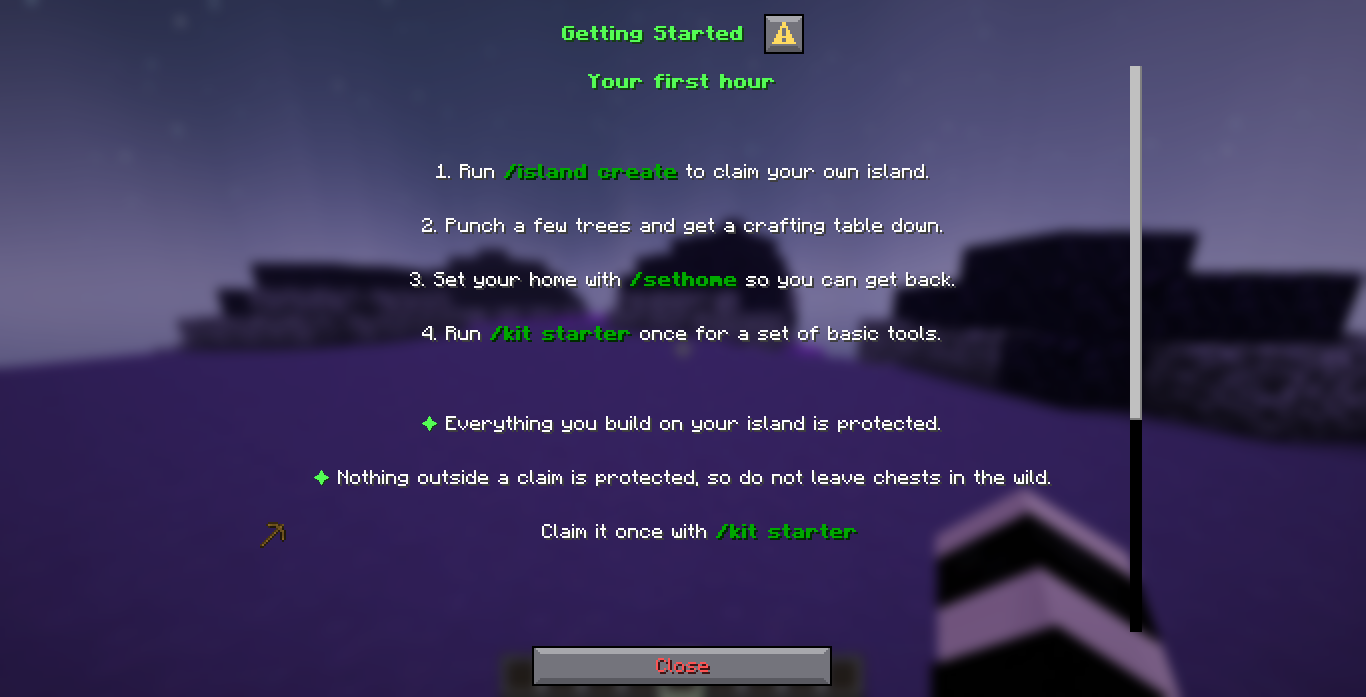
  - id: getting-started
    label: 'Getting Started'
    title: '<green><bold>Getting Started</bold></green>'
    icon: '<green>⛏</green> '
    tooltip: 'Your first hour'
    content:
      - '<white>1. Run <dark_green><bold>/island create</bold></dark_green>.</white>'
      - ''
      - '<green>✦</green> <white>Everything you build is protected.</white>'
    items:
      - material: WOODEN_PICKAXE
        name: '<green>Starter kit</green>'
description: '<white>Claim it once with</white> <dark_green><bold>/kit starter</bold></dark_green>'| Key | What it does |
|---|---|
id | Unique within the menu, used by open_page and by parent |
label | The sidebar text |
title | Replaces the menu title while this page is open |
icon | Put in front of the label, any MiniMessage text or an %icon:name% |
tooltip | Shown on hover in the panel layout |
content | One dialog line per list entry, wrapped for you |
items | Small item cards drawn inline, see below |
buttons | Extra buttons beyond the category grid, see Inputs & actions |
inputs | Text, toggle, slider or dropdown fields, see Inputs & actions |
parent | Draws this page indented under another page's id, see Subcategories below |
permission-mode / permission | Locks this one page rather than the whole menu |
hide-when-locked | Never show this page even when layout.show-locked-pages is on |
icon-width | Overrides panel.icon-width for this page's icon only |
actions | Makes this a shortcut instead of a screen, see below |
An items entry takes material, name, description, amount, tooltip,
show-tooltip and show-decorations, and is drawn as a small card inline with the content.
That page, as the shipped guide.yml draws it. The page's own title has replaced the
menu title at the top, and the item card sits inline after the content:
Subcategories
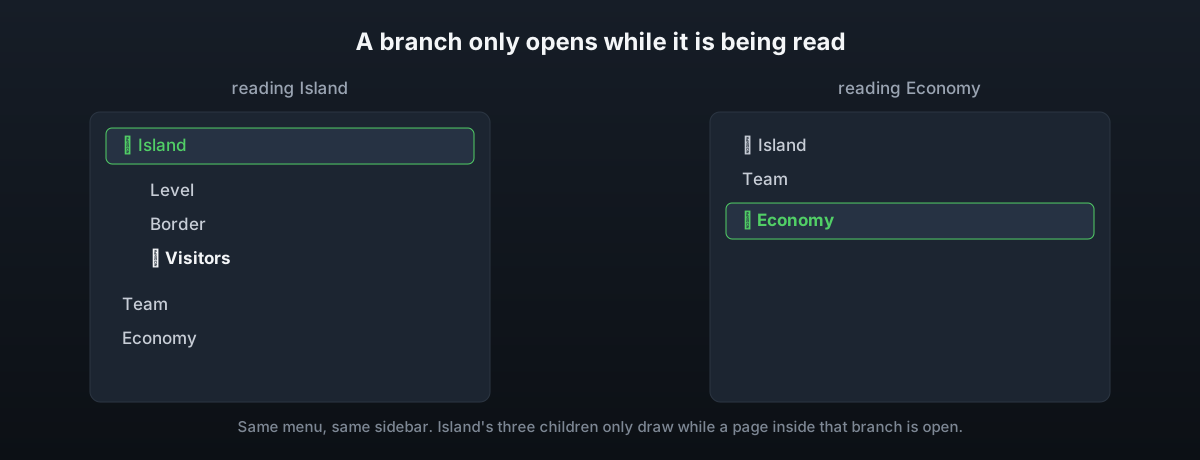
A page names a parent to sit indented underneath it in the sidebar instead of alongside
it:
- id: island
  label: 'Island'
  content: [...]

- id: island-level
  parent: island
  label: 'Level'
  content: [...]
A branch only shows while the page being read is somewhere inside it, so a menu of fifty
pages reads as a list of ten until the player picks one. layout.always-expand in
config.yml draws every branch all the time instead. A parent that does not exist, a ring
of parents, or a shortcut used as a parent are all refused when the file is loaded, because
each of those would end up as a category nobody could ever draw.
Shortcuts
A page with actions and no content is a shortcut. It sits in the category list like any
other page, but clicking it runs the actions instead of opening a screen, and the menu
stays exactly where it is:
- id: discord
  label: 'Discord'
  icon: '<blue>💬</blue> '
  tooltip: 'Opens the invite in your browser'
  actions:
    - 'open_url: https://discord.arrowtan.cc'
A page cannot carry both actions and content, and a shortcut cannot be default-page.
Both are refused when the menu file is loaded.
The default page
default-page is the id that opens when the menu is opened with no page named, for example
running /guide with nothing after it. behaviour.resume-last-page in config.yml reopens
a returning player on the page they last had open instead, if it is still one they can see.
Full examples
The five shipped menus cover most of what a menu file can do. guide.yml is a plain public
guide with subcategories and a shortcut. rules.yml pairs a confirm page with a
lock. settings.yml shows every input type saving a per-player value.
staff.yml shows a menu locked with permission-mode: required and a page locked again
inside it. faq.yml sets layout: panel on itself, so it is the sidebar menu: questions
grouped under topics down the left, the answer beside them, and a button on its last page
that is still a real button.
Every one of these ships with the plugin and is meant to be edited or deleted, not kept
as-is. menus/guide.yml, rules.yml, settings.yml, staff.yml and faq.yml are on
disk after the first start.