
Installation
Requirements, the install steps, what happens on the first run and what the plugin folder looks like afterwards.
Installing DialogForge takes about two minutes. The only thing you have to get right is the Paper version.
Requirements
| Server software | Paper only |
| Minimum version | 1.21.7, build 17 or newer |
| Maximum tested | 26.2 |
| Java | 21 |
| Client | 1.21.6 or newer, to see a dialog at all |
| PlaceholderAPI | Optional, soft-depend |
Spigot, Bukkit and Purpur are not supported and will not be. The Dialog API this plugin is built on is Paper's own, and Paper hardforked at 1.21.4, before it existed, so it has no equivalent on those platforms.
Why 1.21.7 build 17
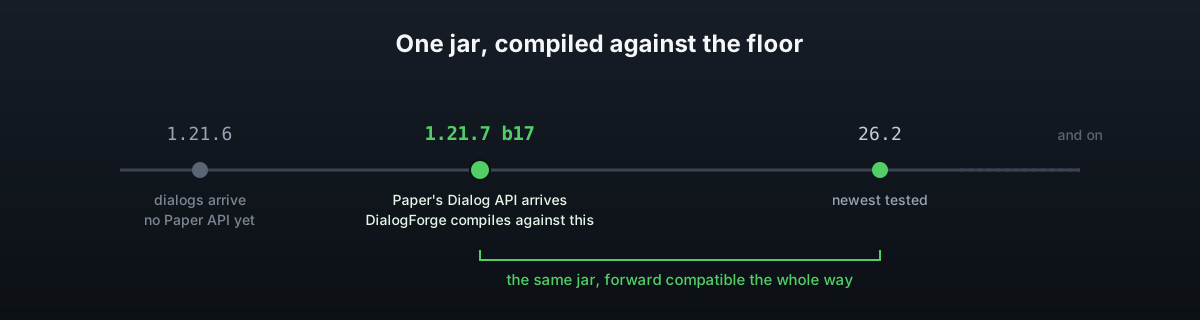
The dialog feature itself arrived in Minecraft 1.21.6. Paper's own Dialog API followed a version later, in 1.21.7, and only from build 17 onwards. DialogForge is compiled against that exact release on purpose: compiling against a newer artifact would make it easy to use API that an older supported server does not have. Paper is forward compatible, so the same jar loads on everything up to the current 26.x line.
The Dialog API is still marked experimental in the 1.21.7 javadocs. That is an IDE level warning rather than something DialogForge can opt out of, and it means a Paper update is the most likely place a future break comes from.
Install
Get the jar
See Download for where to buy it and how to get the latest build.
Stop the server
Shut it down fully before adding the jar.
Drop in the jar
Move the DialogForge jar into your plugins/ folder.
Start the server
DialogForge checks for Paper and for the Dialog API classes before anything else. Either check failing logs one line and disables the plugin, so a healthy start is silent on that front.
Try it
Run /guide in game. It opens the shipped server guide, a working menu you can read
straight away and copy from for your own.
First run
The first start writes config.yml, all three shipped language files under lang/, and
five example menus under menus/: guide.yml, rules.yml, settings.yml, staff.yml
and faq.yml. Every line of every file is commented. faq.yml is the one drawn in the
panel layout, and it reads as a plain list until the font pack
is in place.
Storage is set up at the same time. With the default SQLite backend that means creating
data.db in the plugin's own folder. Nothing else is needed.
PackService also runs on every enable, writing the panel resource pack to
plugins/DialogForge/pack/. It does this whether or not you use the panel layout, see
Layout modes for what to do with it.
Plugin folder
| Path | What it holds | Page |
|---|---|---|
config.yml | Layout, panel, permissions, storage and every other global setting | Configuration |
lang/*.yml | Every message DialogForge sends, English always kept as the fallback | Messages & language |
menus/*.yml | One file per menu, subfolders allowed | Menus |
backgrounds/ | Images declared under backgrounds: in config.yml | Backgrounds |
icons/ | Images declared under icons: in config.yml | Icons |
pack/ | The panel resource pack, written on every enable | Layout modes |
data.db | The SQLite database, only when storage.type is sqlite | Storage |
Upgrading
Stop the server, replace the jar, start it again. config.yml is read through BoostedYAML,
so new keys arrive with their comments and the values you already set are kept exactly as
you left them.
Reloading without a restart
auto-reload.enabled is on by default. Editing config.yml, a language file or anything
under menus/ and saving it reloads the plugin on its own within interval-ticks, no
command needed. Anyone with a menu open at the time is shown the same page again once the
files have been read.
/dialogforge reload does the same thing on demand, and needs dialogforge.reload.
Optional integrations
| What | Why | Where |
|---|---|---|
| PlaceholderAPI | Every expansion on the server becomes usable in menu text | Placeholders |
| ItemsAdder | Merge the panel font into the pack ItemsAdder already serves | Layout modes |
| MySQL | Shared player state across a network | Storage |
| Any permissions plugin | optional and required permission modes | Permissions |