
Commands
The admin command and the command every menu registers for itself, with the permission each one needs.
/dialogforge
Aliased to /df.
| Command | What it does | Permission |
|---|---|---|
/dialogforge reload | Reloads config, languages and every menu | dialogforge.reload |
/dialogforge open <menu> [page] [player] | Opens a menu, optionally on a page, optionally for someone else | none, [player] needs dialogforge.open.others |
/dialogforge list | Lists every loaded menu, its command and its page count | dialogforge.admin |
/dialogforge version | Prints the plugin version, server version, default layout, storage type and active language | dialogforge.admin |
open takes - in place of a page to open a menu on its default page while still naming a
target player:
/dialogforge open guide - NotchMenu commands
Every menu registers its own command and aliases, taken straight from the menu file:
# menus/guide.yml
command: guide
aliases:
  - wiki
Running /guide with nothing after it opens the menu on default-page, or on the page the
player was last looking at if behaviour.resume-last-page is on. These commands are
registered through Bukkit.getCommandMap() rather than plugin.yml, since the set of
commands is only known once the menu files are read and can change on every reload.
Whether a menu command needs a permission depends entirely on that menu's own
permission-mode. See Permissions.
When another plugin already owns the command
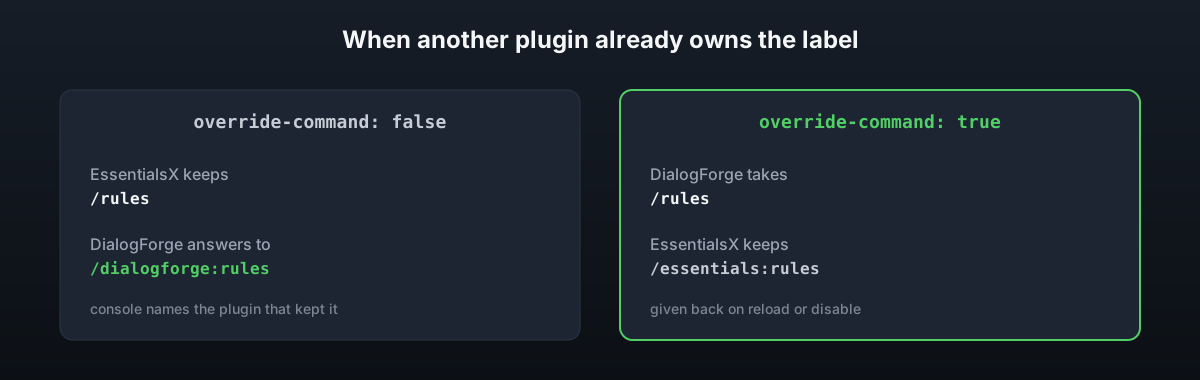
If something else has already claimed the label, for example EssentialsX registering
/rules, the console says so and the menu answers to dialogforge:rules instead. Set
override-command: true on the menu, or commands.override-conflicts: true in
config.yml for every menu, to take the label back, as long as nothing else has claimed it
in the meantime. DialogForge hands the command back to the other plugin on its own when
reloaded or disabled.