
Backgrounds
A picture of your own drawn behind a menu, declared once in config.yml and named from any menu file.
A dialog has no background of its own and the API offers none, so DialogForge draws one as a font glyph in the first body element of the screen, which is what everything else on the page lands on top of.
Declaring one
# config.yml
backgrounds:
  guide:
    image: 'guide.png'
    width: 440
    height: 400
    fit: cover
    offset: 0
    shift: 0
    overlay: false
    repeat: 1
Drop guide.png into plugins/DialogForge/backgrounds/, then name it from a menu file:
# menus/guide.yml
background: guide
A single page can carry its own background instead, so the picture follows the category.
Restart, then re-upload the pack zip or run /iazip, and rejoin, since a background changes
the pack's hash.
How it is cut up
A single font glyph cannot be larger than 256 pixels in either direction, so a background is resized to the size you asked for and cut into tiles small enough for the client to draw, each one followed by a shift that closes the gap between it and the next.
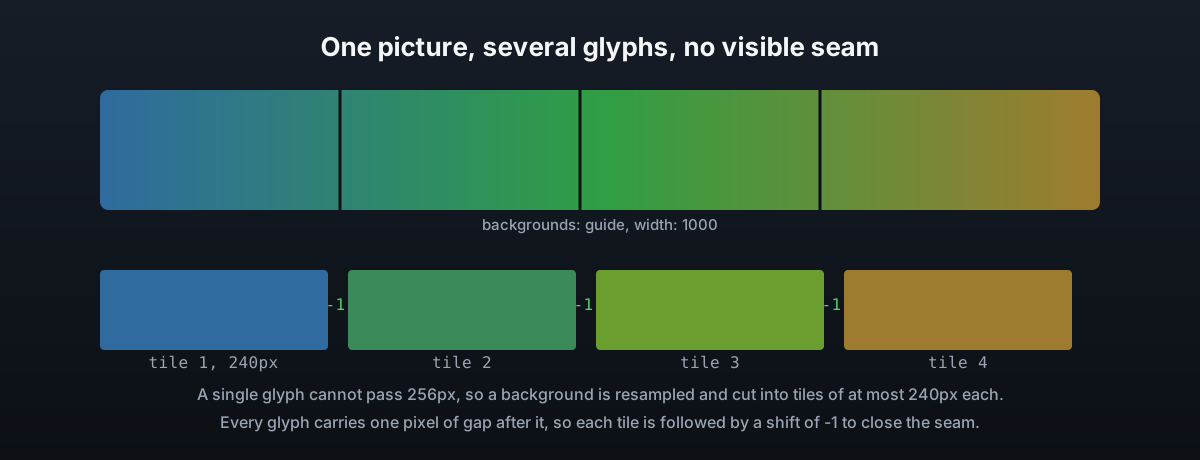
Sizing
| Key | What it does |
|---|---|
width / height | The size to draw it at, in interface pixels, not the size of the file. Set one and the other follows the file's shape, set neither and it is 400 wide |
fit | cover crops the middle to fit, contain shrinks the whole picture in, stretch uses the exact size given |
offset | How far down the screen it starts. 0 hangs it from the first line of the body, negative pulls it up over the title |
shift | Nudges it sideways. Negative is free, a positive shift is taken out of the width available unless overlay is on |
overlay | Draws the picture without the dialog counting how wide it is, see below |
repeat | How many copies to draw stacked underneath each other, or auto for enough to reach 2048 pixels |
The width is capped at 1016 pixels, a hair under the 1024 a dialog line may be, so the line the picture sits on keeps a few pixels of room at the end. The height is capped at 2048, which is generous rather than a client limit, since nothing measures how tall a run of glyphs is except DialogForge itself.
Any size of source image works. DialogForge resizes it to the numbers above whatever the file started at, so a 1920 by 1080 screenshot does not need cropping by hand first.
Overlay
Minecraft lays a dialog out around the widest thing in it and draws the scrollbar down that element's right edge. A picture wider than the text is therefore what decides the dialog's width, and a picture wider than the game window pushes that scrollbar off the side of the screen.
overlay: true starts the run of tiles half a picture to the left and gives back every
pixel it advances, so the dialog is laid out as though the picture were not there at all.
The text column decides the width, the scrollbar sits where you would expect, and the
picture is still drawn over everything. It also lifts the width limit to 2032, since the run
starts from the middle. The one thing to check afterwards is that the client is not clipping
the body to the width it worked out without the picture.
Repeating
The body of a dialog scrolls, and a picture drawn once scrolls with it, so a background as
tall as the screen still runs out where a long page of text keeps going. repeat: auto
works out enough copies to reach 2048 pixels down on its own, and copies past the last line
of text are clipped by the client for free. The seam between one copy and the next only
disappears if the top and bottom of the source image match.
The console line
PackService#prepare prints which backgrounds loaded against how many were declared, and
the size, repeat count and overlay setting each one ended up at. Check that line first if a
picture is not appearing: a name that does not match a declared background draws nothing,
and two backgrounds declared under the same name keep only the last, both silently.