
Ratings and profiles
How employers rate finished work and what a player profile shows.
Ratings help players pick good workers. After a job is completed, its employer can give the worker one to five stars, and every player has a profile that adds up their history.
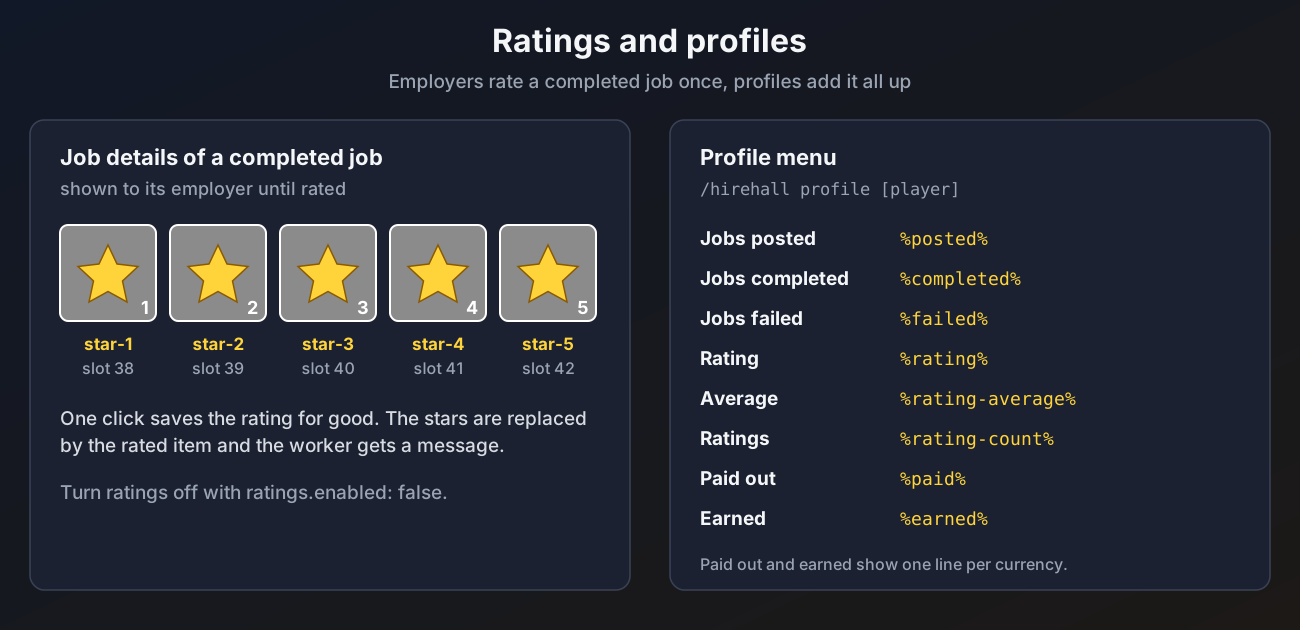
Rating a job
- When a job completes, the employer gets a message pointing to
/hirehall postings. - Completed jobs you have not rated yet are listed there with a star icon.
- Open the job and click one of the five star buttons.
A job can be rated once, and only by its employer. Community jobs cannot be rated, since there is no single worker. The worker gets a message with the stars. The buttons are then replaced by the rating.
To turn ratings off:
ratings:
  enabled: false
With ratings off the star buttons are hidden, completed jobs no longer show up in My Postings, and the completion message does not mention rating.
Profiles
/hirehall profile opens your own profile, /hirehall profile <player> someone else's. Looking at other profiles needs hirehall.profile.others, which everyone has by default. Profiles can also be opened by clicking a player head in the job menus, or by right clicking a job on the board.
| Line | What it counts |
|---|---|
| Jobs posted | Jobs this player posted |
| Jobs completed | Jobs this player finished as a worker, plus community jobs they delivered to that were completed |
| Jobs failed | Jobs this player abandoned, plus jobs that expired while they were working on them |
| Rating | The average rating as stars, the average as a number, and how many ratings |
| Paid out | Money paid for completed jobs, one line per currency |
| Earned | Money received for completed jobs, one line per currency |
Other players can be looked up by name even when offline, as long as they have used HireHall before.
The same numbers are available as placeholders, for example %hirehall_rating_stars% and %hirehall_completed%.