
Messages and language
Editing HireHall messages, the bundled translations, and adding your own language.
Every chat message, status name, time format and help line is in a language file in plugins/HireHall/lang. English, French and Spanish are included.
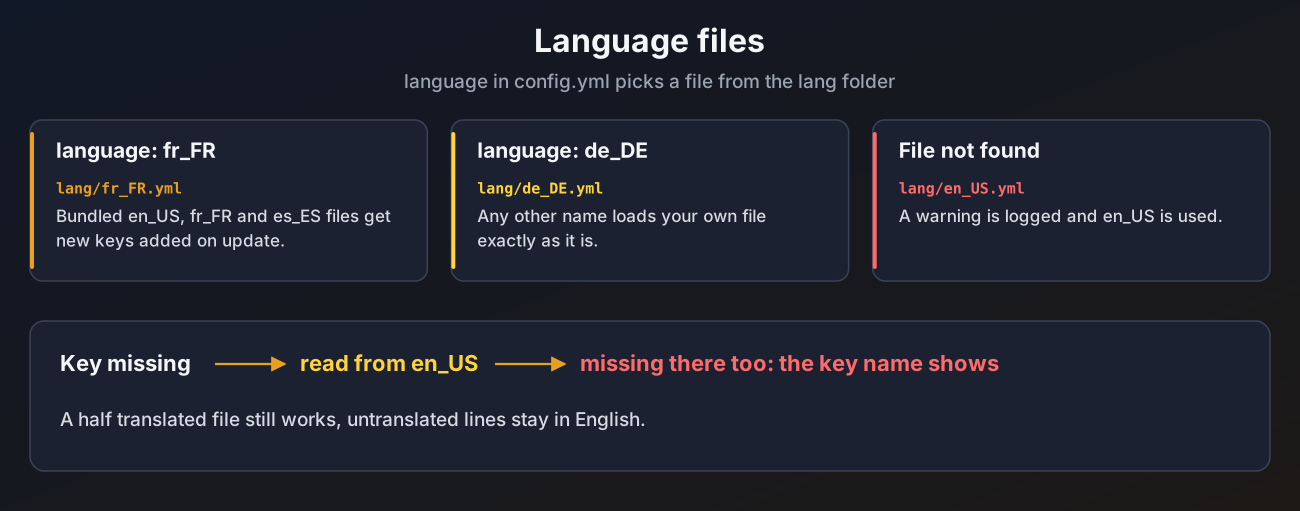
Picking a language
# config.yml
language: fr_FR| File | Language |
|---|---|
en_US.yml | English |
fr_FR.yml | French |
es_ES.yml | Spanish |
Run /hirehall admin reload after changing it.
Menu language
The menu files and job-types.yml come in English, French and Spanish too. Which one you get is decided when the files are first created:
# config.yml
language: fr_FR
menu-language: auto
menu-language: autofollowslanguage. Set it toen_US,fr_FRores_ESto pick the menu language on its own.- Any other language (your own
de_DE, for example) gets the English menus. - Files that already exist are never replaced, so your edits are safe.
Switching an existing server
Changing the language on a server that already has its menus does not change them. To get fresh menus in the new language:
- Set
language(ormenu-language) inconfig.yml. - Run
/hirehall admin resetmenus.
The command copies every file in menus/ to backups/menus-<date> and then makes a fresh set of the bundled menus in the menu language, and reloads. Any edits you made, and any menus of your own, are in the backup folder to copy back. job-types.yml is not touched by this command. To get it in the new language, move it out of the folder and restart or reload.
Your own language
- Copy
en_US.ymlto a new name, for examplede_DE.yml. - Translate the lines.
- Set
language: de_DEand reload.
HireHall reads your own file exactly as it is and never changes it. Any key missing from it is read from en_US.yml, so a half finished translation still works. If the file does not exist, a warning is logged and English is used.
The three bundled files get new keys added automatically when you update. Your edits to them are kept.
Formatting
Messages use MiniMessage:
jobs:
taken: "%prefix%<white>You took job <#e8a021>#%id%</#e8a021>: %type% <white>for</white> %pay%<white>.</white>"%prefix%is replaced by theprefixline at the top of the file.- Click and hover tags work, the help pages use them for their page buttons.
- A message can be a list of lines. Each line is sent separately.
- An empty message (
"") is not sent at all, a simple way to turn a message off. %hirehall_...%placeholders and, with PlaceholderAPI, any other placeholder work in every message. Legacy&colours returned by other plugins' placeholders are converted.
Sections
| Section | What is in it |
|---|---|
prefix | The prefix used by %prefix% |
format | How money, pay, item lists, stars, the progress bar and dates are written |
time | Days, hours and minutes, and the Expired text |
status | The name of each job status |
goals | The name of each job goal, like Delivery or Hunting |
reasons | Why a job was cancelled or expired |
general | No permission, still loading and storage errors |
post | Messages while posting |
jobs | Messages while taking and working jobs |
rating | Rating messages |
notify | Messages sent to the other side of a job, and the broadcast |
claims | Payout and claim messages |
admin | Admin command replies |
menus | Texts used inside menus, like payment mode names and claim reasons |
confirm | The questions on the confirm menu |
commands | Unknown command, player only and usage messages |
help | The help pages |
input | The typed number input: its titles, hint and the reasons shown on the barrier. See Typing a number |
Useful format keys
| Key | Default | Controls |
|---|---|---|
format.money | %amount% %currency% | How every money amount is written |
format.date | dd MMM yyyy, HH:mm | Date layout, in Java date pattern letters |
format.star-full, format.star-empty | amber and grey stars | Rating stars |
format.bar-filled, format.bar-empty | amber and dark grey bars | The ten part progress bar |
format.unlimited | Unlimited | Shown for an unlimited limit, also in placeholders |
format.post-modes | Community, Exclusive, Direct offer | Names of the posting modes |
format.pricing-unit, format.pricing-total | Price per unit, One total price | Names of the two pricing choices |
Menu names, lore and titles are not in the language files, they are in the menu files, which are made in the menu language.