
Menus
The menu file format, slots, fillers, items, templates, pagination, input slots, actions and custom items.
Every HireHall menu is a yml file in plugins/HireHall/menus. You can move any button, change every name, lore line, icon and sound, add your own buttons with actions, and even add whole new menus.
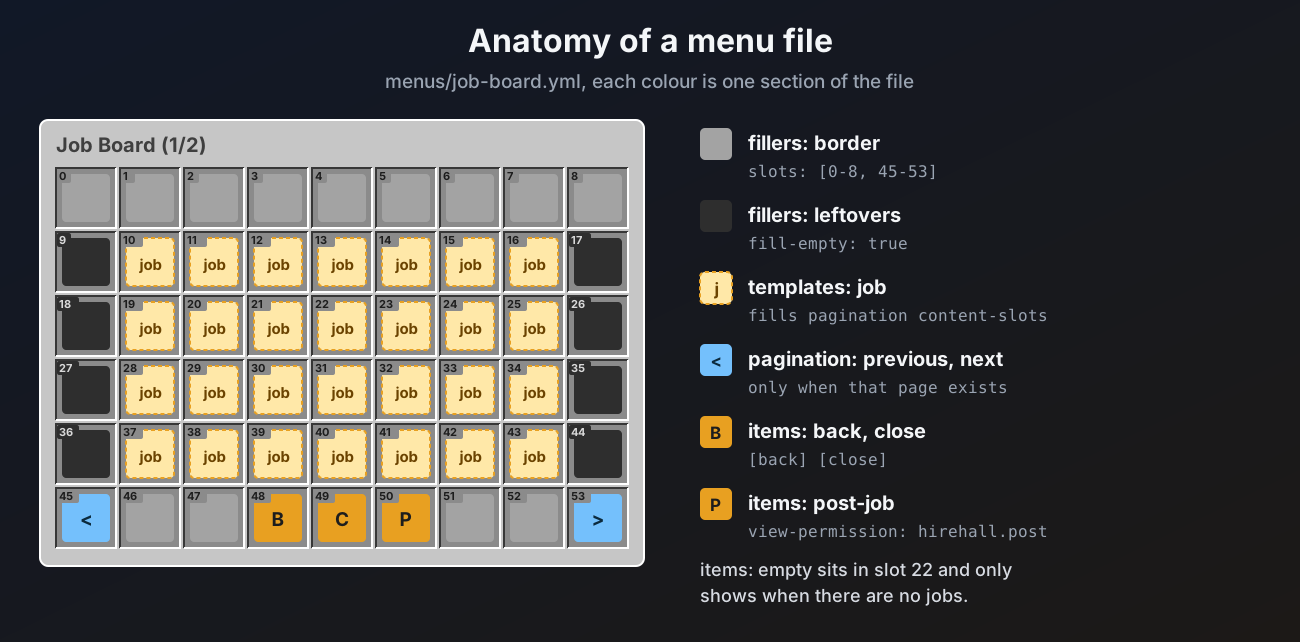
The bundled menus come in English, French and Spanish, picked by menu-language when the files are first made. /hirehall admin resetmenus backs up your menus and makes a fresh set, see Menu language.
Changes apply after /hirehall admin reload. Mistakes (a slot outside the menu, an unknown action, a missing template) are logged once in the console with the file and the key, and the rest of the menu still works.
The file
menu-version: 1
title: "<#e8a021>Job Board <white>(%page%/%pages%)"
rows: 6
open-sound: "BLOCK_NOTE_BLOCK_HARP"
click-sound: "UI_BUTTON_CLICK"

fillers:
  border:
    material: GRAY_STAINED_GLASS_PANE
    name: " "
    slots: [0-8, 45-53]
    priority: 1

items:
  close:
    slot: 49
    material: BARRIER
    name: "<#e8a021>Close"
    actions:
      left: "[close]"

templates:
  job:
    material: "%icon%"
    name: "<#e8a021>%type% <white>#%id%"

pagination:
  content-slots: [10-16, 19-25, 28-34, 37-43]
  previous:
    slot: 45
    material: ARROW
    name: "<#e8a021>Previous Page"
  next:
    slot: 53
    material: ARROW
name: "<#e8a021>Next Page"| Key | What it does | Default |
|---|---|---|
menu-version | File version, do not change | |
title | Title at the top. Placeholders work | the file name |
rows | Rows from 1 to 6 | 6 |
open-sound | Sound when the menu opens, empty for none | none |
click-sound | Sound when a button is clicked, empty for none | none |
fillers | Background items | none |
items | Fixed buttons | none |
templates | Layouts for list entries | none |
pagination | Where list entries go and the page buttons | none |
input-slots | Slots players can put items into | none |
Sounds are sound names like UI_BUTTON_CLICK or full keys like minecraft:ui.button.click, so resource pack sounds work too.
Slots
Slots count from 0 in the top left corner, left to right, top to bottom. A 6 row menu has slots 0 to 53.
All of these are valid:
slot: 13
slots: [10, 11, 12]
slots: [0-8, 45-53]
slots: "10-16, 19-25"
Buttons accept slot or slots, fillers and content-slots use slots. A slot outside the menu is skipped with a warning.
Fillers
Fillers are background items. They cannot be clicked and never do anything.
| Key | What it does | Default |
|---|---|---|
material | The item, see Custom items | GRAY_STAINED_GLASS_PANE |
name | Name, a space hides it | a space |
slots | Where it goes | none |
fill-empty | Fill every slot nothing else uses | false |
priority | Drawing order, lower first | 1 |
model | Custom model data, 0 for none | 0 |
A menu is drawn in this order, each step covering the one before:
- fillers with
slots, lowestpriorityfirst, so a higher priority wins where they overlap items- entries of slotted templates
- list entries in
pagination.content-slots - the previous and next page buttons
- fillers with
fill-empty: true, which only fill what is still empty (the lowest priority one gets there first)
Input slots are never filled.
Items
Items are the fixed buttons.
| Key | What it does | Default |
|---|---|---|
slot or slots | Where it goes, a button can sit in several slots | none |
material | The item, see Custom items. Placeholders work | STONE |
amount | Stack size shown, 1 to 99, capped at the item's stack size | 1 |
name | Name, MiniMessage and placeholders | the item's own name |
lore | Lore lines, a placeholder that holds several lines expands into several lines | none |
glow | Enchantment glint | false |
model | Custom model data, 0 for none | 0 |
view-permission | Permission needed to see and use the button | none |
hide-if-no-permission | true hides the button without the permission. false shows it as a grey dye that cannot be clicked | true |
actions | What clicks do, see Actions | none |
Built in buttons
Some item keys have a job in HireHall itself, for example take in job-details.yml takes the job. For these:
- Move them, restyle them, add actions to them: all fine. Your
actionsrun first, then the built in behaviour. - Do not rename the key, or the button loses its behaviour.
- HireHall decides when they show.
takeonly shows on an open job for other players,hand-inonly when a task job is ready,communityandcontributeonly on community jobs, and so on.
The custom buttons on the amount and currency menus open the typed number input. pricing switches between a price per unit and one total price, and is hidden for community jobs. The total item on the currency menu is a plain item that shows %total%.
An item keyed empty is special in menus with a list: it only shows when the list has no entries.
Templates
A template is the layout for one entry of a list, like one job on the board. It takes the same keys as an item, and has placeholders for that entry (%id%, %pay%, %employer% and so on, see the menu reference).
There are two kinds:
- Paged templates fill
pagination.content-slots, one entry per slot, over as many pages as needed. Their ownslotskey is not used. - Slotted templates fill their own
slotslist, in order, one entry per slot. The posting menus use these for the plus and minus steps and the deadline choices. If there are more entries than slots, the extra ones do not show.
templates:
  increase:
    slots: [14, 15, 16]
    material: LIME_STAINED_GLASS_PANE
    name: "<#8ce99a>+%step%"
Here posting.quantity-steps: [1, 10, 100] gives three entries, placed in slots 14, 15 and 16. Add a fourth step and a fourth slot together.
Template names are fixed per menu. A missing template is logged and its entries do not show.
Pagination
| Key | What it does |
|---|---|
content-slots | The slots list entries fill, page by page |
previous | Button to the previous page, an item with its own slot |
next | Button to the next page |
The page buttons only show when there is a page to go to. %page% and %pages% work in the title and every item. Actions on the page buttons run before the page turns.
Input slots
input-slots: [10-16, 19-25, 28-34]Input slots are real empty slots players can put items into. They are used by post-job-items.yml (items to pay with) and deliver.yml (items to hand in).
- Shift clicking an item in the player's inventory moves it into the input slots.
- Double click collecting and dragging into other slots are blocked.
- Leaving the menu takes the items out and gives them back (or keeps them for the next posting step). Nothing is dropped.
In any other menu, including your own, input slots only hold items while the menu is open. When the menu is left, the items go back to the player.
Actions
actions:
  left: "[menu] job-board"
  right:
    - "[message] <white>Opening your profile"
    - "[command] hirehall profile"
Clicks are left, right, shift-left, shift-right and middle. Each takes one action or a list.
| Action | What it does |
|---|---|
[menu] <file> | Opens another menu by file name without .yml. Back returns to this menu |
[back] | Goes back to the previous menu, or closes when there is none |
[close] | Closes the menu |
[command] <command> | Runs a command as the player, with or without the / |
[console] <command> | Runs a command from the console |
[message] <text> | Sends the player a MiniMessage line, %prefix% works |
[sound] <sound> | Plays a sound to the player |
[refresh] | Redraws the menu |
Menu placeholders work in every action. In [command] and [console], %hirehall_...% and PlaceholderAPI placeholders work too.
Conditions
There is no general condition system in the menu files. What decides whether a button shows is:
view-permissiontogether withhide-if-no-permission- the
emptyitem, for menus with a list - the built in rules of the built in buttons, which you cannot change
To show something only to some players, give them a permission and use view-permission.
Custom items
material on items, templates and fillers accepts:
| Value | Gives |
|---|---|
DIAMOND | A normal item by its material name |
head:Notch | That player's head. head:%player% shows the viewer's own head |
base64:<texture> | A head with a texture value, as found on head sites |
ia:namespace:id or itemsadder:namespace:id | An ItemsAdder item |
nexo:id | A Nexo item |
%icon% | The icon placeholder a menu provides, for example the job's target |
A material that cannot be found shows as a barrier named after the bad value, with one warning in the console. ItemsAdder and Nexo items show as barriers while those plugins are still loading their items, reopen the menu once they are done. See ItemsAdder and Nexo.
Text
Names, lore and titles use MiniMessage, for example <#e8a021> or <bold>. Placeholders use %name%:
%player%,%page%and%pages%in every menu- the placeholders of that menu, see below
- all
%hirehall_...%placeholders, with or without PlaceholderAPI - any PlaceholderAPI placeholder, when PlaceholderAPI is installed
Menus showing jobs or claims update by themselves while open, for example when a worker makes progress.
Your own menus
Any extra .yml file dropped into menus/ is loaded too. Open it with [menu] <file name> from any button, for example a rules menu opened from main.yml. Your own menus support fillers, items, view-permission, actions, custom items and placeholders. Built in buttons, templates, pagination and input slots do nothing there, since HireHall has no list or items to give them.
Menu reference
| File | Opened by | Built in buttons | Templates |
|---|---|---|---|
main.yml | /hirehall | none, everything uses actions | |
job-board.yml | /hirehall board | job (left click opens, right click opens the employer profile) | |
job-details.yml | clicking a job | take, contribute, community, accept, decline, cancel, contract, employer, worker, star-1 to star-5, rated | |
offers.yml | /hirehall offers | offer | |
my-contracts.yml | /hirehall contracts | contract | |
contract-details.yml | clicking a contract | deliver, hand-in, abandon, employer | |
deliver.yml | Deliver Items | deliver, deliver-all | |
my-postings.yml | /hirehall postings | posting, completed | |
post-job-type.yml | /hirehall post | type | |
post-job-goal.yml | posting step 2 | target | |
post-job-quantity.yml | posting step 3 | min, max, custom, next | increase, decrease (slotted) |
post-job-mode.yml | posting step 4 | community, exclusive, direct, next | |
post-job-payment.yml | posting step 5 | money, money-and-items, items | |
post-job-currency.yml | posting step 6 | min, max, pricing, custom, next | currency, increase, decrease (slotted) |
post-job-items.yml | posting step 7 | next | |
post-job-deadline.yml | posting step 8 | deadline (slotted) | |
post-job-confirm.yml | posting step 9 | note, mode, offer, public, decline-action, post, discard | |
player-select.yml | Offer to a Player, admin Inspect | player | |
claims.yml | /hirehall claim | collect-all | claim |
profile.yml | /hirehall profile | ||
confirm.yml | anything that asks first | confirm, cancel | |
admin.yml | the Admin button | inspect, reload | job |
admin-player.yml | /hirehall admin inspect | profile, wipe | job, claim |
Placeholders by menu
Used by every job template, and across the whole of job-details.yml, contract-details.yml and deliver.yml.
| Placeholder | Value |
|---|---|
%id% | Job number |
%employer%, %worker%, %offered-to% | Player names, or Nobody |
%type%, %goal%, %target% | Job type name, goal name, target name |
%icon% | The target's icon |
%quantity%, %progress%, %remaining%, %percent% | Amounts |
%delivered% | Amount delivered so far, used by community jobs |
%post-mode% | Community, Exclusive or Direct offer |
%unit-price% | Price per unit, or Fixed total when the job pays one total |
%total% | The total money pay |
%budget% | Money still held for a community job |
%progress-bar% | A ten part bar |
%pay%, %money%, %items%, %item-count% | The pay in full, the money part, the item list, the number of items |
%deadline% | Time left, like 1d 4h |
%deadline-date%, %created% | Dates |
%status% | Status name |
%note% | The employer's note |
%rating% | The rating as stars |
%decline-action% | What a decline does |
All posting menus have %type%, %goal%, %target%, %icon%, %quantity%, %mode% (the payment choice), %post-mode% (Community, Exclusive or Direct offer), %money%, %total%, %unit-price%, %pricing%, %items%, %item-count%, %pay%, %deadline%, %note%, %offered-to% and %decline-action% for the job being posted.
| Menu | Extra placeholders |
|---|---|
post-job-type.yml, template type | %type%, %icon%, %goal%, %min%, %max%, %targets%, %description% (the type's lore) |
post-job-goal.yml, template target | %target%, %icon% |
post-job-quantity.yml | %min%, %max%, and %step% in the step templates |
post-job-currency.yml | %currency%, %amount% (the price as entered), %min% and %max% (the smallest and largest price for the current pricing), %min-pay% and %max-pay% (the allowed total), %total%, %balance%, and %step% in the step templates. Template currency has %currency%, %icon%, %min%, %max% |
post-job-items.yml | %max-stacks% |
post-job-deadline.yml, template deadline | %hours% |
| Menu | Placeholders |
|---|---|
player-select.yml, template player | %target% |
claims.yml | %count%. Template claim: %job%, %icon%, %reason%, %money%, %items%, %item-count%, %date% |
profile.yml | %target%, %posted%, %completed%, %failed%, %rating%, %rating-average%, %rating-count%, %paid%, %earned% |
confirm.yml | %question%, plus the placeholders of what is being confirmed |
admin.yml | %count%, and job placeholders in template job |
admin-player.yml | %target%, %jobs%, %claims%, and job and claim placeholders in the templates |