
Jobs and job types
The seven job goals, how a job moves from open to completed, and how to write job-types.yml.
A job is a contract between two players: the employer who posts and pays, and the worker who does the work. What kinds of job employers can post is up to you, through job-types.yml.
Two kinds of job
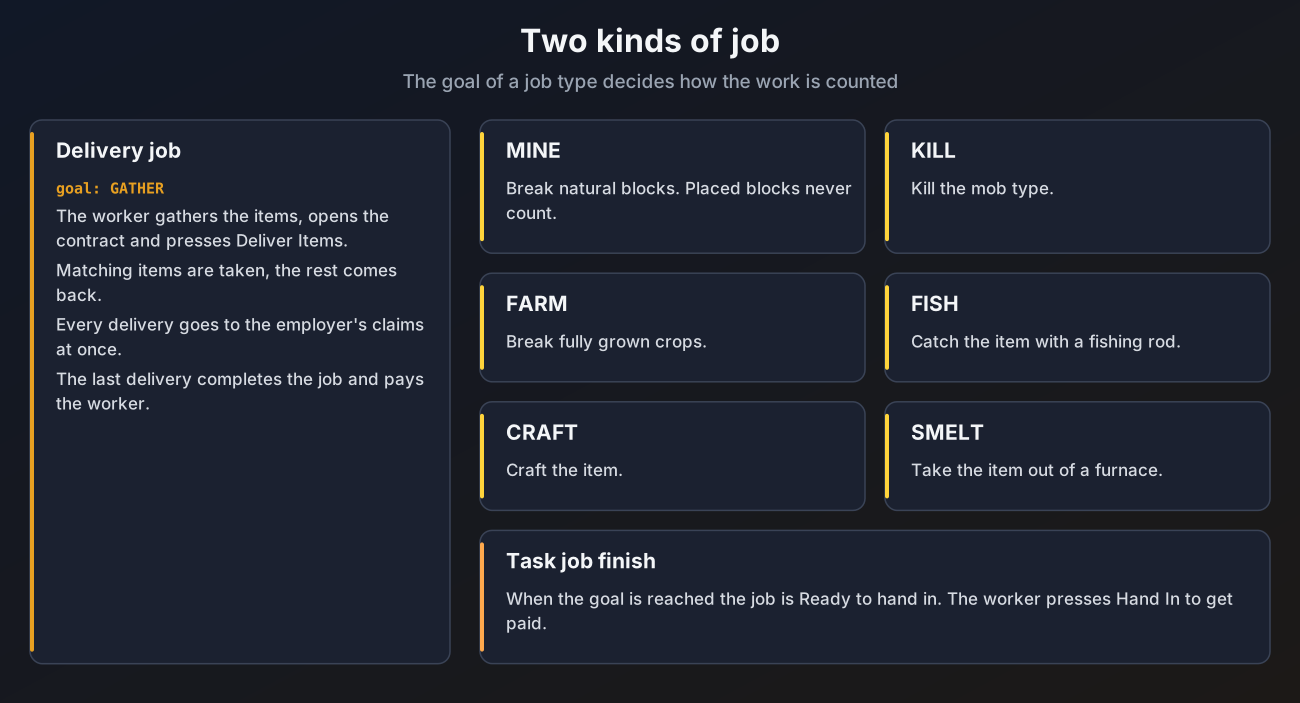
| Goal | Kind | What counts |
|---|---|---|
GATHER | Delivery | Items the worker hands in through the deliver menu |
MINE | Task | Breaking the block. Blocks placed by players never count |
KILL | Task | Killing the mob |
FARM | Task | Breaking the crop when it is fully grown |
FISH | Task | Catching the item with a fishing rod |
CRAFT | Task | Crafting the item |
SMELT | Task | Taking the smelted item out of a furnace |
- Delivery jobs finish by themselves when the last item is delivered.
- Task jobs wait as Ready to hand in once the goal is reached, and the worker presses Hand In to finish and get paid.
A task type can also be switched to delivery, so the worker has to hand in the items (for example raw iron for an iron ore mining job) before anyone is paid. See Activity or delivery.
See Taking and working jobs for the worker's side.
The job lifecycle
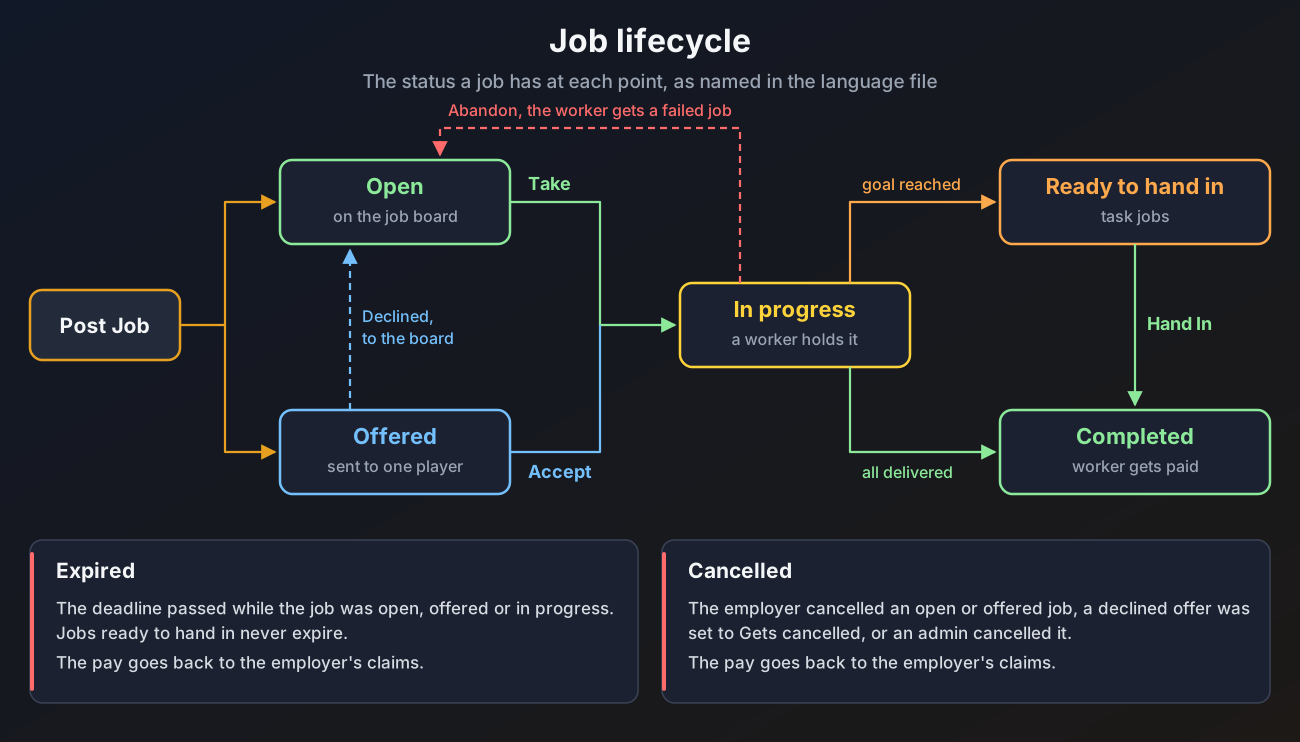
| Status | Meaning |
|---|---|
| Open | On the job board, anyone can take it |
| Offered | Sent to one player, see Direct offers |
| In progress | A worker holds it |
| Ready to hand in | A task job reached its goal. It no longer expires |
| Completed | The worker was paid |
| Expired | The deadline passed first, the employer gets the pay back |
| Cancelled | Cancelled by the employer, by a declined offer or by an admin, the employer gets the pay back |
The deadline starts when the job is posted, not when it is taken. A job that is still open when the deadline passes expires as well.
Writing job-types.yml
Each entry under types is one job type employers can pick. The file ships with nine examples: Gather Ores, Gather Wood, Gather Food, Mine Blocks, Hunt Mobs, Harvest Crops, Go Fishing, Craft Items and Smelt Items. It is made in English, French or Spanish the first time the plugin starts, following menu-language in config.yml (see Messages and language).
types:
  mine-blocks:
    enabled: true
    goal: MINE
    mode: ACTIVITY
    icon: IRON_PICKAXE
    name: "<#e8a021>Mine Blocks"
    lore:
      - "<white>Break natural blocks, placed blocks do not count."
    min-quantity: 1
    max-quantity: 0
    targets:
      stone:
        match: STONE
        name: "<white>Stone"
        deliver: COBBLESTONE
      iron-ore:
        match: IRON_ORE
        name: "<white>Iron Ore"
        deliver: RAW_IRON
Job type keys
| Key | What it does | Default |
|---|---|---|
enabled | Turn the job type on or off. A type that is off cannot be posted, but jobs of that type already posted keep working | true |
goal | GATHER, MINE, KILL, FARM, FISH, CRAFT or SMELT. A type with any other value is skipped | none |
mode | ACTIVITY or DELIVERY, see Activity or delivery. GATHER types always use DELIVERY | ACTIVITY |
icon | Icon on the job type menu | PAPER |
name | Name in menus and messages, MiniMessage colours allowed | the type id |
lore | Lines under the name on the job type menu | none |
min-quantity | Smallest amount an employer may ask for | 1 |
max-quantity | Largest amount an employer may ask for. 0 uses limits.max-quantity from config.yml | 0 |
allow-named | Accept renamed items. Only used by GATHER types | false |
allow-enchanted | Accept enchanted items and enchanted books. Only used by GATHER types | false |
targets | The things the employer chooses between, at least one | none |
Target keys
| Key | What it does | Default |
|---|---|---|
match | What counts, see below. Required | none |
name | Name in menus and messages | the target id |
icon | Icon on the goal menu | the matched item, a spawn egg for mobs, or a chest for ANY |
model-data | Custom model data a delivered item must have, 0 means any. Only used by GATHER types | 0 |
deliver | The item handed in when the type uses DELIVERY mode. Not used by GATHER types, which always hand in the matched item | empty, which uses the match when it is an item |
What match can be
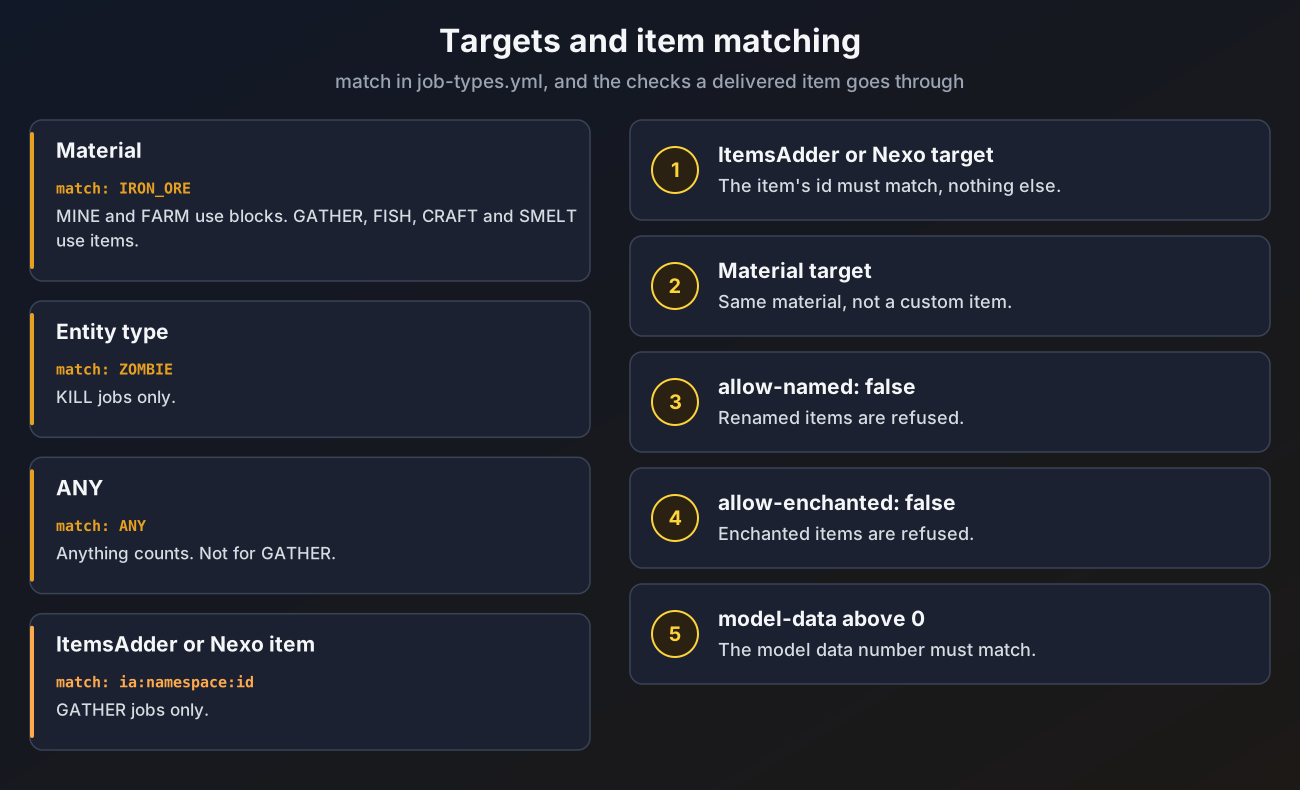
| Value | Allowed for |
|---|---|
A material, like IRON_ORE | MINE and FARM need a block, GATHER, FISH, CRAFT and SMELT need an item |
An entity type, like ZOMBIE | KILL only |
ANY | Every goal except GATHER |
ia:namespace:id, itemsadder:namespace:id or nexo:id | GATHER only. See ItemsAdder and Nexo |
A type or target that does not fit these rules is skipped with a warning in the console that names the file, the type and the target. For crops, use the block name: CARROTS, POTATOES and BEETROOTS, not the item.
Amount limits
Every bundled job type has min-quantity: 1 and max-quantity: 0. A max-quantity of 0 means the type uses the server wide limit, limits.max-quantity in config.yml (1000000 by default). Setting limits.max-quantity: 0 removes your own limit, but amounts are still capped at 1,000,000,000 so nothing can overflow. A type's own max-quantity above the server wide limit is lowered to it.
Servers that already had a job-types.yml before this change keep their old min-quantity and max-quantity values. Change them by hand if you want the new defaults.
Activity or delivery
Each job type has a mode:
mode | How the job works |
|---|---|
ACTIVITY | HireHall counts the action (breaking the block, killing the mob and so on) and the worker presses Hand In once the goal is reached. The employer gets nothing but the work done |
DELIVERY | The worker brings the items and hands them in through the deliver menu. The items go to the employer's claims and the pay is only released once they are in. The action itself is no longer tracked |
GATHER types are always DELIVERY. For any other goal, the item that is handed in comes from the target's deliver key. The bundled file sets it for the targets where it makes sense:
| Job type | Target | deliver |
|---|---|---|
| Mine Blocks | Stone | COBBLESTONE |
| Mine Blocks | Deepslate | COBBLED_DEEPSLATE |
| Mine Blocks | Iron Ore | RAW_IRON |
| Mine Blocks | Coal Ore | COAL |
| Mine Blocks | Diamond Ore | DIAMOND |
| Hunt Mobs | Zombie | ROTTEN_FLESH |
| Hunt Mobs | Skeleton | BONE |
| Hunt Mobs | Creeper | GUNPOWDER |
| Hunt Mobs | Spider | STRING |
| Hunt Mobs | Enderman | ENDER_PEARL |
| Harvest Crops | Carrots | CARROT |
| Harvest Crops | Potatoes | POTATO |
| Harvest Crops | Beetroots | BEETROOT |
When deliver is empty, the match itself is used if it is an item (for example SAND or IRON_INGOT). A target with no item to hand in (a mob or ANY without deliver) is hidden while its type is in DELIVERY mode. If none of a type's targets has an item, the console warns you.
Only job types in DELIVERY mode can be used for community jobs.
Delivery only servers
# config.yml
jobs:
  delivery-only: true
With jobs.delivery-only: true every job type in ACTIVITY mode is hidden from the posting menu, so every job ends with items handed in to the employer. The default is false.
If you remove or rename a job type while jobs of that type are still active, those jobs can no longer make progress or be delivered. Cancel them first with /hirehall admin cancel, or set enabled: false instead, which stops new postings and lets the running jobs finish.
Changes apply after /hirehall admin reload.