
Posting a job
The posting menus step by step, and the limits that apply to employers.
Players post jobs with /hirehall post or the Post a Job button in the main menu. Posting needs hirehall.post, which everyone has by default.
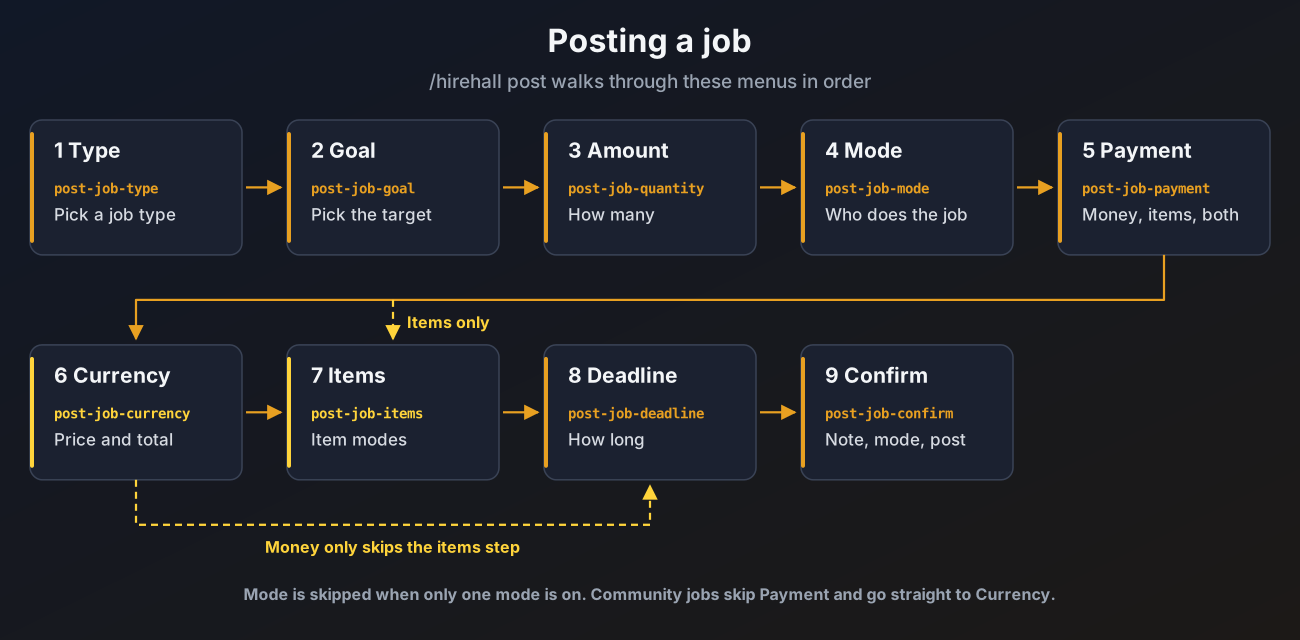
The steps
Type
Pick one of the job types from job-types.yml. See Jobs and job types.
Goal
Pick the target, for example Iron Ore or Zombie.
Amount
Change the amount with the plus and minus buttons, or jump to the smallest or largest allowed amount. The step sizes come from posting.quantity-steps in config.yml. Type an Amount lets you type the exact number instead, see Typing a number.
Mode
Choose who does the job:
- Community: anyone can deliver any part of the order and is paid per unit straight away. See Community jobs.
- Exclusive: the first player to take the job does all of it and is paid at the end.
- Direct Offer: pick one player to offer the job to. See Direct offers.
Only the modes turned on under posting.modes show, and Community only shows for job types where items are handed in. When just one mode is available this step is skipped (unless that mode is Direct Offer, since you still have to pick the player). See Posting modes.
Payment
Choose Money, Money and Items or Items. When no currency is loaded the money buttons are hidden and only items can be used. Community jobs pay with money only, so they skip this step.
Currency (money modes)
Pick a currency and set the price with the plus and minus buttons (posting.money-steps), or press Type a Price to type it.
- Pricing switches between a price per unit and one total price. The one a player starts on comes from
posting.default-pricing. Community jobs are always priced per unit. - Total shows what the job will cost: the amount times the unit price. The currency's
min-payandmax-payapply to this total, so the smallest and largest unit price change with the amount.
The menu also shows your balance.
Items (item modes)
Put the items you pay with into the empty slots. Shift click works. At most limits.max-payment-stacks stacks are allowed.
Deadline
Pick how long the job may take. The choices come from posting.deadline-hours. The time starts when the job is posted.
Confirm
Check the summary (mode, amount, unit price and total), then optionally:
- Note: opens an anvil. Type the note, then click the paper on the right to save it. Closing the anvil keeps the old note.
- Posting Mode: go back to the mode menu and pick another mode. Only shown when more than one mode is available.
- Offer to a Player: send the job to one online player instead of the board. See Direct offers.
Press Post Job. The money is taken from your balance and the items leave the menu at that moment. Discard stops posting and gives the items back.
Closing a posting menu at any point throws the draft away. Items you had placed come back to your inventory, or to /hirehall claim if they do not fit.
Typing a number
The amount menu has a Type an Amount button and the currency menu a Type a Price button. Both open an anvil, so the number is typed privately and never goes through chat.
- Type the number in the anvil's name box.
- While you type, the result slot checks it. A paper means the number is fine. A barrier means it is not, and its lore says why.
- Click the result to confirm. Closing the anvil cancels and keeps the old value.
| The barrier says | Why |
|---|---|
| That is not a number | The text could not be read as a number |
| Only whole numbers are allowed | Decimals were typed for an amount, or for a currency without decimals |
| Use at most two decimals | More than two decimals were typed |
| The smallest allowed value is ... | Below the smallest amount or price |
| The largest allowed value is ... | Above the largest amount or price |
Numbers can be typed in several ways:
| Typed | Read as |
|---|---|
1000 or 1,000 | 1000 |
1.5k | 1500 |
2m | 2000000 |
1b | 1000000000 |
12,50 | 12.50, when the currency allows decimals (a decimal comma, as used in French) |
The texts are in the language file under input. See Messages and language.
Posting modes
posting:
  modes:
    community: true
    exclusive: true
    direct-offer: true
  default-mode: EXCLUSIVE
default-pricing: UNIT| Key | What it does | Default |
|---|---|---|
posting.modes.community | Allow community jobs | true |
posting.modes.exclusive | Allow jobs one player takes and finishes | true |
posting.modes.direct-offer | Allow direct offers | true |
posting.default-mode | Mode selected when a player starts posting: COMMUNITY, EXCLUSIVE or DIRECT | EXCLUSIVE |
posting.default-pricing | Pricing selected when a player starts posting: UNIT for a price per unit or TOTAL for one price | UNIT |
If the default mode is not available for a job type (for example Community on a job type where nothing is handed in), the first available mode is selected instead.
Rules checked when posting
| Rule | Setting | Default |
|---|---|---|
| Enough money for the pay | the currency balance | |
| Total pay (amount times unit price) between the currency's smallest and largest pay | min-pay, max-pay in currencies.yml | per currency |
| Amount between the type's smallest and largest amount | min-quantity, max-quantity in job-types.yml | 1 and 0 (use the global limit) |
| Amount at most the global limit | limits.max-quantity | 1000000 |
| The chosen mode is turned on | posting.modes | all on |
| Open and offered postings at one time | limits.max-open-postings | 5 |
| Wait between posts | limits.post-cooldown-seconds | 30 |
| Item stacks in one payment | limits.max-payment-stacks | 27 |
| Longest deadline | limits.max-deadline-hours | 168 |
| Note length | posting.max-note-length | 60 |
The limit on hired workers (hirehall.limit.<n>) is checked when someone takes the job, not when it is posted. See Permissions.
Broadcasts
When broadcast.enabled is true, a new job on the board is announced to the whole server if its money pay is at or above the threshold for its currency:
broadcast:
  enabled: true
  thresholds:
    vault: 10000
Keys under thresholds are currency ids from currencies.yml. Currencies not listed are never announced, and neither are item only jobs or direct offers. For a job priced per unit the total pay is what is compared. A declined offer that goes back to the board is checked again.
Managing your postings
/hirehall postings lists every active job you posted, plus completed jobs you have not rated yet. Click one to open its details, where you can:
- Cancel it while it is open or offered. The pay goes back to your claims. Once someone is working on it, only an admin can cancel it. Cancelling a community job refunds the budget that is left.
- Rate it once it is completed. See Ratings and profiles.
While a worker is busy you get messages when they take the job, at each progress milestone (jobs.milestones, 25, 50 and 75 percent by default), for each delivery, and when the goal is reached.