
Arena Tools
Copying bases, the marker overlay, marker plates, and the commands for fixing, wiping and reloading an arena.
These are the admin tools for building an arena faster and keeping it tidy afterwards. All of them need brainrot.admin and work on the arena you are editing (arena1 unless you switched with /brainrot admin arena select). For the first build, start with Arena Setup.
Copying a base
Set up one base perfectly, then stamp it onto every other house. The copy brings the claim zone, shield, re-arm plate, hologram, mob slots and trap zones. The runway is shared by all bases, so it is never copied.
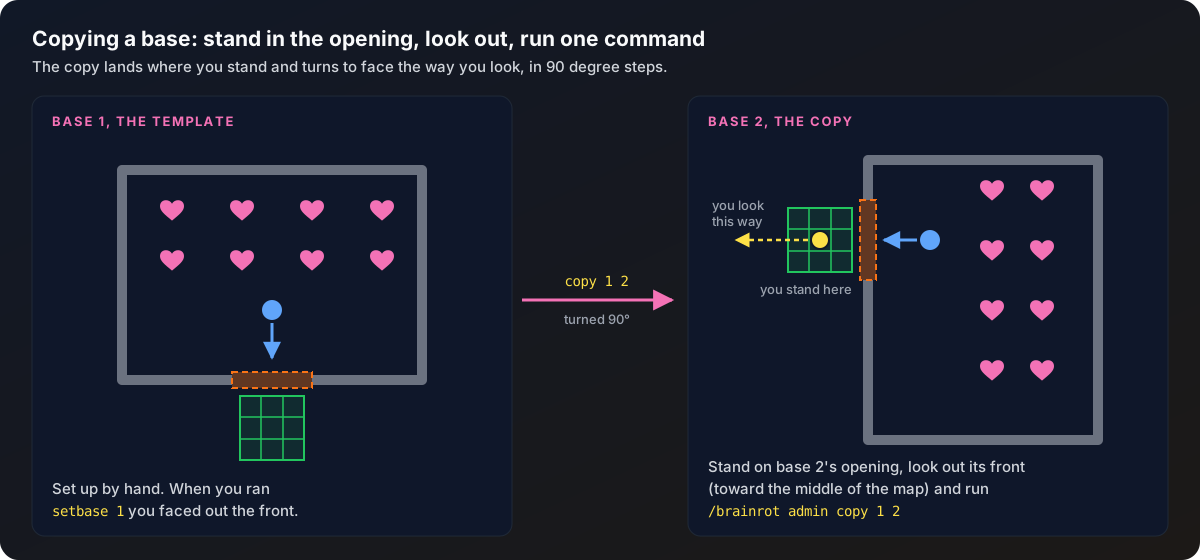
It works just like setting a base spawn: stand where the new base goes, look the way it faces, run one command.
Get the template right
Set up base 1 fully. When you ran setbase 1, you should have been facing out the front of the house. That direction is what every copy turns from. If copies come out facing the wrong way, re-run setbase 1 facing out the front and copy again.
Stand in the new base's opening
Walk to the next house and stand on the block where its claim zone should be: the spot right in front of the opening, where mobs will walk to. Not the middle of the floor.
Look out the front and copy
Face out of the house, toward the middle of the map, and run:
/brainrot admin copy 1 2Base 1's claim zone lands on the block you are standing on, and everything else drops into place around you, turned in 90 degree steps to match the way you are looking. Chat tells you how far it turned and how many slots and trap zones came across.
Check it
Run /brainrot admin show to see the markers. If something is off, stand in the right spot and copy again. It overwrites the destination each time.
The destination base is created if it does not exist yet, up to bases.max-per-arena. A ring of twelve houses is max-per-arena: 12 and eleven copies.
Copy also lays a real pressure plate at the copied re-arm spot, using the same plate type as the base you copied from. That is what lets the new base raise its shield. Chat tells you when a plate was placed, and the copy never replaces a solid block.
Seeing what you marked
/brainrot admin showToggles a particle overlay, only for you:
| Particle | Marks |
|---|---|
| Green square | Claim zones |
| Fire outline | Shield boxes |
| Blue flame | Base spawns |
| Hearts | Mob slots |
| White beam | Shield re-arm plates |
| White crosses | Trap zones |
Marker plates
/brainrot admin slots <n> (including plates for the upgrade slots) and /brainrot admin setpath plates hand you pressure plates that record a slot or a runway point wherever you place them. Oak plates are slots, birch plates are the runway. Running either command again wipes what it set before and starts you over.
/brainrot admin plates hide
/brainrot admin plates show
hide takes every marker plate back out of the world so the arena is clean for play. The slots and runway points stay saved. show puts the plates back when you want to see or adjust them.
Fixing and removing things
| Command | What it does |
|---|---|
resetbase <n> | Blanks one base: its markers, hologram, marker plates and traps are cleared, but the base number stays in the arena, ready to set up again. Anyone who owned it loses it. |
deletebase <n> | Removes a base from the arena completely. |
deletearena [name] | Deletes a whole arena: its mobs, holograms and marker plates are cleared and it is removed from arenas.yml for good. Without a name it deletes the arena you are editing. Refuses while anyone is on a base. |
reloadarenas | Re-reads arenas.yml from disk, so hand edits to the file take effect. Refuses while anyone is on a base. |
cleanup | Deletes leftover or duplicate hologram stands and clears marker plates, then puts the correct holograms back. |
save | Writes the arena to arenas.yml right now. Rarely needed, since every change already saves itself. |
The plugin never re-saves arenas.yml on shutdown, so if you edit or delete things in that file while the server is running, your change sticks. Run reloadarenas to apply it without a restart.
Holograms
Every base has a floating label, drawn with invisible armor stands or with DecentHolograms if it is installed (the holograms.provider option in Configuration). The plugin never saves those stands into the world and sweeps up strays on every start and every refresh, so doubled labels clear themselves within a couple of seconds. If an area still looks cluttered from an older build, /brainrot admin cleanup clears it on the spot.