
Installation
Requirements, installing the jar, the first start and the files Emberstore creates.
Getting Emberstore running takes a few minutes. Taking real payments takes a little longer, because a payment gateway has to be able to reach your server over HTTPS. This page covers both.
Requirements
| What | Needed |
|---|---|
| Server | Paper or a fork of Paper, 1.21.7 and newer, including 26.x. On anything else Emberstore prints one line saying it needs Paper and turns itself off. |
| Java | 21 or newer. 26.x servers need Java 25, the same as Paper. |
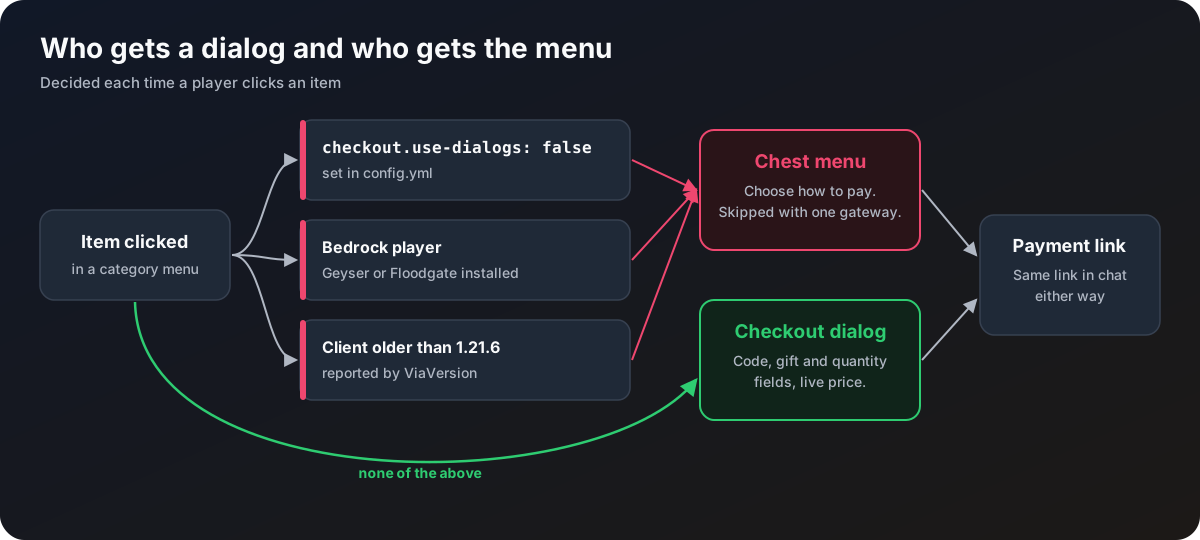
| Players | Any client can buy. Java 1.21.6 and newer get the dialog, everyone else gets a chest menu. |
| Public HTTPS address | Needed for real payments, so gateways can send their webhooks. See Payment gateways. |
| Vault and an economy plugin | Only if you sell items with reward: type: economy, or want /store balance and referral money. |
Folia is not supported.
Install
Get the jar
Buy it from one of the stores on the Download page and download the latest build.
Drop it in
Stop the server, put the jar in your plugins/ folder, and start the server. On the first start Paper downloads the database libraries Emberstore needs, so give it a moment.
Check the console
You should see each category listed with its items and prices, then a line saying the storage is ready and Emberstore is enabled. Any problem in a file is named with the file and the key, and that item or setting is skipped instead of stopping the plugin.
Open the store
Join and type /store. You see the four template categories: Ranks, Coins, Points and Cosmetics. Clicking an item says no payment method is available yet, because every gateway starts switched off except NOWPayments, which still needs its keys.
Turn on a gateway
Open plugins/Emberstore/config.yml, find the section for the gateway you want, fill in its keys, set enabled: true, and set webhook.public-base-url to your server's public HTTPS address. Each gateway has its own setup page under Payment gateways. Run /store admin reload.
Try it with test mode
Set test-mode.enabled: true and test-mode.fake-invoices: true, reload, and buy something. Then mark the order as paid with /store admin simulate. See Test mode. Turn test mode off before you take real payments.
What gets created
| File or folder | What it holds | Page |
|---|---|---|
config.yml | Currencies, gateways, webhooks, storage, networks, the dashboard and every other switch | Configuration |
categories/ | One file per category in the store menu | Category files |
promotions.yml | Sales, promo codes and referrals | Promotions file |
dialogs/ | How the checkout dialogs are laid out | Dialog files |
lang/ | Every message players and admins see | Messages and language |
data/ | The SQLite or H2 database | Storage |
logs/ | One purchase log per day, while purchase-log.enabled is true | Notifications |
The four category templates are only written when the categories folder does not exist yet. Delete a template you do not want and it stays gone. The other files are only rewritten when an update adds new keys, and your values and layout are kept.
Optional plugins
| Plugin | What Emberstore does with it |
|---|---|
| Vault | Pays economy rewards, takes them back on a refund, shows /store balance and pays the referral referrer-amount. Without it those parts are skipped with a warning. |
| LuckPerms | Nothing directly. The template items give ranks with lp user ... commands, so you need it for those as written. Any plugin with console commands works. |
| ViaVersion | Tells Emberstore which players are on a client older than 1.21.6, so they get the chest menu. |
| Geyser or Floodgate | Tells Emberstore which players are on Bedrock, so they get the chest menu. |
These are only checked on the same server as Emberstore. If ViaVersion runs on your proxy instead, older clients are assumed to handle dialogs.