
Payment gateways
The eleven gateways, what each one supports, the webhook address they use and how a payment gets confirmed.
A gateway is the company that takes the player's money: Stripe, PayPal, a crypto processor and so on. Emberstore asks the gateway for a payment link, the player pays on the gateway's own page, and the gateway tells your server when the money arrived. You can turn on as many gateways as you like. Players pick between them in the checkout dialog.
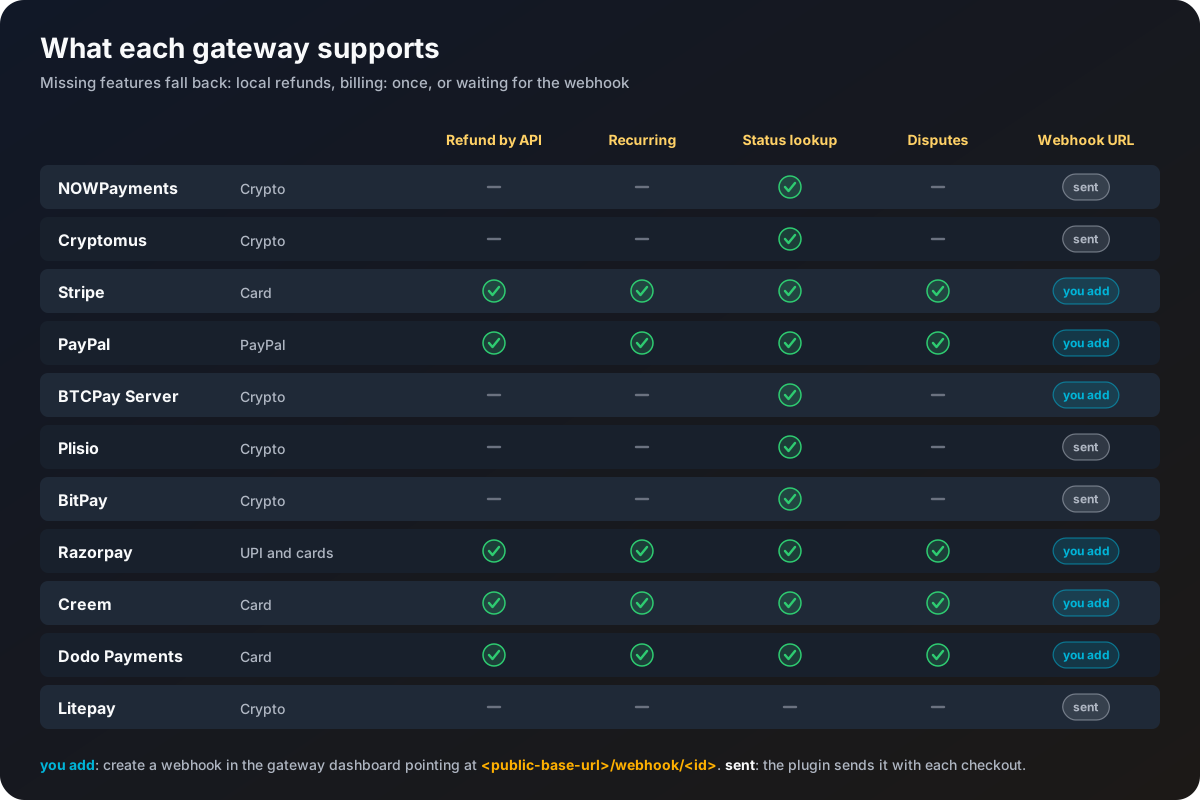
Pick your gateways
| Gateway | Players pay with | Page |
|---|---|---|
| Stripe | Cards and wallets | Stripe |
| PayPal | PayPal balance and cards | PayPal |
| Razorpay | UPI, cards and wallets, India focused | Razorpay |
| Creem | Cards, as merchant of record (Creem handles tax) | Creem |
| Dodo Payments | Cards, as merchant of record (Dodo handles tax) | Dodo Payments |
| NOWPayments | Crypto | NOWPayments |
| Cryptomus | Crypto | Cryptomus |
| BTCPay Server | Crypto, on your own BTCPay Server | BTCPay Server |
| Plisio | Crypto | Plisio |
| BitPay | Crypto | BitPay |
| Litepay | Crypto | Litepay |
What the columns mean
| Feature | With it | Without it |
|---|---|---|
| Refund by API | /store admin refund sends the money back for you | The order is only marked refunded and you return the money from the gateway's dashboard |
| Recurring | Items with billing: recurring can be bought through it, as a real subscription | Not offered for recurring items. Timed items with billing: once still work |
| Status lookup | A payment whose webhook got lost is still found within a few minutes | The order waits for its webhook, or expires |
| Disputes | A chargeback arrives on its own and takes the reward back | Handle chargebacks by hand |
Every gateway section in config.yml
Each gateway has its own section named after its id. These three keys are the same in all of them:
stripe:
  # Offer this gateway at checkout
  enabled: false
  # Material shown for this gateway in the checkout menu
  icon: DIAMOND
  # Currency this gateway bills in, empty uses price-currency
  currency: ""
The rest are the gateway's own keys, listed on its page. A gateway that is enabled but still has a YOUR_... placeholder (or an empty value) in one of its keys stays off, and the console names the missing key at startup. It never stops the plugin.
The name players see on the button comes from the gateway.<id> line in the language file, for example "<#ffd166>◆</#ffd166> <white>Card <#b0b7c3>(Stripe)".
The webhook address
Gateways tell your server about payments by sending a request to Emberstore's built-in listener. Its address is:
<webhook.public-base-url>/webhook/<gateway id>With public-base-url: "https://store.example.com", Stripe posts to https://store.example.com/webhook/stripe and Razorpay to https://store.example.com/webhook/razorpay.
- Some gateways need you to add this address in their dashboard and copy back a signing secret. Each gateway page says so.
- The others get the address from Emberstore with every checkout, so there is nothing to register.
- The listener runs on
webhook.listen-addressandwebhook.listen-port(8443 by default). Almost every gateway wants HTTPS, and Razorpay only delivers to ports 80 and 443, so put a reverse proxy with a certificate in front of it. The Web dashboard guide shows how, for the webhook listener and the dashboard together.
webhook.public-base-url must be the address the outside world uses, with https://. If it still says https://yourdomain.com, gateways cannot reach you and payments are only found by the status lookup, or not at all.
How a payment is confirmed
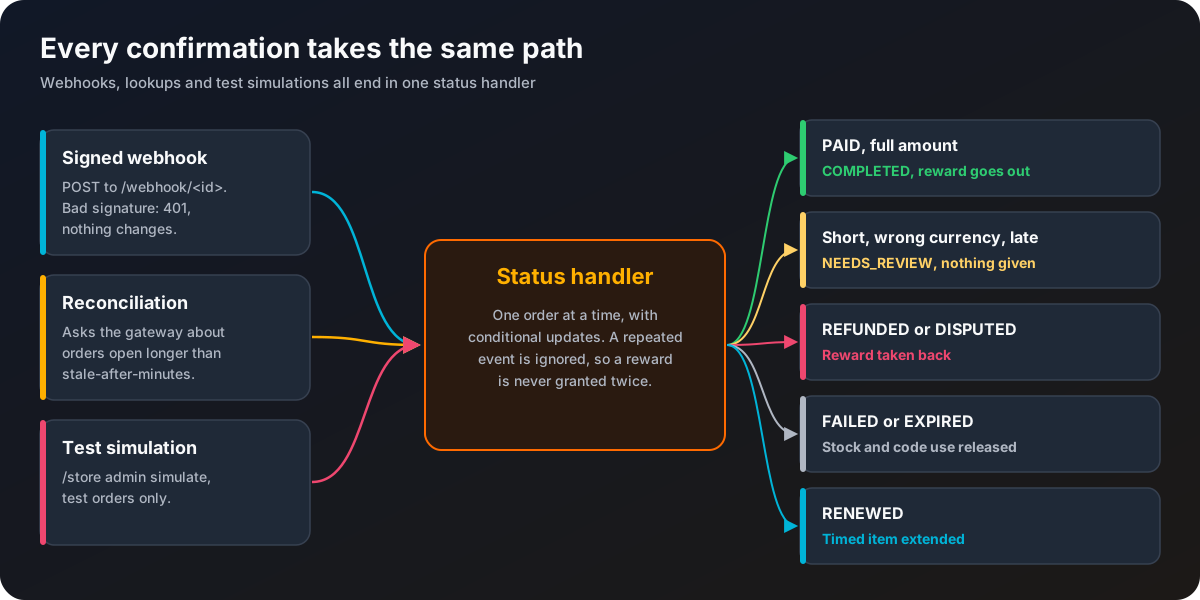
Every webhook is checked against the gateway's signature (or, for PayPal and BitPay, by asking the gateway). A request that fails the check gets a 401 answer and changes nothing. That is what stops anyone from faking a "paid" message.
If a webhook never arrives, reconciliation catches it. Every reconciliation.poll-interval-seconds (120 by default), orders that are still open and older than reconciliation.stale-after-minutes (5) are looked up at their gateway. Unpaid orders older than checkout.expire-minutes are marked expired, which releases their stock and code use.
Both paths end in the same place, so a payment is handled the same way whichever arrives first, and a second message about the same payment does nothing.
When a payment is not granted
These orders get the Needs review status, nothing is given, and staff are told in game, in the console and (if set up) in Discord:
- less was paid than the order total (more than half a percent short)
- the payment came in a different currency
- a partial payment
- the payment arrived after the order had already expired
- the item was deleted from the category files before the payment arrived
- a payment accepted by hand at the gateway, where the gateway reports that
Look at the order with /store admin order <id>, check the gateway's dashboard, and give the item with /store admin give if it should be given.
config.yml keys used by every gateway
| Key | Default | What it does |
|---|---|---|
webhook.enabled | true | Runs the listener on this server. On a network, only one server. See Networks. |
webhook.listen-address | "127.0.0.1" | Address the listener binds to. Keep 127.0.0.1 behind a reverse proxy, use 0.0.0.0 inside a container. |
webhook.listen-port | 8443 | Port the listener binds to. |
webhook.public-base-url | "https://yourdomain.com" | Public HTTPS address of the listener. |
success-url | "https://yourdomain.com/thanks" | Page buyers land on after paying. |
cancel-url | "https://yourdomain.com/cancelled" | Page buyers land on after cancelling. |
checkout.expire-minutes | 30 | Minutes a payment link stays valid. |
reconciliation.enabled | true | Look up stuck orders at their gateway. |
reconciliation.poll-interval-seconds | 120 | Seconds between lookups. |
reconciliation.stale-after-minutes | 5 | Only orders older than this are looked up. |
fees.show and fees.percent | off | Shows an estimated fee per gateway in checkout. Display only, it never changes what is charged. |