
Stock, limits, quantity, gifts and bundles
Limit how many of an item can ever be sold or bought per player, let players buy several at once, gift items and sell bundles.
These are all per-item settings in the category files. None of them is needed for a simple item, and each one adds one line.
Stock
flame_trail:
  # Optional total stock. Omit for unlimited
  stock: 50
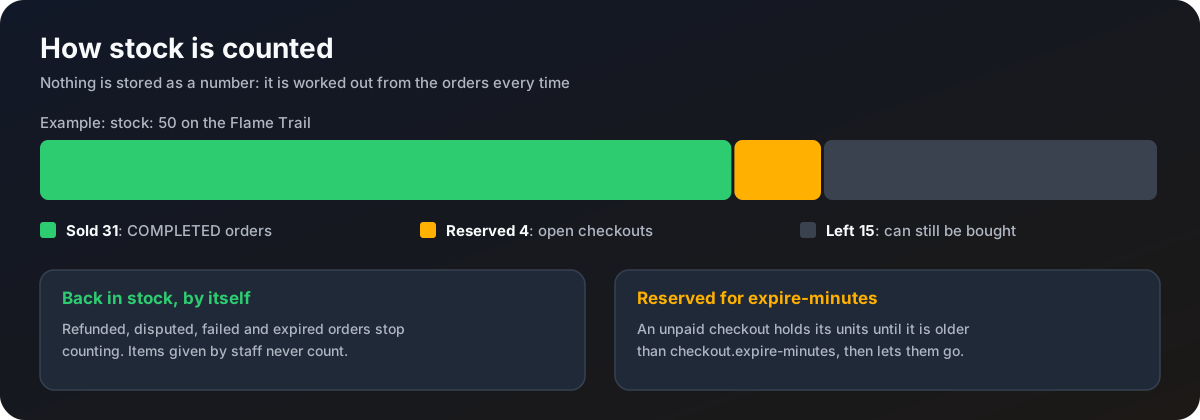
stock is the total that may ever be sold. What is left is worked out from the orders every time:
- Sold: quantity on completed orders.
- Reserved: quantity on unpaid orders younger than
checkout.expire-minutes. - Left: stock minus sold minus reserved.
Refunded, disputed, failed and expired orders stop counting, so a refund puts the item back in stock. Items given with /store admin give never count. To restock, raise stock and run /store admin reload.
Lore shows what is left through <stock>, the menu.stock-unlimited text for items without a limit, and menu.sold-out at zero. /store admin stock lists total, sold, reserved and left for every limited item.
Stock is checked inside the same database step that creates the order, so two players can never both buy the last one.
Per-player limit
vip:
  # Optional purchases allowed per player. Omit for unlimited
  limit-per-player: 1
Caps the quantity one buyer can have on completed and still-open orders for that item. Gifts count against the buyer, not the recipient.
Quantity
coins_1000:
  # Optional highest quantity buyable at once. Omit or 1 for no quantity slider
  max-quantity: 10
With max-quantity above 1, the checkout dialog shows a quantity slider. The price is the unit price times the quantity.
- Command rewards run once per unit. Buying 3 runs the commands 3 times.
- Economy rewards pay the amount times the quantity.
%quantity%in a command is the total quantity bought. Because the command also runs once per unit, use either%quantity%or the repeat, not both, or the player gets the square of what they paid for.- A timed item bought several at once lasts the duration times the quantity.
Players on the chest menu always buy one.
Gifts
gifts:
  # Let players buy an item for another player
  enabled: true
With gifts on, the checkout dialog has a "Gift to" field. Empty (or the buyer's own name) means the buyer.
- The name must belong to a player who has joined this server before.
- The reward goes to the recipient:
%player%is the recipient,%buyer%is the payer. - The recipient gets the
purchase.gift-receivedmessage, now or when they next join. The buyer getspurchase.reward-deliveredif online. - Stock and limits count against the buyer.
- A gifted timed item belongs to the recipient, but renewing or cancelling it stays with the buyer.
Bundles
starter_bundle:
  display-name: "<gradient:#ff6a00:#ffb000><bold>Starter Bundle</bold></gradient>"
  icon: CHEST
  slot: 15
  price: 3.99
  # Items granted together, written as category-file-name/item-key
  bundle:
    - cosmetics/flame_trail
    - coins/coins_1000
A bundle has its own price and gives the reward of every item it lists, as one order. A refund takes all of them back. Rules:
- A bundle has no
rewardsection of its own. If one is there it is ignored with a warning. - A bundle cannot contain another bundle, and every listed item must exist, otherwise the bundle is skipped with a warning.
- Only the bundle's own
durationmakes it timed, and it decides how long everything inside lasts. A bundle that lists a timed item must have its ownduration, otherwise it is skipped with a warning.