
Prices and currencies
Write prices once in your main currency, and bill gateways that use another currency with a fixed or converted price.
You write every price once, in your main currency. When a gateway bills in a different currency (Razorpay in rupees, for example), Emberstore uses a price you set for that currency, or converts your main price with an exchange rate. The player sees both amounts before paying.
Main currency and symbols
# Currency your item prices are written in
price-currency: "usd"

currencies:
  # Symbol shown for each currency code in prices. A code without an entry shows the code itself
  usd: "$"
  eur: "€"
  gbp: "£"
  inr: "₹"
Menus, lore, /store top and stats all show prices in price-currency. Prices are shown with the currency's own number of decimals, so $4.99, ₹399.00, or 500 JPY when there is no symbol for it.
Which price a gateway bills
Each gateway bills in its own currency (empty means price-currency). For each gateway, Emberstore picks the price in this order:
- The gateway bills in your main currency: the item's
price. - The item has a
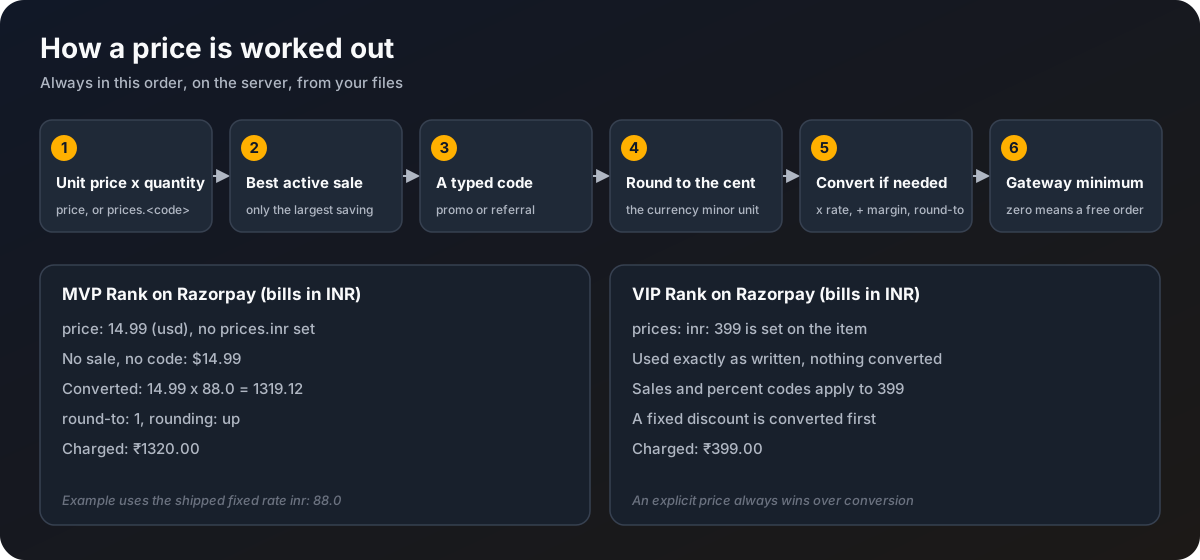
pricesentry for that currency: that amount, exactly as written. - Conversion is on and a usable rate exists: your main price, converted.
- None of these: that gateway is not offered for the item.
vip:
  price: 4.99
  # Optional prices in other currencies. A gateway billing in one of these uses that price
  prices:
    eur: 4.59
    inr: 399
Conversion settings
currency-conversion:
  enabled: true
  mode: live
  fixed-rates:
    inr: 88.0
  source-url: ""
  refresh-minutes: 60
  max-age-hours: 24
  max-deviation-percent: 10
  margin-percent: 0
  round-to: 1
rounding: up| Key | Default | What it does |
|---|---|---|
enabled | true | Convert prices for gateways that bill in another currency, when the item has no price in it. |
mode | live | live fetches rates on a schedule. fixed only uses fixed-rates. |
fixed-rates | inr: 88.0 | Units of each currency per 1 unit of price-currency. Used in fixed mode, and as the fallback in live mode. The shipped value is only an example, set your own. |
source-url | "" | Where live rates come from. Empty uses the built-in source (European Central Bank reference rates through frankfurter.dev, no key needed). Any address that answers {"rates": {"INR": 88.1}} works, with {base} and {symbols} filled in. |
refresh-minutes | 60 | Minutes between live rate refreshes. Rates are never fetched during a checkout. |
max-age-hours | 24 | How long a live rate may still be used after the last good refresh. After that the fixed rate takes over. |
max-deviation-percent | 10 | A new live rate that moved more than this from the last one, or from the fixed rate, is ignored with a warning. |
margin-percent | 0 | Percentage added on top of the rate to cover movement and fees. |
round-to | 1 | Round converted prices to a multiple of this many whole units. 1 means whole rupees. |
rounding | up | nearest, up or down. up makes sure you are never short. |
With no usable rate (live failed for longer than max-age-hours and no fixed rate set), Emberstore never guesses. Gateways that need conversion are simply not offered for items without an explicit price. In test mode only fixed rates are used.
The order of the maths
Always in this order:
- Unit price times quantity.
- The best active sale. Sales never stack, the one that saves the most wins.
- A promo or referral code, unless that sale has
allow-codes: false. - Round to the currency's smallest unit (cents, paise).
- For a converted price: times the rate, plus
margin-percent, then rounded toround-tousingrounding. Discounts are worked out in your main currency first and the result is converted once. - Check the gateway's minimum charge. Below it, the player sees "This price is too low to pay with ..." in the dialog. Exactly zero is a free order: no gateway, the item is given straight away.
A fixed discount (type: fixed) is in your main currency. On an item with an explicit price in the billing currency, it is converted at the current rate, rounded down. Without a usable rate, a fixed code is not valid for that payment.
What the player sees
When the price was converted, the dialog shows a line such as:
Charged in INR: ₹1320.00 (about $14.99, 1 USD = 88 INR)That line is dialog.checkout.converted-line in the language file.
The rate is locked on the order
The rate is read once, when the order is created, and stored with it. The amount sent to the gateway never changes afterwards, and a refund returns exactly what was charged. Stats and the dashboard keep revenue in the currency it was billed in, and convert to your main currency with each order's own stored rate, so old orders keep the rate they were really made at.