
Category files
Every key of a category file, from the category icon to item prices, stock, timed items, rewards and bundles.
Every .yml file in plugins/Emberstore/categories/ is one category. The file name is the category's key (used in applies-to, bundles and /store admin give), and every entry under items is something players can buy.
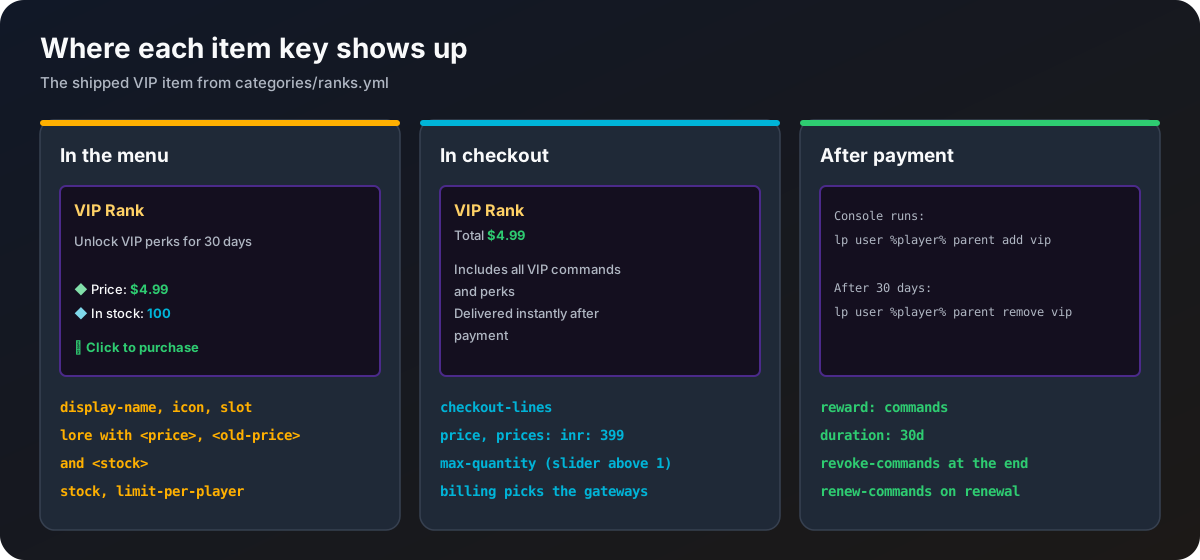
The category section
categories-version: 1

category:
  # Name shown in the main /store menu
  display-name: "<#ffd166><bold>Ranks"
  # Material shown as the category icon
  icon: DIAMOND
  # Slot in the main /store menu
  slot: 10
  # Title of this category's menu
menu-title: "<gradient:#ff6a00:#ffb000><bold>Rank Store</bold></gradient>"| Key | Required | What it does |
|---|---|---|
display-name | yes | Name of the icon in the main menu. MiniMessage. |
icon | yes | Material of the icon, for example DIAMOND. |
slot | yes | Slot in the main menu, 0 to 44 but not 40. Must not clash with another category. |
menu-title | no | Title of this category's own menu. Defaults to display-name. |
An item
items:
  vip:
    display-name: "<#ffd166><bold>VIP Rank"
    icon: IRON_INGOT
    slot: 11
    price: 4.99
    prices:
      eur: 4.59
      inr: 399
    stock: 100
    limit-per-player: 1
    max-quantity: 1
    duration: 30d
    billing: once
    lore:
      - "<#b0b7c3>Unlock VIP perks for 30 days"
      - ""
      - "<#82e0aa>◆ <white>Price: <#2ecc71><bold><price></bold> <#ef476f><st><old-price></st>"
      - "<#7fd8ea>◆ <white>In stock: <#00b4d8><bold><stock>"
      - ""
      - "<#2ecc71><bold>➜ Click to purchase"
    checkout-lines:
      - "<#b0b7c3>Includes all VIP commands and perks"
      - "<#b0b7c3>Delivered instantly after payment"
    reward:
      type: command
      commands:
        - "lp user %player% parent add vip"
      revoke-commands:
        - "lp user %player% parent remove vip"
      renew-commands: []
delivery: instant| Key | Required | What it does |
|---|---|---|
display-name | yes | Name of the item. MiniMessage. |
icon | yes | Material of the item. |
slot | yes | Slot in the category menu, 0 to 44 but not 40. |
price | yes | Price in price-currency. 0 is allowed and gives the item free. |
prices | no | Prices in other currencies, used as written by gateways that bill in them. See Prices and currencies. |
stock | no | Total that may ever be sold. Leave out for unlimited. |
limit-per-player | no | How many one buyer may have. Leave out for unlimited. |
max-quantity | no | Highest quantity bought at once. Above 1 shows a quantity slider. |
duration | no | How long the reward lasts, like 90m, 12h, 30d or 2w. Leave out for permanent. |
billing | no | once (default) or recurring. recurring needs a duration. See Timed items. |
lore | no | Lore lines in the menu. <price> is the current price, <old-price> the price before a sale (empty when there is none), <stock> what is left. |
checkout-lines | no | Extra lines shown in the checkout dialog for this item. |
reward | yes, except bundles | What the player gets. See below. |
bundle | no | Makes the item a bundle of other items. See Stock, limits and gifts. |
delivery | no | Only instant exists. Any other value skips the item. |
Rewards
reward:
  type: command
  # Console commands to run. %player% is the player receiving the item, %buyer% is who paid, %quantity% is the amount bought
  commands:
    - "lp user %player% permission set cosmetics.trail.flame true"
  # Optional commands run when the reward is taken back (refund, dispute or the end of a timed item)
  revoke-commands:
    - "lp user %player% permission unset cosmetics.trail.flame"
  # Optional commands run each time a recurring payment renews
  renew-commands: []
Commands run from the console, once per unit bought, without a leading / (one is removed if you add it). Without revoke-commands, a refund or the end of a timed item cannot take the item back, and the console warns when the file loads.
| Placeholder | In | Value |
|---|---|---|
%player% | commands | The player receiving the item (the gift recipient for gifts) |
%buyer% | commands | The player who paid |
%quantity% | commands | The quantity bought. Commands already run once per unit, see quantity |
When something is wrong
Each item is checked when the file loads. A broken item is skipped and the console says which file, which item and why, for example "price is missing or negative" or "slot 13 already taken by mvp". The rest of the file still loads. A whole file is skipped only when its category section is missing or broken.
After editing, run /store admin reload and read the console.