
Dialog files
Change how the checkout, pay and error dialogs are laid out, from body elements and widths to buttons and sounds.
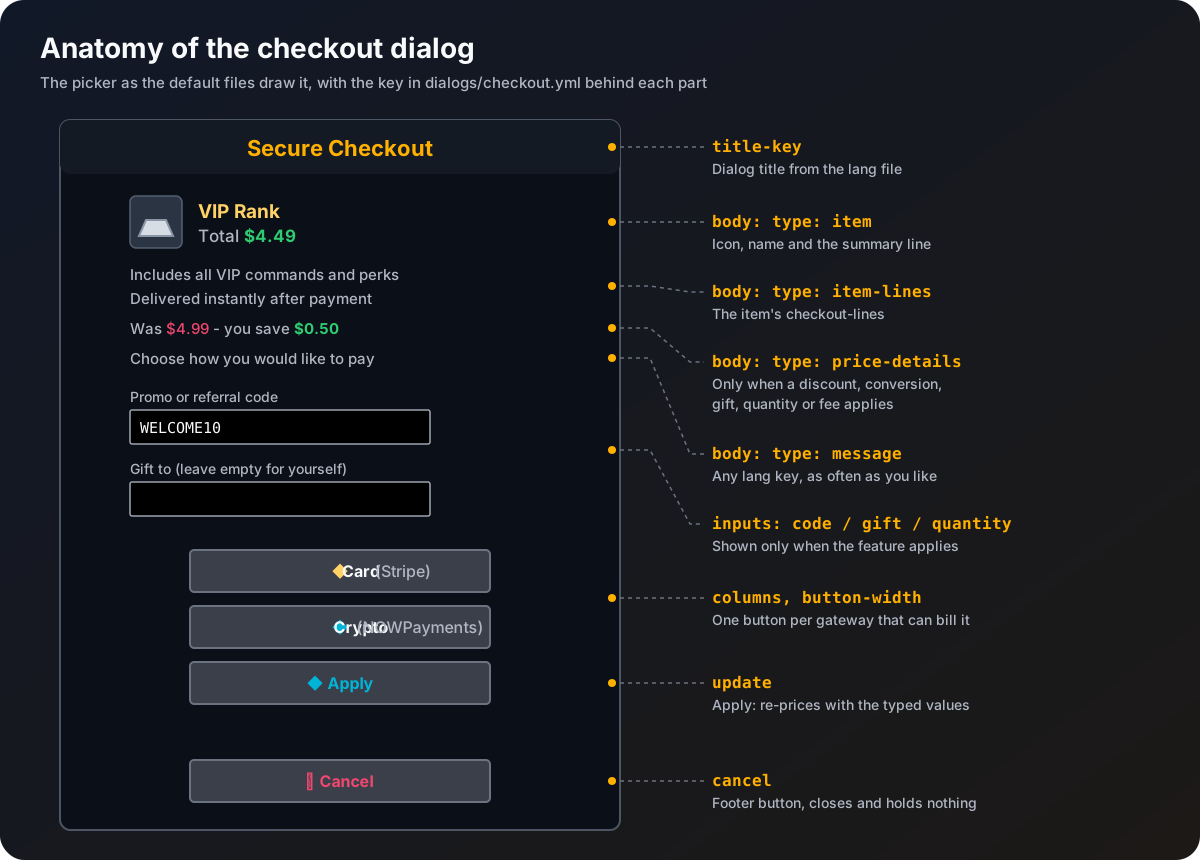
The three files in plugins/Emberstore/dialogs/ decide the structure of each checkout dialog: which parts appear and in what order, widths, columns, buttons and sounds. They hold no words. Every piece of text is a key into the language file, so colours and wording are changed in Messages and language.
| File | Sections | Dialog |
|---|---|---|
checkout.yml | picker, confirm | The checkout dialog with several gateways, or with one |
pay.yml | pay | The dialog with the payment link |
error.yml | error | The dialog shown when the gateway refused |
Keys every dialog has
| Key | What it does |
|---|---|
title-key | Language key of the title. |
can-close-with-escape | Allow closing with Escape. |
pause | Pause the game in single player. Leave false on servers. |
after-action | What happens after a click: close, none or wait_for_response. none only works with pause: false. The picker and confirm use wait_for_response, so the player sees a waiting screen while the checkout is made, and Emberstore always answers. |
open-sound | Sound played when the dialog opens, like BLOCK_AMETHYST_BLOCK_CHIME or minecraft:block.amethyst_block.chime. Empty for none. An unknown sound logs a warning and plays nothing. |
body | The parts above the buttons, in order. |
Body elements
body:
  - type: item
    show-decoration: false
    show-tooltip: true
    description-key: dialog.checkout.summary
    description-width: 240
  - type: item-lines
    width: 300
  - type: price-details
    width: 300
  - type: message
    text-key: dialog.checkout.choose
width: 300| Type | Shows | Keys |
|---|---|---|
item | The item with its tooltip, and a text beside it | show-decoration, show-tooltip, description-key, description-width |
item-lines | The item's checkout-lines. Nothing if it has none | width |
price-details | Only what applies: the discount line, the converted price line, the gift line, the quantity line and the fee line | width |
message | Any language key. Repeat it as often as you like | text-key, width |
Add, remove and reorder elements freely. Widths are 1 to 1024. Out-of-range values are clamped with a warning, and an unknown type is skipped with a warning naming the file and position.
Picker and confirm
| Key | In | What it does |
|---|---|---|
columns | picker | Columns the gateway buttons use. |
button-width | picker | Width of each gateway button. |
gateway-tooltip-key | picker | Tooltip on every gateway button. |
cancel | picker | Footer cancel button: enabled, label-key, tooltip-key, width. |
yes, no | confirm | The pay and cancel buttons: label-key, tooltip-key, width. |
inputs.code | both | Code field: enabled, label-key, width, max-length (up to 32). |
inputs.gift | both | Gift field: enabled, label-key, width, max-length (up to 16). |
inputs.quantity | both | Quantity slider: enabled, label-key, width. |
update | picker | The Apply button: enabled, label-key, tooltip-key, width. |
An input only shows when its feature applies (codes exist, gifts are on, max-quantity is above 1), whatever its enabled says. Setting enabled: false hides it even then.
The gateway buttons cannot be turned off, a dialog without them would have no way to pay.
The confirm dialog's update section works the same as the picker's. When any input field is shown and update.enabled is true, the dialog shows Pay and Apply side by side with Cancel underneath. Set update.enabled: false for the plain two-button version; then a changed field makes the first Pay click show the new price before the second one goes ahead.
Pay and error
| Key | In | What it does |
|---|---|---|
columns | pay | Columns the open and copy buttons use. |
open | pay | The Pay now button that opens the link: label-key, tooltip-key, width. Cannot be turned off. |
copy | pay | The Copy link button: enabled, label-key, tooltip-key, width. |
close | pay | Footer close button: enabled, label-key, tooltip-key, width. |
button | error | The Okay button: label-key, tooltip-key, width. |
Placeholders in dialog text
| Placeholder | Value |
|---|---|
<item> | The item's display name |
<price> | The price, in the main currency until a gateway is chosen, then in that gateway's currency |
<category> | The category's display name |
<player> | The buyer's name |
<minutes> | checkout.expire-minutes |
<gateway> | The gateway's name from the language file |
<original>, <discount> | Price before discounts, and the amount saved |
<quantity>, <recipient>, <fee> | Quantity, gift recipient, estimated fee |
<currency>, <charge>, <base-price>, <base-currency>, <rate> | In the converted price line |
<reason> | Why typed values were refused |
Safe to experiment
A dialog file that cannot be read falls back to the built-in version of that dialog with a warning, so checkout never breaks. A missing key is taken from the built-in file. After a change, run /store admin reload and /store admin preview <picker|confirm|pay|error> to see it.