
Storage
Choosing a storage backend, what gets saved, and the tables and files each backend creates.
Reports and freeze state survive restarts because the plugin writes them to storage. SQLite is the default and needs no setup.
What gets saved
| Data | Kept between restarts |
|---|---|
| Reports, including reason, location, status, assigned staff and notes | Yes |
| The set of frozen players | Yes, and the freeze is reapplied when they rejoin |
| Which players were in staff mode when they left | Yes, unless staff-mode.disable-on-leave is true |
| Where each player was standing when they logged out | Yes, which is what fills the offline list in the teleport menu |
Saved staff mode state is only restored if the player still holds atstaffmode.use when they rejoin. If they lost the node, the state is cleared instead.
Choosing a backend
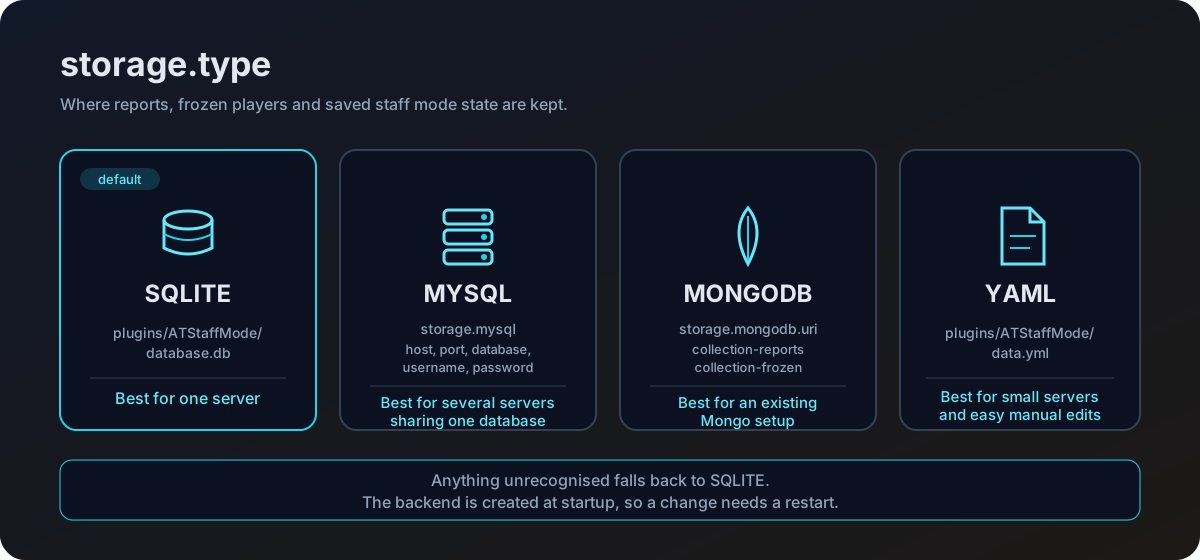
storage:
type: SQLITE| Value | Where it writes | Needs a server | Best for |
|---|---|---|---|
SQLITE | A file in the plugin folder | No | One server. The default, and the right answer for most people. |
YAML | A file in the plugin folder | No | Small servers, or when you want to read the data by hand. |
MYSQL | A MySQL or MariaDB database | Yes | Several servers sharing one report queue. |
MONGODB | A MongoDB database | Yes | Several servers, when Mongo is already part of your setup. |
Anything the plugin does not recognise falls back to SQLite. Watch the console on startup for the line that confirms your choice.
[ATStaffMode] Database initialized using: SQLITEThe backend is created once, when the plugin enables. Changing storage.type needs a full server restart, not /staffmode-reload. Nothing is copied between backends, so a switch starts from empty storage unless you migrate the data yourself.
SQLite
Writes database.db inside the plugin folder. No configuration, no extra software.
YAML
Writes data.yml inside the plugin folder. Useful when you want to open the data in a text editor. Reports, frozen players, staff mode state and a last_locations section all live in that one file.
Edit data.yml only while the server is stopped. The plugin keeps reports in memory and writes them back out, so changes made to a live file will be overwritten.
MySQL
storage:
  type: MYSQL

  mysql:
    host: "localhost"
    port: 3306
    database: "minecraft"
    username: "root"
    password: "password"
    use-ssl: false
The database has to exist already. The tables inside it do not, they are created on first startup.
Set use-ssl to true for a remote database that requires an encrypted connection. Leave it false for a database on the same machine.
Before 1.5.0 the plugin read a differently spelled storage.mysql.useSSL, so the shipped use-ssl did nothing. Both spellings are read now, so if you added useSSL by hand as a workaround it still works. Keep one of them, not both, so it is obvious which value is in effect.
MongoDB
storage:
  type: MONGODB

  mongodb:
    uri: "mongodb://user:password@localhost:27017/minecraft"
    collection-reports: "staff_reports"
    collection-frozen: "staff_frozen"
The database name comes from the connection string. Collections are created as they are used.
Two of the four collection names are fixed rather than configurable.
| Collection | Holds |
|---|---|
collection-reports, staff_reports by default | Reports. |
collection-frozen, staff_frozen by default | Frozen players. |
staff_state | Players who were in staff mode when they left. |
staff_locations | Last known logout location per player. |
Tables created by the SQL backends
Both SQLite and MySQL use the same four tables and create them if they are missing.
| Table | Columns | Holds |
|---|---|---|
staff_reports | id, reporter, reported, reason, timestamp, status, assigned, world, x, y, z, notes | One row per report. |
staff_frozen | uuid | One row per frozen player. |
staff_state | uuid | One row per player who was in staff mode when they left. |
staff_locations | uuid, world, x, y, z, yaw, pitch | One row per player, their location when they last logged out. |
Notes live in a single notes column, with the individual notes joined by ;;;. Keep that in mind if you ever query or edit the column by hand.
A report is skipped while loading if the world it was filed in no longer exists on the server. The row stays in the table, so the report comes back if the world is restored, but it will not show in the reports menu until then. Saved logout locations are skipped the same way.
Last known locations
Every time a player quits, their location is written to storage. That is what the offline filter in the teleport menu reads, so the offline list is complete the moment the server comes back up rather than filling in slowly as people log out.
Two details are worth knowing.
- If a staff member logs out while in staff mode, the location saved is where they were before they entered staff mode, not wherever staff mode took them. Clicking them in the teleport menu sends you where they actually were.
- A saved location whose world no longer exists is skipped when the list is loaded. The row stays put, so it starts working again if the world comes back.
Players who are online are not in the offline list, whatever storage says.
Sharing between servers
MySQL and MongoDB let several servers read one report queue. Point every server at the same database and leave the table or collection names alone.
Live CPS counts stay local to each server, because they are held in memory rather than in storage.
Last known locations are shared, which is worth thinking about on a network. Every server writes into the same staff_locations table, so the offline teleport list on one server can hold a location in a world that only exists on another. Those entries are skipped rather than shown, so the menu stays usable either way.