
Messages and Language
Editing chat messages and menu text, the placeholders each message accepts, and adding your own translation.
Every piece of text a player sees comes from one language file. Edit that file and the wording, the colours and the menu titles all change with it.
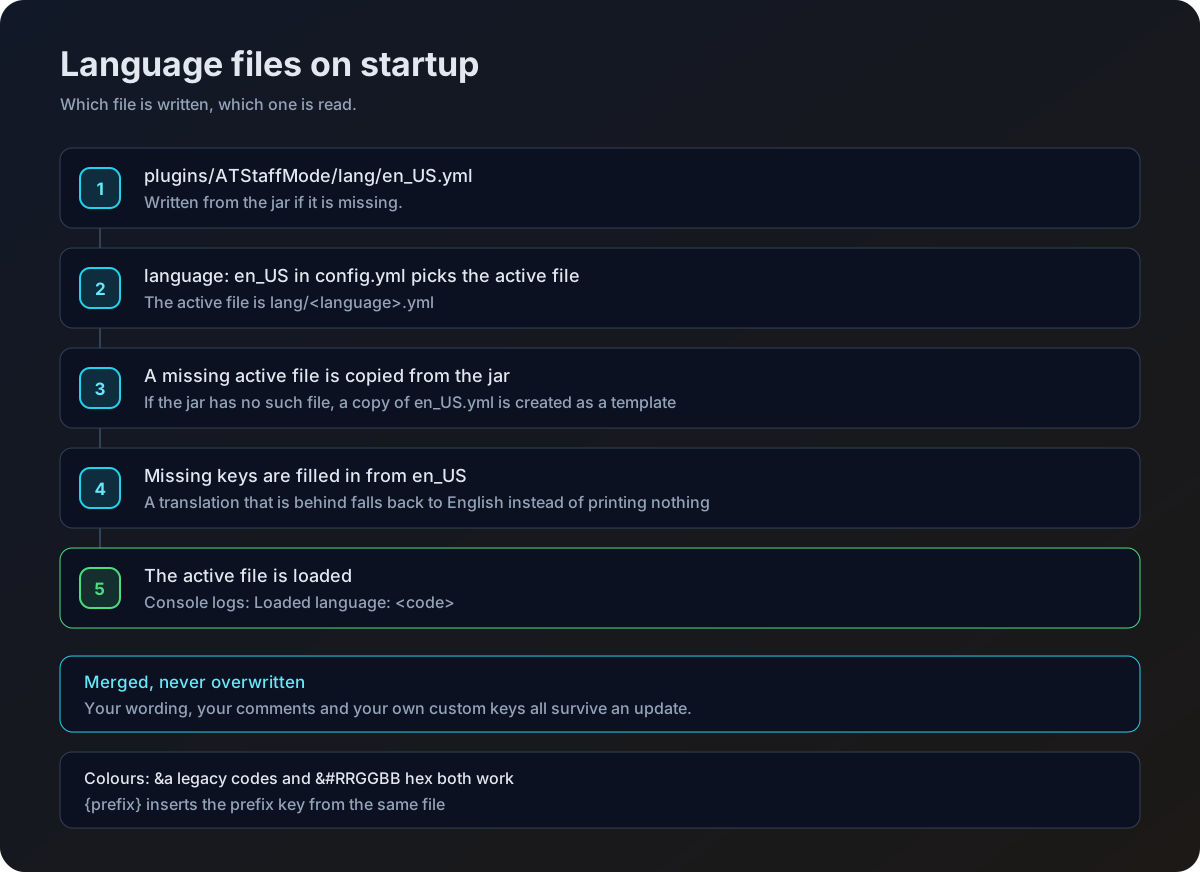
Where the file lives
The language key in config.yml picks which file is loaded.
language: en_USShipped languages
Four translations ship inside the jar, and they are key for key identical, so switching between them never leaves a gap.
| Value | Language |
|---|---|
en_US | English |
en_ES | Spanish |
fr_FR | French |
pt_BR | Brazilian Portuguese |
On startup the plugin writes en_US.yml to disk if it is not there, then looks for the file named by language. If that file is in the jar it is written out too. If it is not, a copy of en_US.yml is created under that name as a starting point for your own translation.
How your file is kept up to date
Language files are managed by BoostedYAML, which merges rather than overwrites. On every startup your active file is compared against the version in the jar, and against en_US as a backstop.
| What happens | To your file |
|---|---|
| A plugin update adds a key | The new key is merged in |
| You changed a value | Left exactly as you wrote it |
| You added a key of your own | Kept, never pruned |
| Your file is missing a key | Topped up from en_US, in English, ready for you to translate |
| Comments you wrote | Preserved |
The practical effect is that a translation which has fallen behind still works. Anything it is missing falls back to the English line instead of printing a "message not found" placeholder.
Every file under lang/ carries a config-version at the top, the same key config.yml has. It is the plugin's record of which revision your file is at, which is how it works out what a new release has added.
# Internal file revision. Do not edit.
config-version: 1
Do not edit or remove config-version. Change it by hand and the merge either skips keys you should have received, or runs when there was nothing to add. The top up from en_US is unaffected either way, so a gap is still filled, but it will be filled in English.
Comments travel with a key only when that key is newly added to your file. Keys you already have keep the form they are in, so an upgrade fills the gaps but does not go back and comment the lines that were already there. Delete the file and let the plugin write a fresh one if you want the fully commented version.
Colours
Both colour styles work anywhere in the file.
| Style | Example | Result |
|---|---|---|
| Legacy codes | &a, &c, &l | The classic sixteen colours and formatting. |
| Hex | �FFFF | Any colour, on servers that support it. |
The prefix
The prefix key at the top of the file is inserted wherever a message contains {prefix}.
prefix: '�FFFF[StaffMode] '
staff-mode:
enabled: '{prefix}�FF00Staff mode enabled!'Remove {prefix} from a message to have it print without the tag.
What each section covers
| Section | Covers |
|---|---|
config-version | Internal file revision. Not a message, and not yours to edit. |
prefix | The tag inserted by {prefix}. |
staff-mode | Turning staff mode on and off. |
vanish | Vanish on and off. |
notes | Adding and removing report notes in chat. |
search | The report search prompts. |
fly | Flight on and off. |
teleport | Teleport results from the teleport menu. |
freeze | Freezing, unfreezing, the frozen player warning, and freeze chat. |
freezechat | Chat freeze wording. |
reports | Filing, assigning, editing and resolving reports. |
cps | CPS alerts, the monitor action bar, and the start and stop notices. |
staffchat | The staff chat format and its toggle messages. |
gui | Every menu title, item name and lore line. |
inventory | The take and place alerts sent to an inspected player. |
update | The new version notice shown to staff on join. |
reload | The confirmation after /staffmode-reload. |
errors | Shared errors such as no permission and player not found. |
Placeholders
Only the placeholders listed here are replaced. Anything else is printed as written.
| Message | Placeholders |
|---|---|
| Any message | {prefix}, {discord} (from discord-link in config.yml) |
freeze.frozen | {staff} |
freeze.staff-frozen, freeze.staff-frozen-debug, freeze.staff-unfrozen, freeze.not-frozen, freeze.quit-punishment | {player} |
freeze.chat-message | {staff}, {message} |
freeze.chat-sent | {player}, {message} |
reports.cooldown | {time} |
reports.received | {reporter}, {player}, {reason} |
reports.created | {player} |
reports.status-changed | {status} |
reports.assigned | {staff} |
reports.assigned-notify | {player} |
cps.alert | {player}, {cps}, {type}, {threshold} |
cps.monitoring-started | {player} |
cps.monitor-actionbar | {player}, {left_cps}, {left_peak}, {right_cps}, {right_peak} |
staffchat.format | {status}, {player}, {message} |
inventory.items-taken, inventory.items-placed | {item}, {amount} |
errors.invalid-usage | {usage} |
teleport.success, teleport.offline-success, teleport.player-not-found | {player} |
teleport.world-not-found, teleport.world-filtered | {world} |
search.no-results-player, search.no-results-handler | {player} |
search.found-player, search.found-handler | {player}, {count} |
freeze.spam-message | {discord} |
gui.inspect.title-inventory, gui.inspect.title-ender-chest | {player} |
gui.teleport.items.player-head.name-online, name-offline | {player} |
reload.success | {time} |
update.available | {current}, {latest}, {spigot}, {builtbybit} |
{type} in cps.alert is not an English word baked into the code. It is filled from cps.type-left or cps.type-right, two keys in the same file, so the alert reads in one language throughout.
The update notice
update.available is a list of lines rather than a single string, so you can make the notice as long or as short as you like. It is sent to staff holding atstaffmode.updates when they join and a newer release exists.
update:
available:
- '{prefix}&#FFFF00A new version of AT-StaffMode is available!'
- '{prefix}&#FFFFFFRunning &#FF0000{current}&#FFFFFF, latest is �FF00{latest}'
- '{prefix}�FFFFSpigot: &#FFFFFF{spigot}'
- '{prefix}�FFFFBuiltByBit: &#FFFFFF{builtbybit}'| Placeholder | Becomes |
|---|---|
{current} | The version running on your server |
{latest} | The version that is available |
{spigot} | The Spigot download page |
{builtbybit} | The BuiltByBit download page |
Drop a line you do not want and the rest still sends. Whether the notice appears at all is controlled by update-checker in config.yml, see Installation.
Keys added in 1.5.0
Several lines that used to be hardcoded English are now yours to edit.
| Key | Where it shows |
|---|---|
freeze.cannot-command | Sent to a frozen player who tries a command that is not allowed. |
cps.type-left, cps.type-right | The two words that fill {type} in the CPS alert. |
cps.monitoring-started, cps.monitoring-stopped, cps.monitoring-target-left | Start and stop notices for a CPS check. |
cps.monitor-actionbar | The live CPS action bar itself. |
teleport.offline-success | Confirmation after teleporting to an offline player's last known location. |
teleport.search-prompt | The prompt asking you to type a name when you search the teleport menu. |
The debug.staffmode-enabled and debug.staffmode-disabled keys were removed in the same release, along with the /staffmode-debug command they belonged to. If they are still in your file, they are simply unused.
staffchat.format also has two small keys of its own, staffchat.status.in-staffmode and staffchat.status.not-in-staffmode. Whichever applies is what {status} becomes.
Menu text
The gui branch holds the titles, item names and lore for every menu.
| Branch | Menu |
|---|---|
gui.reports | The staff reports menu and its filter buttons. |
gui.search-reports | The search menu. |
gui.staff-selection | The staff picker used when assigning a report. |
gui.report-notes | The notes list for one report. |
gui.report-details | The single report view with status buttons. |
gui.world-selection | The world filter for the teleport menu. |
gui.teleport | The teleport menu, its filters and its paging. |
gui.player-reports | The player facing report history opened by /report. |
Menu lore takes placeholders too. The report entries in gui.reports.items.report-item.lore accept {reporter}, {reason}, {date}, {status_color}, {status} and {assigned}, and the item name accepts {player}.
gui:
  reports:
    items:
      report-item:
        name: '&eReport: &f{player}'
        lore:
          - '&7Reporter: &f{reporter}'
          - '&7Reason: &f{reason}'
          - '&7Date: &f{date}'
          - '&7Status: {status_color}{status}'
          - '&7Assigned to: &f{assigned}'
{status_color} is a colour code chosen from the report status, so put it immediately before {status}.
Adding a language
If the language you want is not one of the four that ship, write your own.
Copy the English file
Copy lang/en_US.yml to lang/ under the code you want, for example lang/de_DE.yml.
Translate the values
Change the text on the right of each key. Leave the key names and the placeholders in braces exactly as they are.
Point the config at it
Set language: de_DE in config.yml.
Reload
Run /staffmode-reload. The console prints which language was loaded.
Keep an eye on the console after an upgrade. If your file was missing keys, the plugin says so as it fills them in from en_US, and those new lines will be in English until you translate them.