
Discord Webhooks
Posting new reports and inventory changes into a Discord channel, and every key that shapes the embeds.
The plugin can post to Discord through webhooks, so your staff channel fills up on its own instead of someone relaying reports by hand.
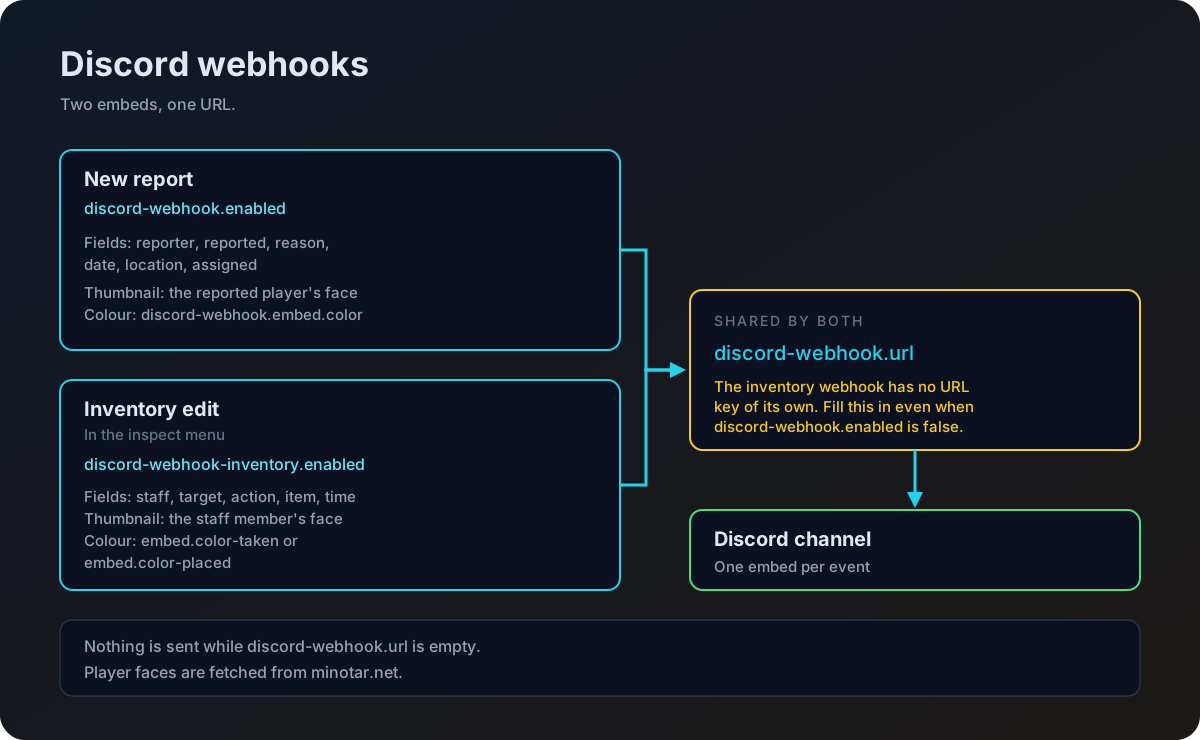
There are two of them, and they are switched on separately.
| Webhook | Fires when |
|---|---|
discord-webhook | A player files a report. |
discord-webhook-inventory | A staff member takes or places an item in the inspect menu. |
Both webhooks post to the same URL, discord-webhook.url. The inventory webhook has no URL key of its own. If you only want the inventory log, you still have to fill in discord-webhook.url, even with discord-webhook.enabled left at false.
Nothing is sent while that URL is empty, so a half configured setup fails quietly rather than filling your console with errors.
Setting it up
Create the webhook in Discord
Open the channel you want the messages in, go to its settings, then Integrations, then Webhooks, and create one. Copy the webhook URL.
Paste the URL into the config
discord-webhook:
  enabled: true
  url: "https://discord.com/api/webhooks/your-webhook-url"
Turn on the parts you want
Set discord-webhook.enabled to true for report messages. Set discord-webhook-inventory.enabled to true for the inventory log. You can have either, both, or neither.
Apply the change
Run /staffmode-reload, or restart the server.
Test it
File a report with /report <player> <reason> and watch the channel. If nothing appears, check the URL and the enabled keys first.
Report messages
discord-webhook:
  enabled: false
  url: "https://discord.com/api/webhooks/url"

  embed:
    title: "New Player Report"
    description: "A new report has been submitted."
    color: "#FFA500"
    footer: "ATStaffMode Report System"
    show-thumbnail: true

  fields:
    reporter: "Reported By"
    reported: "Reported Player"
    reason: "Reason"
    date: "Time"
    location: "Location"
assigned: "Assigned Staff"| Key | What it controls |
|---|---|
enabled | Whether report messages are sent at all. |
url | The webhook URL. Shared with the inventory webhook. |
embed.title | Heading of the message. |
embed.description | Line under the heading. |
embed.color | Side stripe colour, as a hex value. |
embed.footer | Small text at the bottom. |
embed.show-thumbnail | Shows the reported player's face in the corner. |
fields.reporter | Label for who filed the report. |
fields.reported | Label for who was reported. |
fields.reason | Label for the reason. |
fields.date | Label for when it was filed. |
fields.location | Label for the world and coordinates. |
fields.assigned | Label for the assigned staff member. Shows None while nobody has it. |
The fields keys are labels only. The values beside them come from the report itself.
The message is sent when the report is created, so the assigned field is almost always None. Later changes to a report, such as being assigned or marked done, are not posted.
Inventory log messages
discord-webhook-inventory:
  enabled: false

  embed:
    title: "Inventory Modification"
    description: "A staff member modified a player's inventory."
    color-taken: "#FF0000"
    color-placed: "#00FF00"
    footer: "AT-StaffMode Logs"
    show-thumbnail: true

  fields:
    staff: "Staff Member"
    target: "Target Player"
    action: "Action"
    item: "Item"
time: "Time"| Key | What it controls |
|---|---|
enabled | Whether inventory changes are logged. |
embed.title | Heading of the message. |
embed.description | Line under the heading. |
embed.color-taken | Stripe colour when a staff member takes an item. |
embed.color-placed | Stripe colour when a staff member places an item. |
embed.footer | Small text at the bottom. |
embed.show-thumbnail | Shows the staff member's face in the corner. |
fields.staff | Label for the staff member. |
fields.target | Label for the inspected player. |
fields.action | Label for whether the item was taken or placed. |
fields.item | Label for the item and how many. |
fields.time | Label for when it happened. |
This log is separate from the in game warning the inspected player gets. That one is controlled by inventory-inspection.send-inventory-msg, described on the Configuration page.
One message is sent per item moved, so a staff member clearing out a full inventory produces a run of messages. A channel of its own, separate from reports, keeps that readable.
A note on player faces
When show-thumbnail is on, the embed points at minotar.net for the player's face. Discord fetches that image, which means the player's unique id appears in a request to a third party service. Set show-thumbnail to false on either webhook if you would rather it did not.