
Permissions
Every permission node the plugin checks, what it grants, and a suggested layout for helper, moderator and admin ranks.
ATStaffMode checks permissions for every command and for most in game actions. Grant them with your permissions plugin.
Every node
All of them are declared by the plugin, so all of them have a default. op means operators get it automatically, true means everyone gets it.
| Node | What it grants | Default |
|---|---|---|
atstaffmode.use | Toggling staff mode, and counting as staff elsewhere in the plugin. | op |
atstaffmode.freeze | Freezing and unfreezing players. | op |
atstaffmode.freezechat | Talking to a frozen player with /freezechat. | op |
atstaffmode.report.create | Filing a report and opening your own report history. | true |
atstaffmode.report.handle | Receiving the chat alert when a new report comes in. | op |
atstaffmode.bypass.freeze | Cannot be frozen. | op |
atstaffmode.debug.freeze | Freezing a player who would otherwise be protected. | op |
atstaffmode.staffchat | Sending and receiving staff chat. | op |
atstaffmode.vanish | The /vanish command. | op |
atstaffmode.reload | The /staffmode-reload command. | op |
atstaffmode.alerts | Receiving the automatic high CPS alerts. | op |
atstaffmode.updates | Being told on join when a newer version of the plugin is out. | op |
atstaffmode.reports.view | Opening the staff reports menu. | op |
atstaffmode.reports.manage.own | Changing status and notes on reports assigned to you. | op |
atstaffmode.reports.manage.all | Changing status and notes on any report. | op |
atstaffmode.reports.assign | Assigning a report to a staff member with a right click. | op |
atstaffmode.inventory.modify | Moving and taking items inside the inspect menu. | op |
atstaffmode.bypass.inventory | Using your own inventory freely while in staff mode. | op |
atstaffmode.vanish, atstaffmode.reload and atstaffmode.alerts were checked in code but not declared before 1.5.0, so they had no default and behaved as ungranted for anyone who was not an operator. They now default to op like the rest. If you granted them by hand to work around that, nothing changes for you.
Nodes that do more than their command
A few nodes are used as a general test for "is this player staff", so they reach further than the command they are named after.
Beyond toggling staff mode, holding this node means you:
- can still see vanished staff, because the built in vanish only hides a player from those without it
- are counted by the
%atstaffmode_staff_online%placeholder - receive the broadcast when someone is frozen or when a frozen player logs out
- can see other staff in the teleport menu while they are in staff mode
This is the node that decides who gets the chat alert when a player files a report. It is separate from atstaffmode.reports.view, which controls the menu, so a rank can be alerted without being able to open the queue, or the other way round.
manage.own only covers reports whose assigned staff member is that player, matched by name. A staff member with manage.own and nothing assigned to them can open the queue but cannot change anything. manage.all covers every report regardless of assignment.
Opening the reports menu with manage.own and not manage.all starts you on your assigned reports rather than the full list.
This one only decides who sees the new version notice in game, and it is read together with update-checker.notify-staff-on-join in config.yml. With that setting off, nobody is told in game no matter who holds the node, though the console is still told. See Installation.
This blocks the freeze itself, not just the command, so a player holding it also cannot be frozen with the freeze tool. The staff member who tried gets told the target cannot be frozen. Use /freezedebug with atstaffmode.debug.freeze when you need to freeze a protected player for testing.
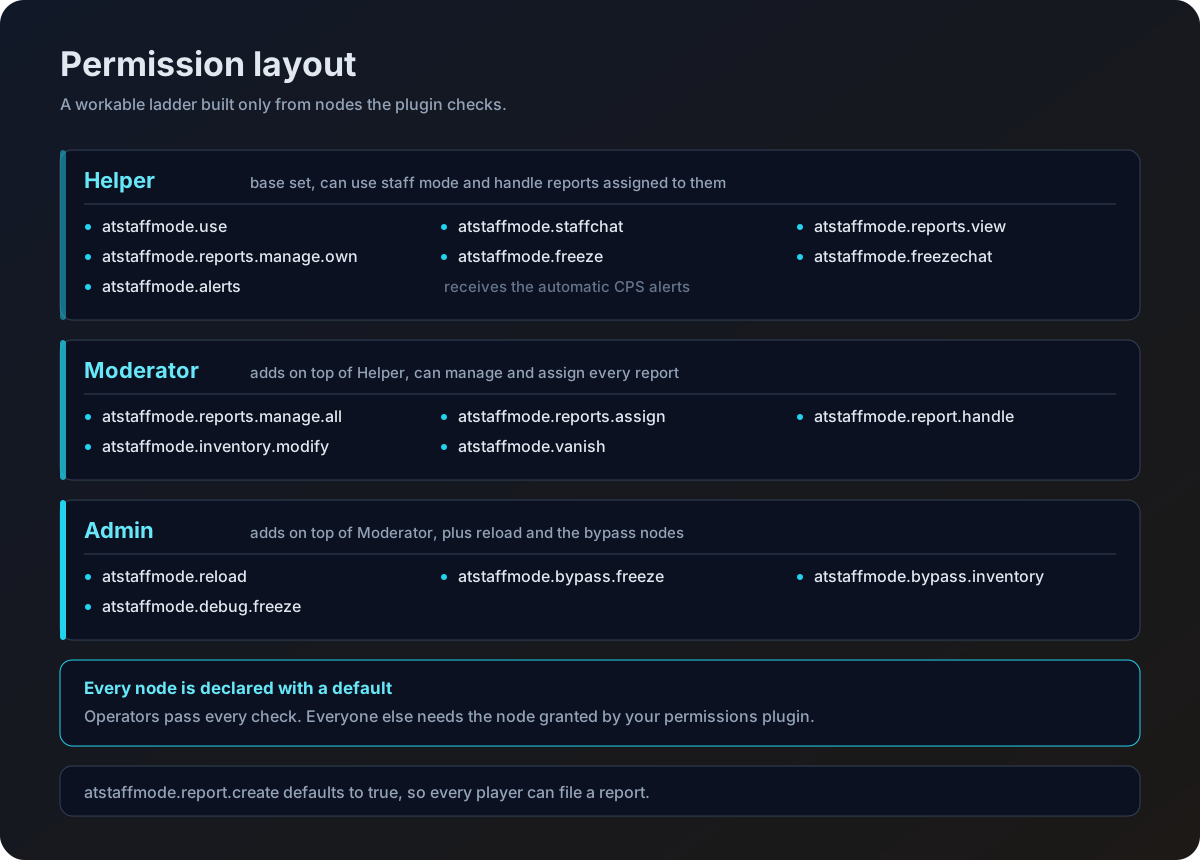
A starting layout
Three ranks built only from the nodes above. Adjust to taste.
Can watch, freeze and answer reports, but cannot touch inventories or reassign work.
- atstaffmode.use
- atstaffmode.staffchat
- atstaffmode.freeze
- atstaffmode.freezechat
- atstaffmode.vanish
- atstaffmode.alerts
- atstaffmode.report.create
- atstaffmode.report.handle
- atstaffmode.reports.view
- atstaffmode.reports.manage.own
atstaffmode.report.create defaults to true on purpose, so ordinary players can report. Only remove it if you want to close reporting off entirely.
Commands and the node each one needs are listed on the Commands page.