
Configuration
A walk through config.yml, what each key controls, and how the file is kept up to date across plugin updates.
Everything except player facing text lives in plugins/ATStaffMode/config.yml. This page walks the file from top to bottom.
Text shown to players lives in a separate language file. See Messages and Language.
Every key in the shipped file carries a comment above it explaining what it does, with a link to the page here that covers it in full. If you would rather read the file than this page, you can.
File revision
| Key | What it controls | Default |
|---|---|---|
config-version | Internal file revision. Do not edit. It is how the plugin knows which keys a new release has added to your file. | 1 |
The same key sits at the top of every file under lang/. Leave both alone. Keeping the file up to date explains what it is used for.
Update checker
The plugin can tell you when a newer release is out. It is on by default.
update-checker:
  enabled: true
  notify-staff-on-join: true
check-interval-hours: 6| Key | What it controls | Default |
|---|---|---|
update-checker.enabled | Master switch. Nothing is fetched when this is false. | true |
update-checker.notify-staff-on-join | Tells staff holding atstaffmode.updates about a new version when they join. The console is always told regardless. | true |
update-checker.check-interval-hours | Hours between checks, minimum 1. The first check runs shortly after startup. | 6 |
Every check runs asynchronously, so it never holds the server up. Full behaviour is on Installation.
Language
| Key | What it controls | Default |
|---|---|---|
language | Which file under lang/ is loaded. en_US loads lang/en_US.yml. Shipped: en_US, en_ES, fr_FR, pt_BR. | en_US |
discord-link | Your Discord invite. Fills {discord} in any message in the language files, such as the frozen player warning. Set it once and every language uses it. | discord.gg/yourserver |
Storage
Picks where reports, frozen players and staff mode state are saved.
| Key | What it controls | Default |
|---|---|---|
storage.type | Backend to use. SQLITE, MYSQL, MONGODB or YAML. | SQLITE |
storage.mysql.host | MySQL server address. | localhost |
storage.mysql.port | MySQL port. | 3306 |
storage.mysql.database | Database name. | minecraft |
storage.mysql.username | MySQL user. | root |
storage.mysql.password | MySQL password. | password |
storage.mysql.use-ssl | Connect to MySQL over SSL. The older useSSL spelling is still accepted. | false |
storage.mongodb.uri | Full MongoDB connection string. | see file |
storage.mongodb.collection-reports | Collection that holds reports. | staff_reports |
storage.mongodb.collection-frozen | Collection that holds frozen players. | staff_frozen |
Backend details, table names and file locations are on the Storage page.
Staff mode
| Key | What it controls | Default |
|---|---|---|
staff-mode.restrict-inventory | Blocks dropping, picking up and moving items while in staff mode. Players with atstaffmode.bypass.inventory are unaffected. | true |
staff-mode.disable-on-leave | true takes a staff member out of staff mode when they disconnect, so they rejoin normally. false puts them straight back into staff mode on their next join, even after a restart. | false |
Presets and features
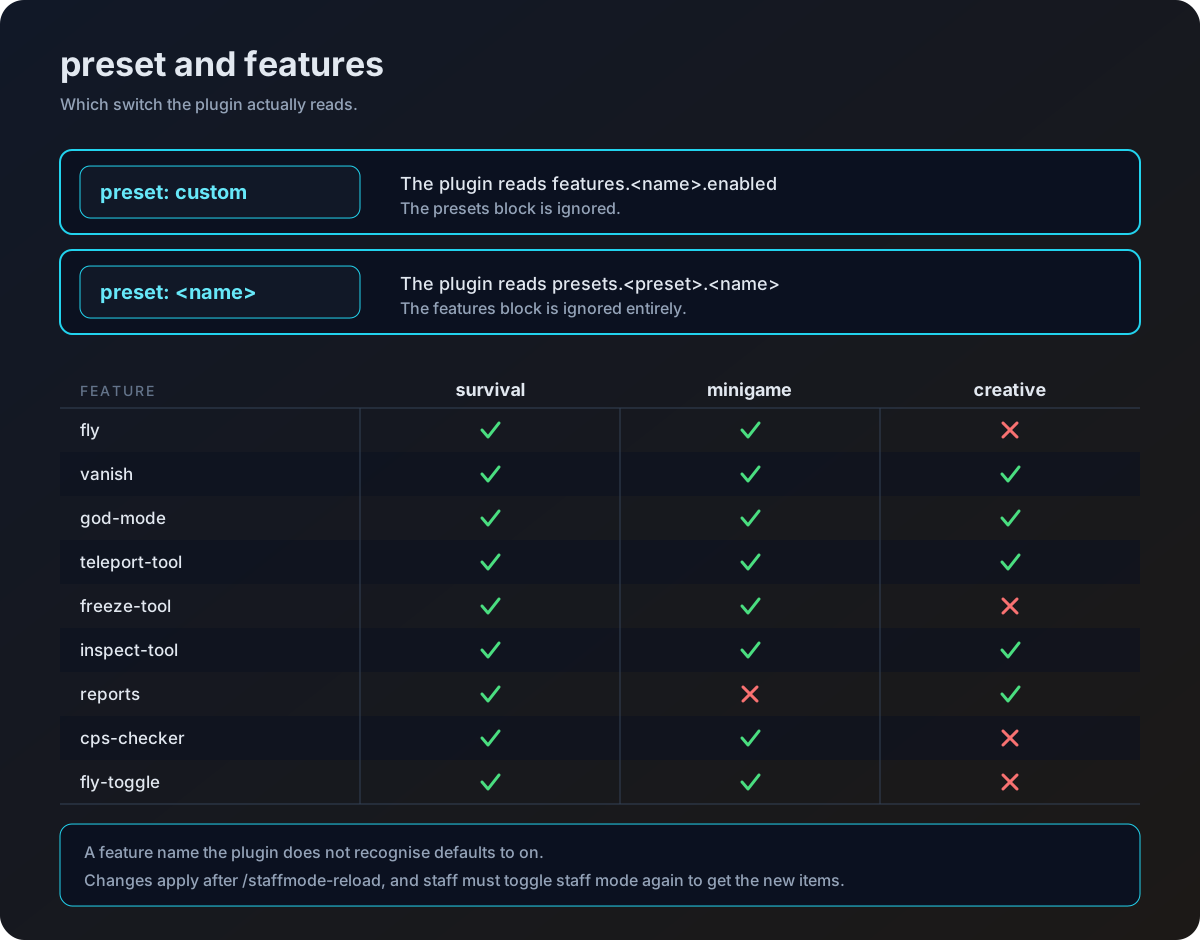
preset decides where the plugin looks for the on and off switches of each staff mode feature.
preset: customreadsfeatures.<name>.enabled.- Any other value, for example
preset: survival, readspresets.<preset>.<name>and ignores thefeaturesblock entirely.
The feature names are the same in both places.
| Feature name | What it does when enabled |
|---|---|
fly | Turns flight on the moment staff mode starts. |
vanish | Hides the staff member from other players. |
god-mode | Makes the staff member invulnerable. |
teleport-tool | Gives the compass that opens the teleport menu. |
freeze-tool | Gives the freeze item. |
inspect-tool | Gives the inspect item. |
reports | Gives the item that opens the reports menu. |
cps-checker | Gives the CPS item, and enables click tracking and CPS alerts. |
fly-toggle | Gives the item that toggles flight on and off. |
The shipped presets are survival, minigame and creative. You can add your own block under presets and point preset at it.
preset: survival

presets:
  survival:
    fly: true
    vanish: true
    god-mode: true
    teleport-tool: true
    freeze-tool: true
    inspect-tool: true
    reports: true
    cps-checker: true
    fly-toggle: true
features.cps-checker.enabled is also checked separately whenever a click is recorded, so switching the CPS checker off stops the click tracking as well as removing the item.
Staff mode items
inventory-items defines the hotbar a staff member receives. Every entry takes the same four keys.
| Key | What it controls |
|---|---|
slot | Hotbar slot, counted from 0. |
name | Display name of the item. |
material | Material name, resolved through XSeries so names from any supported version work. |
lore | List of lore lines. |
The vanish item is the exception. It has two blocks, enabled and disabled, each with its own name, material and lore, and the plugin swaps between them as vanish is toggled. Its slot sits one level up, directly under vanish.
inventory-items:
compass:
slot: 0
name: '�FFFFTeleport Tool'
material: COMPASS
lore:
- '&7Right click to open'
- '&7teleport menu'
vanish:
slot: 6
enabled:
name: '�FF00Vanish: Enabled'
material: LIME_DYE
lore:
- '&7Click to &cdisable &7vanish'
disabled:
name: '&#FF0000Vanish: Disabled'
material: GRAY_DYE
lore:
- '&7Click to &aenable &7vanish'If a material name cannot be resolved the plugin falls back to STONE, or to GRAY_DYE for the vanish item. An item in a slot that another item already uses will overwrite it, so keep the slots unique.
The entry keys are compass, freeze, inspect, reports, vanish, cps and fly. See Staff Tools for what each one does in game.
Freeze
| Key | What it controls | Default |
|---|---|---|
freeze.prevent-movement | Snaps a frozen player back if they try to walk. false lets them move. | true |
freeze.prevent-commands | Blocks commands from a frozen player unless they are on the allow list. | true |
freeze.prevent-damage | Stops a frozen player dealing or taking melee damage. | true |
freeze.screen-effect.enabled | Applies a screen effect when a player is frozen. | true |
freeze.screen-effect.blindness | Uses blindness as that effect. | true |
freeze.spam-message.enabled | Repeats a message in chat to the frozen player. | true |
freeze.spam-message.interval-seconds | Seconds between repeats. | 5 |
freeze.spam-message.messages | Removed in 1.6.0. The lines now live in the language file under freeze.spam-message. A list left here from an older version still overrides the language file until you delete it. | none |
freeze.allowed-commands | Commands a frozen player may still run. Matched with or without the leading slash, and aliases are not resolved. | /report, /helpop |
freeze.quit-punishment.enabled | Runs the commands below when a frozen player disconnects. false only notifies staff. | true |
freeze.quit-punishment.commands | Console commands run in order, with {player} replaced. | see file |
The shipped quit-punishment.commands bans the player and broadcasts it, and the block is on by default. Change the list or set enabled: false if that is not your policy. Full behaviour is on Freeze.
CPS
| Key | What it controls | Default |
|---|---|---|
cps.check-duration | Sampling window in seconds. Clicks are averaged back to clicks per second, so a higher value smooths the reading rather than inflating it. | 1 |
cps.warning-threshold | Clicks per second that triggers an automatic alert. | 15 |
cps.alert-staff | Sends those alerts to everyone holding atstaffmode.alerts. | true |
cps.check-duration was ignored before 1.5.0 and the old shipped default was 10. An upgrade keeps your existing value, and at 10 a short burst is diluted across ten seconds, which makes warning-threshold very hard to trip. Set it to 1 unless you want a smoothed reading. See CPS Checker.
Reports
| Key | What it controls | Default |
|---|---|---|
reports.cooldown-seconds | Seconds a player must wait between filing reports. 0 disables the wait. | 60 |
reports.duplicate-report-cooldown-hours | Hours before a player may report the same target again, whether or not the earlier report was resolved. 0 disables the check. | 24 |
reports.max-reports-per-player | How many reports one player may file inside the reset window. 0 or less turns the limit off. | 5 |
reports.limit-reset-hours | Length of that window in hours. | 24 |
Staff chat
| Key | What it controls | Default |
|---|---|---|
staffchat.enabled | Turns the chat prefix and the toggle on. | true |
staffchat.chat-prefix | Character that sends a single message to staff chat. | ! |
staffchat.min-message-length | Messages shorter than this after the prefix are left in normal chat. | 2 |
Vanish
| Key | What it controls | Default |
|---|---|---|
use-premium-vanish | Hands vanish over to PremiumVanish or SuperVanish when one of them is installed. false uses the built in vanish. | false |
use-yvanish | Hands vanish over to YVanish when it is installed. Loses to use-premium-vanish if both are on. | false |
Each hook is only active when its key is true and its plugin is enabled on the server. When it takes, the console logs that it hooked in successfully.
Inventory inspection
| Key | What it controls | Default |
|---|---|---|
inventory-inspection.send-inventory-msg | Tells the inspected player in chat when a staff member takes or places an item. | true |
Discord webhooks
discord-webhook posts a message for every new report, and discord-webhook-inventory posts one whenever a staff member changes someone's inventory from the inspect menu. Both are off by default. Every key is listed on the Discord Webhooks page.
Applying changes
Run /staffmode-reload to reload config.yml and the active language file. The aliases are /smreload and /atsmreload, and the permission is atstaffmode.reload.
Two things are set up once, at startup, and a reload will not move them.
use-premium-vanishanduse-yvanish, because the vanish hook is chosen when the plugin enables.storage.type, because the backend is created when the plugin enables.
Change either of those and restart the server.
atstaffmode.reload defaults to op. Grant it to your admin group so anyone who is not an operator can use the reload. See Permissions.
Keeping the file up to date
config.yml and the language files are managed by BoostedYAML, which merges rather than replaces. On every startup your file is compared against the defaults inside the jar.
| What happens | To your file |
|---|---|
| A plugin update adds a key | The new key is merged in, with its comment |
| You changed a value | Left exactly as you wrote it |
| You added a key of your own | Kept, never pruned |
| You deleted a key | Restored, with its comment |
| A key from an older release you still have | Kept, never pruned |
| Comments you wrote | Preserved |
When anything is added the plugin says so in the console, so a line about the config being updated after an upgrade is expected rather than a problem.
What config-version is for
The merge is versioned. Each file carries a config-version at the top, and the copy inside the jar carries one too. When a release changes the set of keys it ships a higher number, the plugin sees that yours is behind, and merges the new keys into your file.
Never edit or remove config-version. It is the only thing that tells the plugin your file is behind. Change it by hand and an upgrade either merges nothing, or merges when it did not need to.
A file written before this key existed has no version at all, which reads as the oldest possible, so it merges cleanly on the first startup after the upgrade.
Comments only travel with keys that are newly added to your file. A key you already have keeps the form it is already in, so upgrading a config.yml written before 1.5.0 gives you commented new sections and bare old ones.
If you want the fully commented file, delete config.yml and let the plugin write a fresh one, then reapply your settings. Nothing forces you to. An upgrade preserves changed values, hand added legacy keys and custom keys of your own exactly as they are.
Values that YAML could misread
Values such as yes, no, on, off, ~ and numbers with a leading zero like 007 are written back in quotes automatically, so they stay text. Setting staffchat.chat-prefix to ~ or to no now does what you meant rather than quietly becoming nothing. There is nothing for you to do.