
Reports
How players file reports and how your staff triage, assign, and resolve them
Players report rule breakers with one command. Your staff work through the queue in a menu, claim what they are handling, leave notes, and teleport to where the report was filed. Nothing gets lost between shifts, because every report is stored.
For players
/report <player> <reason> files a report. The permission is atstaffmode.report.create, which defaults to true, so everyone can use it.
/report Steve breaking blocks in spawnEverything after the player name becomes the reason, so there is no need for quotes.
/report on its own opens the player's own report history. Each report they have filed shows its reason, date and current status.
| Click | Effect |
|---|---|
| Left click a pending report | Retype the reason in chat, or type cancel to keep the old one |
| Right click a pending report | Withdraw the report |
Only reports still sitting at pending can be edited or withdrawn. Once a staff member has picked one up, the player is told they can no longer change it.
Limits on reporting
All of these live under reports in config.yml.
| Key | Default | What it does |
|---|---|---|
cooldown-seconds | 60 | How long a player waits between filing any two reports |
duplicate-report-cooldown-hours | 24 | How long a player waits before reporting the same target again |
max-reports-per-player | 5 | How many reports one player may file inside the reset window |
limit-reset-hours | 24 | The rolling window the limit is counted over |
Set max-reports-per-player to 0 or lower to switch that limit off.
The duplicate check
duplicate-report-cooldown-hours is the one that stops the same argument arriving five times. Once a player has reported someone, they cannot report that same person again until this many hours have passed. Resolving the earlier report does not shorten the wait.
Which message they get depends on where the earlier report stands:
| Earlier report | Message |
|---|---|
| Still open, staff have not closed it | reports.duplicate-active |
| Already resolved, but the hours have not elapsed | reports.duplicate |
reports:
  duplicate-report-cooldown-hours: 24
It is scoped to the pair, so the same player can still report somebody else straight away, subject to cooldown-seconds. Set it to 0 to disable the check entirely.
This key was ignored before 1.5.0, and the check behind it always passed, so neither reports.duplicate-active nor reports.duplicate could ever be sent. If you are upgrading, the default of 24 now applies. See the Config key audit.
What a report stores
Every report keeps the reporter name, the reported name, the reason, the time it was filed, its status, the staff member it is assigned to, the exact location the reporter was standing in, and a list of notes.
The location is what makes the teleport button in the details menu work, so a staff member can arrive at the griefed build rather than guessing.
When a report comes in
Every online player holding atstaffmode.report.handle gets the reports.received chat alert with the reporter, the target and the reason.
A Discord webhook can fire at the same time, posting an embed with the same details plus the reported player's head. See Discord webhooks to set that up.
The reports menu
Staff open the queue with /reportlist, or its aliases reportsmenu, rm and reportslist. It needs atstaffmode.reports.view. The reports book in the staff toolbar opens the same menu.
A staff member who has atstaffmode.reports.manage.own but not atstaffmode.reports.manage.all opens straight into their own assigned reports instead of the full queue.
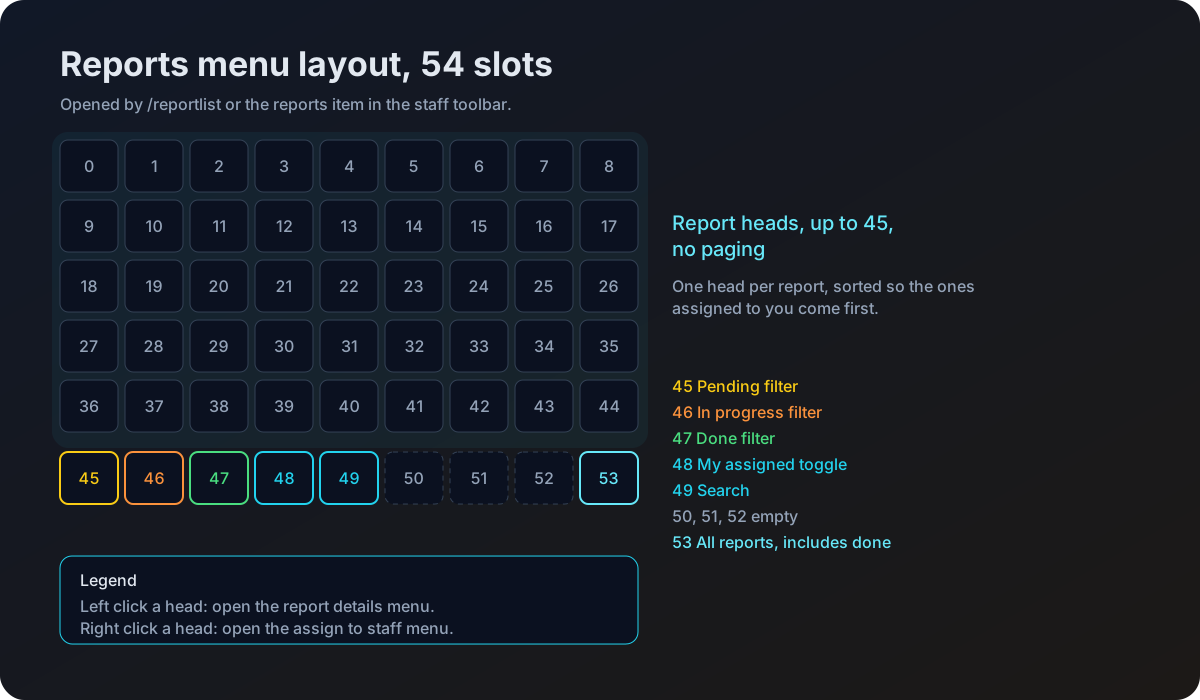
Reports fill slots 0 to 44 as player heads, so the menu shows up to 45 at a time. There is no paging, so keep the queue clear.
| Slot | Button |
|---|---|
| 45 | Filter to pending |
| 46 | Filter to in progress |
| 47 | Filter to done |
| 48 | Toggle to reports assigned to you |
| 49 | Search |
| 53 | All reports, including resolved history |
The filter button you are currently on carries an enchant glint, so you can see at a glance which view you are in. Inside the list, reports assigned to you or already in progress are glinted too, and the default view sorts your own assigned reports to the front.
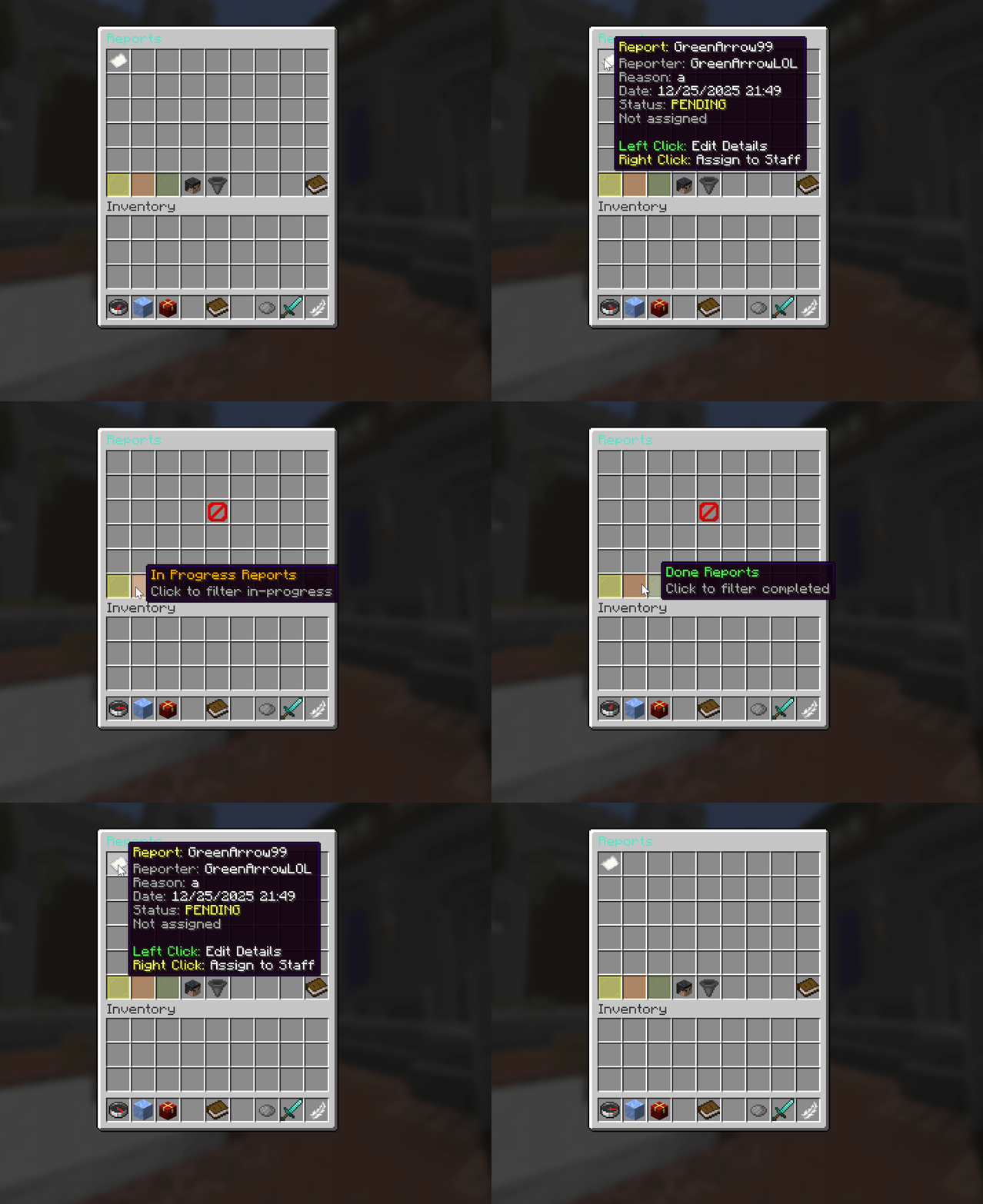
Filter reports by status: Pending, In Progress, and Done.
| Click on a report | Effect |
|---|---|
| Left click | Open the details menu |
| Right click | Open the staff selection menu to assign it |
Assigning needs atstaffmode.reports.assign.
Report details
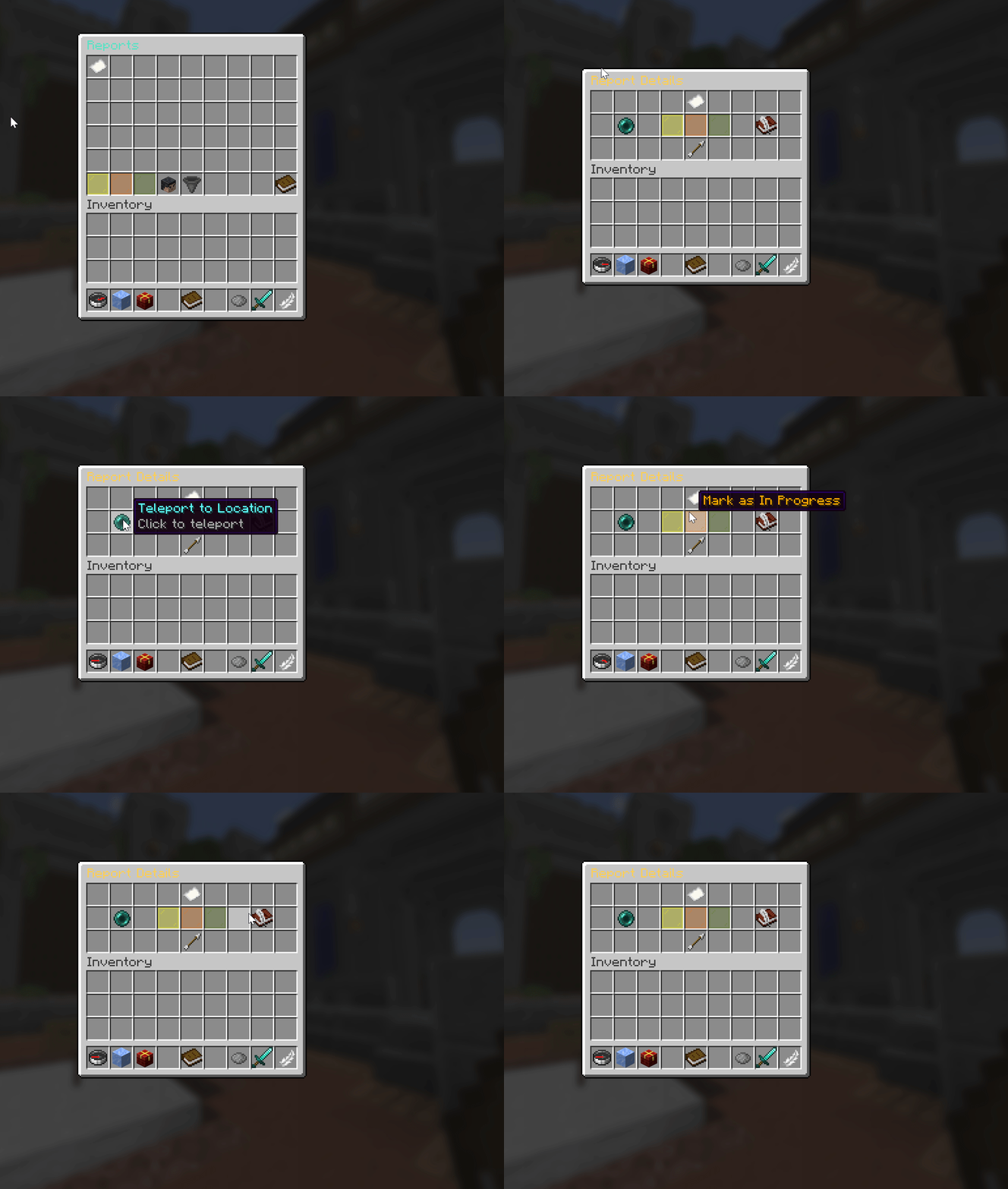
Left-click reports to edit details and update status.
Sends you to the exact spot the reporter was standing when they filed it, then closes the menu.
Mark the report pending, in progress, or done. The button for the current status shows as the selected variant rather than a click prompt.
Opens the notes menu for this report.
Returns to the reports list. This is the one button that works even without manage permission.
Changing anything here needs atstaffmode.reports.manage.all, or atstaffmode.reports.manage.own when the report is assigned to you. Without either, you get told you cannot manage that report.
Notes
Notes are how a shift hands work to the next one. Open them from slot 16 of the details menu.
| Slot or click | Effect |
|---|---|
| Slot 9 upward | Existing notes, newest last |
| Slot 49 | Add a note by typing it in chat, or type cancel to abort |
| Shift right click a note | Remove that note |
| Slot 45 | Back to the report details |
Search
Slot 49 of the reports menu opens search.
| Slot | Search by |
|---|---|
| 11 | Reported player |
| 15 | Handling staff member |
| 22 | Back to reports |
Either option closes the menu and asks you to type the name in chat.
Assigning work
Right click a report in the queue to open the staff selection menu. It lists staff members as heads. Clicking one assigns the report to them, sets its status to in progress, and sends them a notification.
Slot 53 of that menu unassigns the report instead, putting it back in the pool.
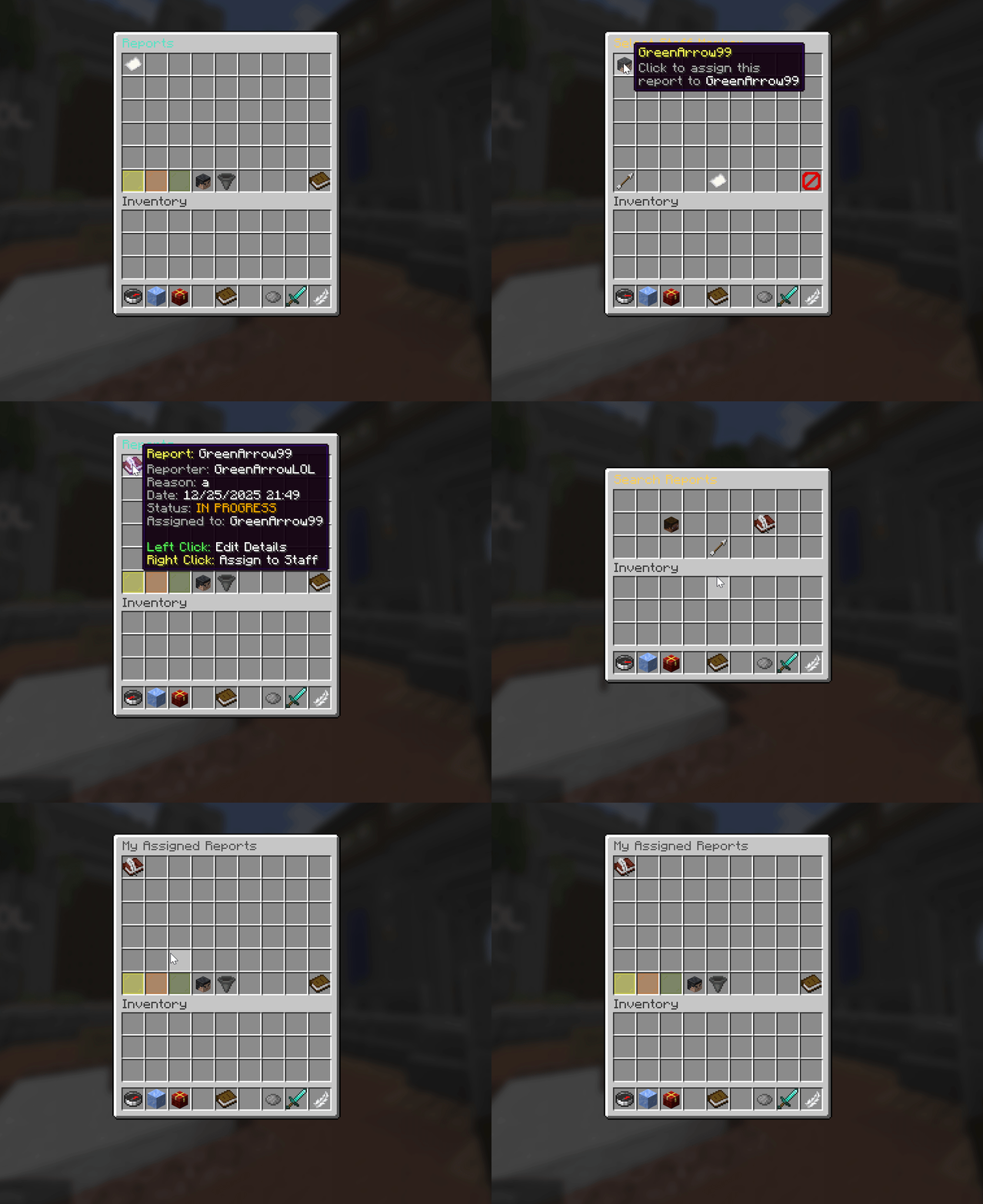
Right-click reports to assign staff members. Assigned reports show a book icon for tracking.
The report lifecycle
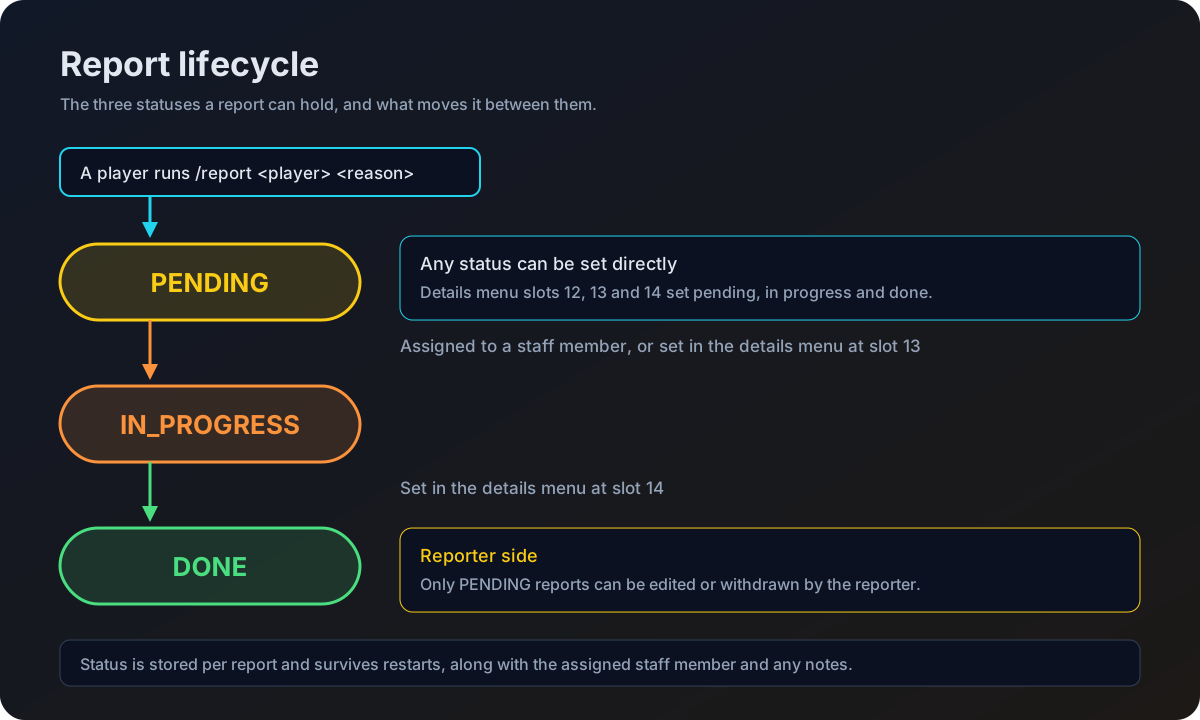
There are three statuses.
| Status | Meaning |
|---|---|
PENDING | Filed and untouched. The reporter can still edit or withdraw it |
IN_PROGRESS | Someone is on it. Set automatically when a report is assigned |
DONE | Resolved |
Marking a report done does not lift the duplicate check. The cooldown is measured from when the last report against that player was filed, whatever its status, so the reporter still waits out duplicate-report-cooldown-hours before they can file against the same player again. What changes is the message they see: reports.duplicate rather than reports.duplicate-active.
Permissions
| Node | Grants | Default |
|---|---|---|
atstaffmode.report.create | Filing reports with /report | true |
atstaffmode.report.handle | Receiving the new report chat alert | op |
atstaffmode.reports.view | Opening the reports menu | op |
atstaffmode.reports.manage.own | Editing status and notes on reports assigned to you | op |
atstaffmode.reports.manage.all | Editing status and notes on any report | op |
atstaffmode.reports.assign | Assigning reports to staff by right clicking | op |
Full node list on the Permissions page.