
CPS Checker
Watch a player's clicks per second live on your action bar, and get alerted when anyone clicks too fast
The CPS checker counts how fast a player clicks. You can watch one player live while you talk to them, and the plugin can shout at your staff on its own when someone crosses a threshold.
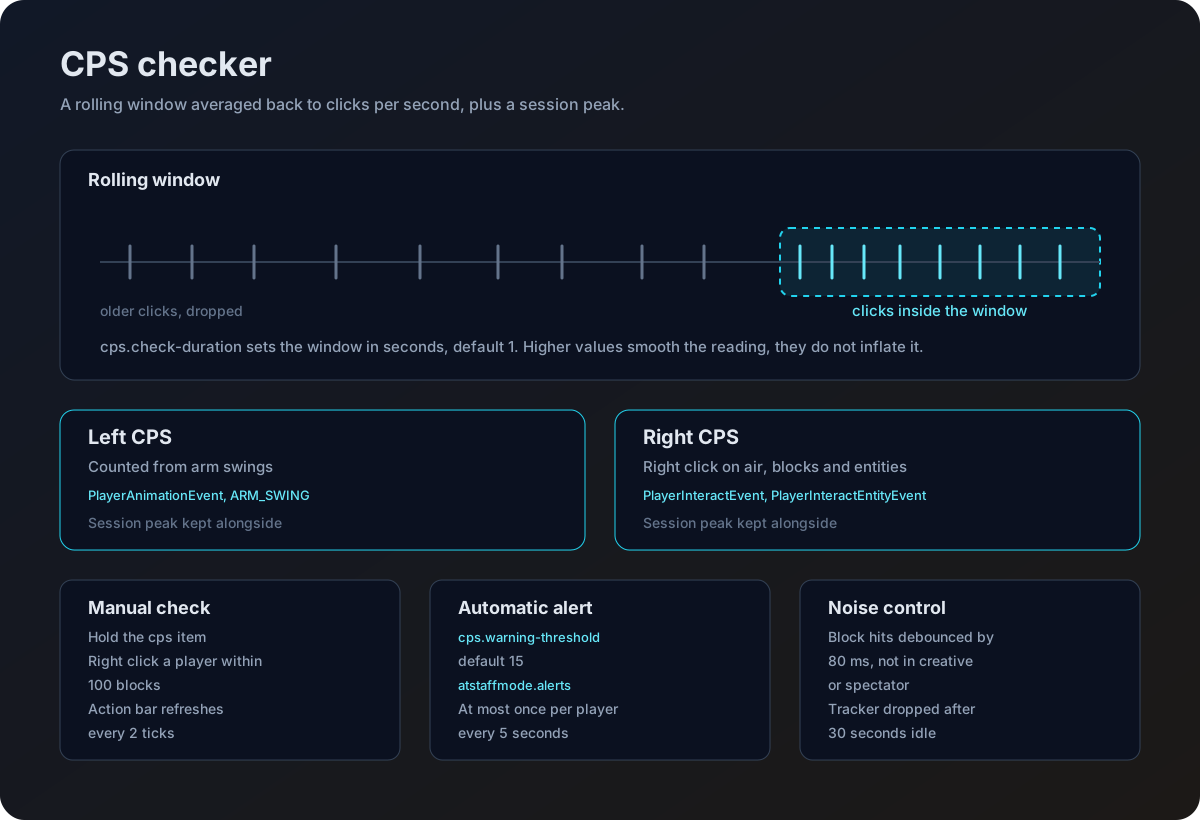
How the count works
CPS is measured over a rolling window. Every click is timestamped, anything older than the window falls out of it, and what is left is divided back down to a per second figure. Alongside that, the plugin remembers the highest count it has seen for that player as a peak.
| Reading | Counted from |
|---|---|
| Left CPS | Arm swings |
| Right CPS | Right click on air, on a block, or on an entity |
Two details stop the numbers lying to you. Swings that land on a solid block are ignored if they come within 80 ms of the last one, so mining does not inflate a left CPS reading. That debounce does not apply in creative or spectator, where every swing is counted.
Trackers are dropped after 30 seconds without a click, and cleared when the player quits. A player who has not clicked recently reads as 0 rather than holding an old number.
The sampling window
cps.check-duration is the length of that window, in seconds.
cps:
  check-duration: 1
Because the count is always averaged back to clicks per second, raising this smooths the reading rather than inflating it. At 1 you see raw CPS that reacts to a burst the instant it happens. At 5 a two second burst of 20 CPS is spread across five seconds and reads as about 8.
| Value | Reading behaves like |
|---|---|
1 | Raw. Jumpy, reacts immediately, catches short bursts. The default |
2 to 3 | Lightly smoothed. Still catches a burst, with less flicker on the action bar |
5 and above | Heavily smoothed. Short bursts are diluted away |
Upgrading from 1.4.3? This key was ignored before 1.5.0, and the old shipped default was 10. Your existing config.yml keeps whatever value is in it, and the value is now live.
At 10, a burst of clicking is averaged over ten seconds, which makes cps.warning-threshold extremely hard to trip. Open your config.yml and set check-duration: 1 unless you deliberately want a smoothed reading.
Watching a player
Hold the CPS item
It is the diamond sword in the staff toolbar by default. See Staff tools to change the item or its slot.
Right click while looking at them
Look at the player, within 100 blocks, and right click. You get a confirmation that monitoring has started.
Read the action bar
Their live left and right CPS show on your action bar with the peak for each, refreshed every two ticks.
Stop when you are done
Right click air with no player in your crosshair to stop. Monitoring also stops on its own if either of you leaves the server.
Starting a new check while already monitoring someone switches you over to the new target.
Automatic alerts
The plugin can watch everyone at once and alert staff when a player crosses a threshold.
cps:
  warning-threshold: 15
  alert-staff: true
When a player's CPS reaches warning-threshold, every online player holding atstaffmode.alerts gets the cps.alert message. Alerts for the same player are limited to one every 5 seconds, so a fast clicker does not flood your chat.
atstaffmode.alerts defaults to op. Grant it to your staff group so anyone who is not an operator receives the alert too.
All four placeholders in cps.alert are filled in.
| Placeholder | Becomes |
|---|---|
{player} | The player who tripped the threshold |
{cps} | Their reading at that moment |
{type} | The cps.type-left or cps.type-right text from your language file |
{threshold} | Your cps.warning-threshold value |
Because {type} comes from the language file rather than the code, the whole alert reads in one language.
See Messages and Language for editing that line.
Turning it off
The whole feature sits behind the cps-checker switch. With preset: custom that is features.cps-checker.enabled. With a named preset it is that preset's own cps-checker value.
preset: custom

features:
  cps-checker:
    enabled: true
With it off, no clicks are recorded, no alerts fire, the tool is not given out, and using it tells you the checker is disabled. See Configuration for how presets and feature switches interact.
Wording the CPS messages
Everything the checker prints comes from your language file, including the action bar, so you can translate the whole feature.
| Key | Where it shows |
|---|---|
cps.monitor-actionbar | The live action bar line. Takes {player}, {left_cps}, {left_peak}, {right_cps} and {right_peak} |
cps.monitoring-started | Confirmation when you start watching someone. Takes {player} |
cps.monitoring-stopped | Confirmation when you stop |
cps.monitoring-target-left | Sent when the player you were watching disconnects |
cps.type-left and cps.type-right | The two words that fill {type} in the alert |
cps.alert | The automatic high CPS alert |
Placeholders
With PlaceholderAPI installed, CPS readings are available anywhere placeholders work, which is handy for a scoreboard during a check.
| Placeholder | Returns |
|---|---|
%atstaffmode_cps% | Left CPS for the viewing player |
%atstaffmode_cps_left% | Left CPS for the viewing player |
%atstaffmode_cps_right% | Right CPS for the viewing player |
%atstaffmode_cps_<player>% | Left CPS for a named online player |
%atstaffmode_cps_left_<player>% | Left CPS for a named online player |
%atstaffmode_cps_right_<player>% | Right CPS for a named online player |
A player who is offline or not found returns 0. Full list on the Placeholders page.