
NPC providers
FancyNpcs first, then Citizens, then a built in villager, and how skins work for each.
The Father can be shown three different ways, tried in this order:
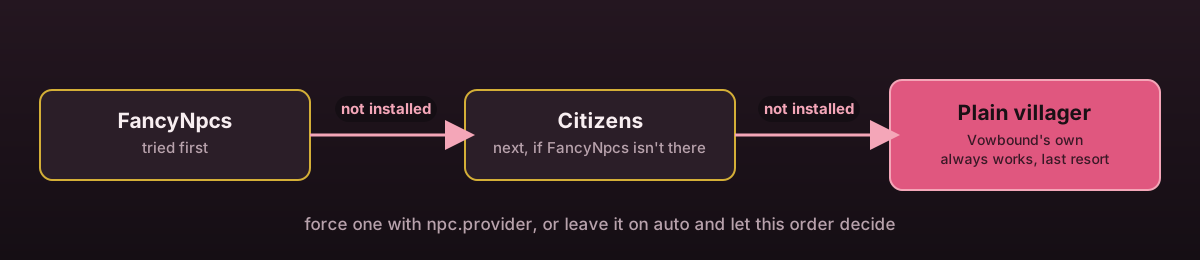
FancyNpcs
Used if the FancyNpcs plugin is installed.
Citizens (free build)
Used if FancyNpcs is not installed but Citizens is.
Built in
A plain villager, spawned by Vowbound itself, used if neither is installed. The plugin works fully on this fallback, nothing is disabled.
npc:
  provider: auto
auto is the priority order above. Set fancynpcs, citizens or builtin to force
one regardless of what else is installed. Changing this and running
/marry admin reload removes every NPC from the old provider and places fresh ones
through the new provider.
Shared behaviour
Whichever provider is active, the Father:
- Stands at the church's father position, facing the set direction
- Carries the display name from
npc.name - Turns to look at nearby players where the provider supports it
- Cannot be damaged or pushed
- Is re-placed on enable, on reload, on
setfather, and by/marry admin npc respawn - Opens the ceremony menu and speaks a random greeting from
npc.greetingon right click, with a cooldown fromnpc.interact-cooldown-seconds
npc:
  name: '<#f4a6b8>Father'
  entity-type: VILLAGER
  villager-profession: CLERIC
  look-at-players: true
  interact-cooldown-seconds: 3
  greeting:
    - 'Welcome, child. Are you here to be wed?'
    - 'Love brought you here. Let us see it through.'
entity-type and villager-profession apply to the built in provider. FancyNpcs and
Citizens can also use PLAYER as the entity type, in which case a skin applies.
Skins
npc:
  fancynpcs:
    skin:
      type: NAME
      value: MHF_Villager
  citizens:
    skin:
      type: NAME
      value: MHF_Villager
type: NAME looks up a Mojang player name, the same on both providers. type: URL
takes a direct link to a skin PNG instead:
- FancyNpcs resolves a URL itself, no extra setup needed.
- Citizens does not, so a URL skin on the Citizens provider is uploaded through MineSkin's API, which needs an API key:
npc:
  mineskin-api-key: ''
Only required when a Citizens skin uses type: URL. Get a key from
mineskin.org. Uploaded textures are cached by URL so the same
image is never re-uploaded on every reload, and a failed upload falls back to the
built in entity type for that church rather than leaving the Father missing.
Checking which one is active
/marry admin church info <id> and /marry admin npc respawn both report the active
provider. %vowbound_church% and the other placeholders work
the same regardless of which provider placed the NPC.