
Churches
Setting up a church region, altar, entrance and seats, all from where you are standing.
A church is admin content, built up with commands rather than edited as a file, and stored separately from everything else so an update never touches it.
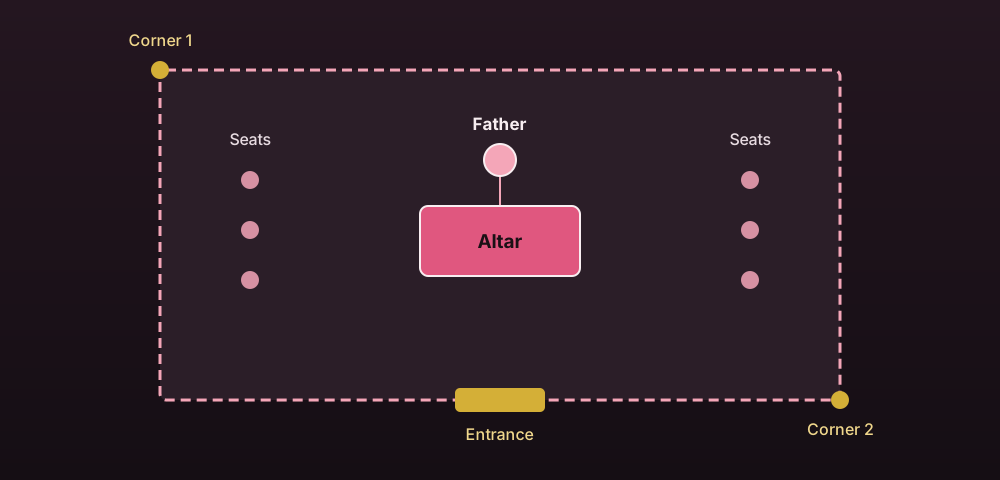
Setting one up
Create it
/marry admin church create <id>Set the region
Stand at each corner and run /marry admin church setcorner <id> 1 and
setcorner <id> 2. The region is the cuboid between them, and both corners must be in
the same world.
Set the altar
/marry admin church setaltar <id> from where you want the couple to stand, using your
position and the direction you're facing.
Set the Father's position
/marry admin church setfather <id>. This is where the NPC
appears, re-placed immediately if the church is otherwise ready.
Set the entrance
/marry admin church setentrance <id>, where the couple and guests arrive.
A church is ready once all five of those are set. Seats and music are optional on top of that.
Seats
/marry admin church addseat <id>
/marry admin church removeseat <id> <n>
/marry admin church seats <id>
Each seat is a stored location. seats.max-guests in config.yml caps how many are
usable at once, even if a church has more physical seats defined than that. See
Married life for how a guest actually takes a seat during a
ceremony.
Music
/marry admin church music <id> procession <sound>
/marry admin church music <id> pronouncement <sound>
/marry admin church music <id> procession none
Overrides the sound played for that one phase at that one church, none clears the
override back to the default in config.yml. Only the sound itself is overridden, the
pitch, volume and category still come from config.yml.
Checking status
/marry admin church list
/marry admin church info <id>
list shows every church with its status: setup incomplete, ready, or busy with a
ceremony. info shows the full detail for one, including which NPC provider is active.
Deleting one
/marry admin church delete <id>
/marry admin church delete <id> confirm
The first run asks for confirmation, the second actually deletes it and removes its NPC.
Where players see churches
/marry churches lists every ready church with its status, and clicking a ready one
teleports there if churches.public-teleport is on. Busy churches show that a ceremony
is running instead of a teleport option.