
Installation
Requirements, the install steps, what the first run writes to disk and what the plugin folder looks like afterwards.
Installing Vowbound takes a couple of minutes. The one thing you have to get right is having eco installed first.
Requirements
| Server software | Spigot or a fork |
| Minimum version | 1.21.4 |
| Java | 21 |
| eco | Required |
| FancyNpcs | Optional, one of the three ways to show the Father |
| Citizens (free build) | Optional, one of the three ways to show the Father |
| PlaceholderAPI | Optional |
| Vault | Optional, for an economy marriage or divorce fee |
Vowbound will not start without eco already installed and enabled first.
Why eco
Vowbound stores nothing of its own. Marriage status, partners, shared homes, settings and statistics all go through eco's own persistent data layer, which already speaks Yaml, MySQL or MongoDB depending on how the server owner has eco set up. Config updating, the menu system and item lookups also come from eco rather than being built again from scratch.
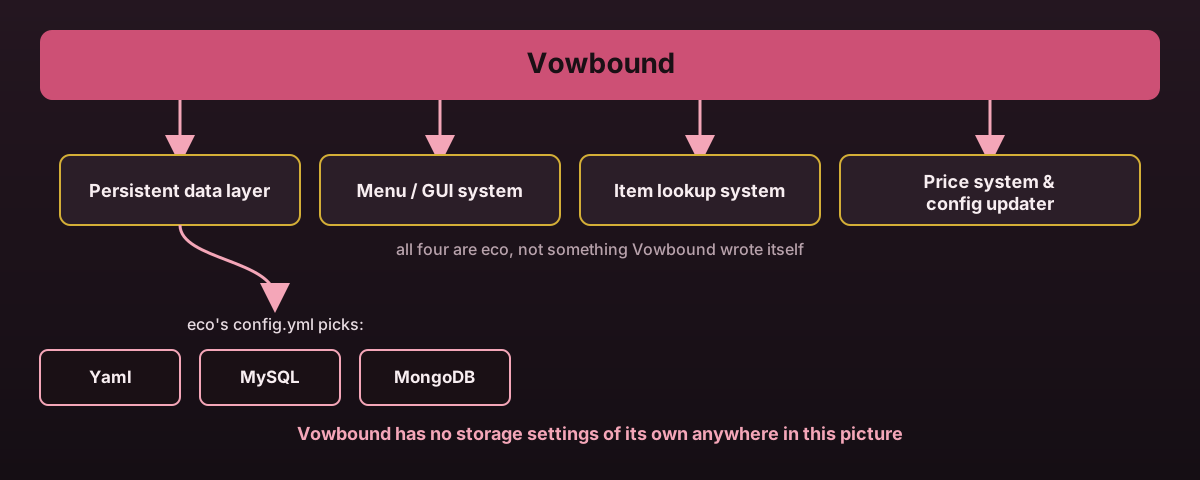
Database settings live in eco's config.yml, not Vowbound's. See
Storage for the exact keys.
Install
Get eco
Vowbound needs it enabled before it will start. Get it from its SpigotMC page if you do not already run it.
Stop the server
Shut it down fully before adding the jar.
Drop in the jar
Move the Vowbound jar into your plugins/ folder, alongside eco.
Start the server
Vowbound checks for eco before anything else. A missing or too old eco logs a clear line rather than throwing halfway through startup.
Set up a church
Run /marry admin church create <id>, then walk to your altar spot, your entrance, and
each corner of the region and set them. See Churches for every step.
First run
The first start writes config.yml, menus.yml, lang.yml and the three shipped
language files under lang/: en_US.yml, fr_FR.yml and es_ES.yml. churches.yml is
also created, empty apart from a version marker, since churches are admin content you
build up with commands rather than something shipped with an example.
There is nothing to set up for storage. Vowbound reads and writes through whichever backend eco itself is configured to use.
Plugin folder
| Path | What it holds | Page |
|---|---|---|
config.yml | Proposals, fees, ceremony, vows, NPCs, anniversaries and every other global setting | Configuration |
lang.yml | The three keys eco itself needs, prefix, no-permission and not-player | Messages & language |
lang/*.yml | Every message Vowbound sends, English always kept as the fallback | Messages & language |
menus.yml | The main, church list, ceremony and admin menus | Menus |
churches.yml | Every church you have set up, never touched by the config updater | Churches |
Upgrading
Stop the server, replace the jar, start it again. Every config file goes through eco's
own updater, so new keys arrive with their comments and the values you already set are
kept exactly as you left them. churches.yml is explicitly excluded from that diffing,
so your churches are never at risk from an update.
Reloading without a restart
/marry admin reload reloads config.yml, menus.yml, the active language file and
churches.yml, and re-places every NPC in case npc.provider changed. It needs
vowbound.admin.reload.
Optional integrations
| What | Why | Where |
|---|---|---|
| FancyNpcs | Shows the Father, tried before Citizens | NPC providers |
| Citizens (free build) | Shows the Father if FancyNpcs isn't installed | NPC providers |
| PlaceholderAPI | Lets other plugins show Vowbound info | Placeholders |
| Vault | Lets the marriage and divorce fee use real money instead of XP | Configuration |