
Scoring rules
The checks every action passes before it counts, why a score can sit on zero, and how the console explains each case.
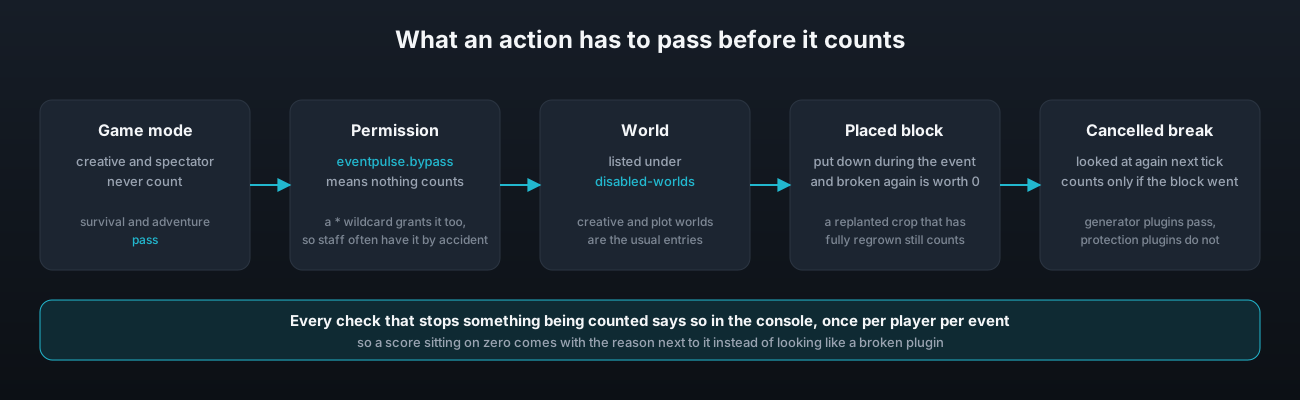
An action scores only when the player, the world and the block all pass the same short list of checks. They are the same for every event type, and each one that blocks something says so in the console, once per player per event, so a score sitting on zero always comes with its reason.
The player
Creative and spectator mode never count. Survival and adventure do.
The bypass permission, eventpulse.bypass, means nothing that player does is counted. It is meant for staff who are building in creative or testing things. It is off by default, but a permissions plugin that grants * or eventpulse.* grants it too, so an admin with a wildcard counts nothing at all. That is the single most common reason behind "nothing is being counted", and the console line says so in as many words. See Permissions.
The world
A world listed under disabled-worlds in config.yml counts nothing. The shipped file lists creative_world and plots as examples. Names are matched without regard to case.
disabled-worlds:
  - creative_world
  - plots
Placed blocks
A block put down during the event is remembered, and breaking it again is worth nothing. That is what stops the same piece of stone being placed and broken all day. On a shared island it also covers blocks another member placed, because otherwise one player could place for another.
The one exception is a crop. A crop replanted during the event that has fully regrown by the time it is broken counts again, because the growing time is the whole point of the placed block rule and the crop has served it. Bamboo is left out of the exception because it can be placed already at full height.
The list of placed blocks is cleared when the event ends and has a cap. If a very busy event fills it, the console says so once, and the only effect is that later placed blocks are not remembered.
Cancelled breaks
Some plugins cancel a block break and then remove the block themselves. Generator, prison and custom drop plugins mostly work that way. Others cancel the break and leave the block standing, which is what a protection plugin such as WorldGuard does. EventPulse tells the two apart by looking at the block again on the next tick and counting it only if it really went. A protected block that stayed in place is worth nothing, which is the right answer, and a generator block that vanished is counted, which is also the right answer.
Combat
Damage is counted after armour and resistance, and anything past the mob's remaining health is trimmed, so a killing blow is worth what was left and not the full swing. Arrows, thrown potions and tamed pets count towards their owner. Players, villagers, armour stands and pets never count as targets. An event can also skip mobs that came out of a spawner. See the combat section of Event types.
Ties
Two players on the same score are ranked by who reached that score first. The same rule applies between islands in a team event.
Reading the console
While an event is running, each of the checks above prints one line the first time it stops a player, naming the player and the reason. Between events nothing is printed, so a staff member in creative does not fill the log all day. A typical line reads:
[EventPulse] Nothing Steve does is being counted because they have the eventpulse.bypass permission. A permission plugin that gives them * or eventpulse.* gives them this one as well, so take it away if they are meant to compete.If a score is sitting on zero and there is no such line, the action is not one the running event counts. Check the event's type and targets in Events file.