
Scoreboard
The board shown down the right for the whole event, how it sits on top of another scoreboard plugin, and every key in scoreboard.yml.
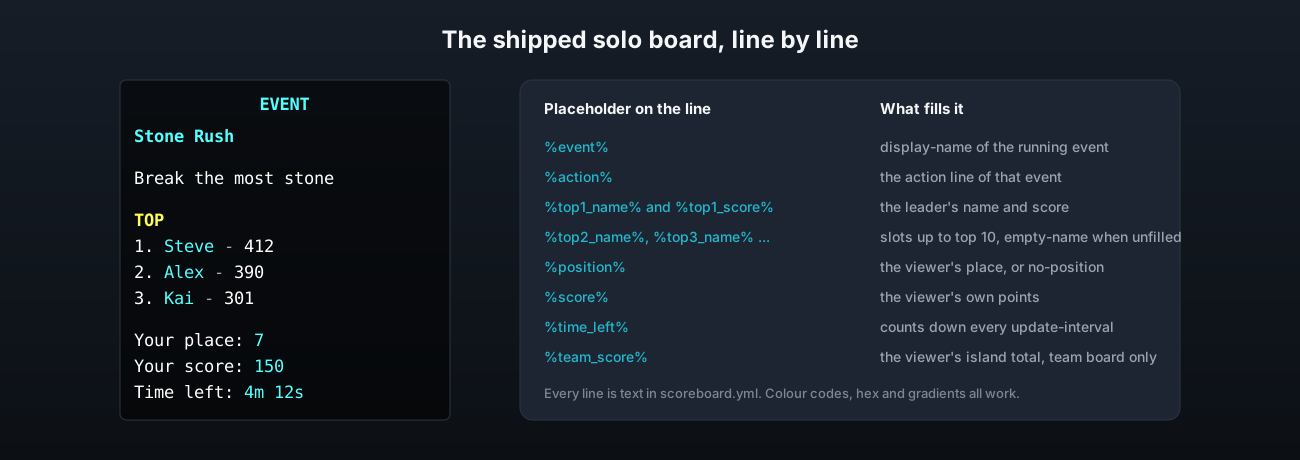
While an event runs, every player sees a board down the right hand side with the event name, what to do, the top three, their own place and score, and the time left. It goes on top of whatever board the player already had and that board is given back when the event ends.
scoreboard.yml
enabled: true
default-on: true
update-interval: 20
reapply-interval: 20
hide-numbers: true
title: "&b&lEVENT"| Key | What it does | Default |
|---|---|---|
enabled | Turn the board off altogether. | true |
default-on | Whether a player who has never used /event toggle sees it. | true |
update-interval | How often the lines refresh, in ticks. 20 is one second. | 20 |
reapply-interval | How often the plugin checks that another plugin has not replaced the board, in ticks. | 20 |
hide-numbers | Hide the red numbers down the right hand side. Paper only, see below. | true |
title | The line at the top. | &b&lEVENT |
lines | The solo board, top to bottom. An empty string is a blank line. | see the file |
team-lines | The board used during a team event. | see the file |
empty-name | Shown in a top slot nobody has reached yet. | &7Nobody |
empty-score | The score shown next to it. | &7- |
no-position | Shown as the place for a player who has not scored yet. | &7Not ranked |
Every line is plain text with colour codes. Legacy & codes, hex colours, gradients and the named colour palette all work in any line. See Messages & language for the colour formats.
Placeholders on a line
These work on a board line without PlaceholderAPI installed.
| Placeholder | What it shows |
|---|---|
%event% | The event's display-name |
%action% | The event's action line |
%top1_name% to %top10_name% | The name in that slot, or empty-name |
%top1_score% to %top10_score% | The score in that slot, or empty-score |
%position% | The viewer's place, or no-position |
%score% | The viewer's own points |
%team_score% | The viewer's island total, during a team event |
%time_left% | Time until the event ends |
In a team event the top slots hold island names and %position% is the island's place.
Toggling it
/event toggle turns the board off or on for that player. The choice is saved in the database, so it survives a rejoin and a restart. A player who joins in the middle of an event gets the board straight away if they want it, and can still score from zero.
Sitting on top of another scoreboard plugin
The board is put on top of whatever scoreboard the player had, and the old one is put back at the end. If the old one has gone by then, the player gets the server's main scoreboard. A task runs every reapply-interval ticks and puts the event board back if another plugin has replaced it in the meantime. If another scoreboard plugin keeps taking over, lower that number.
The ranking is worked out once per refresh and shared by every viewer, and lines are edited in place rather than rebuilt, so the board does not flicker and a full server costs no more than an empty one.
The red numbers
Minecraft draws a score next to every line of a sidebar. Hiding those needs a feature that only Paper puts on its API, so hide-numbers works on Paper and on any server built on Paper. On plain Spigot the numbers stay, the plugin says so once in the console at startup, and nothing else is affected.
Line length
A board line cannot be longer than 64 characters including colour codes. Anything longer is cut at 64 rather than failing, so if the end of a line is missing, that is why.