
Scheduling
How the plugin decides when the next event starts and which one it picks, and how to stop the same event coming round twice.
Left alone, EventPulse starts an event on its own every so often. The wait, the conditions and the pick are all under scheduler and anti-repeat in config.yml, and an event can always be started by hand instead. See Commands.
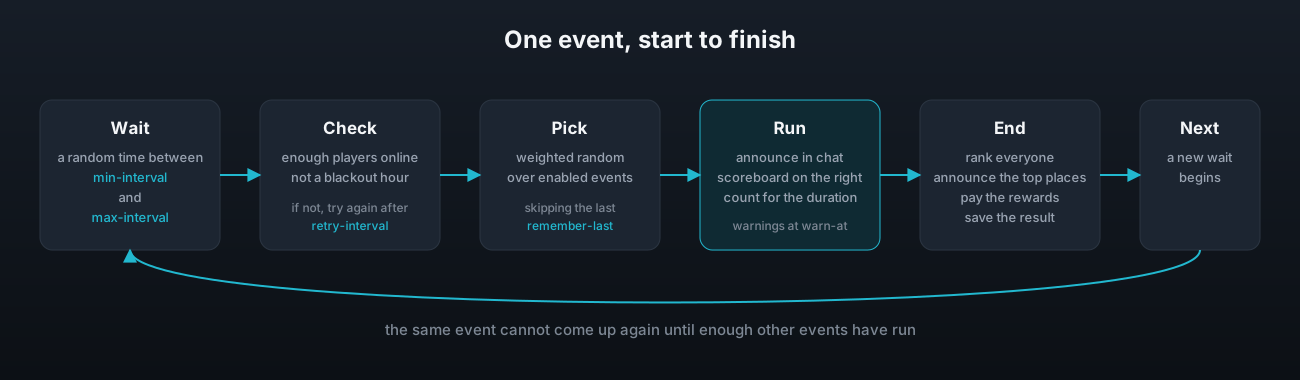
The wait
scheduler:
  enabled: true
  min-interval: 45m
  max-interval: 90m
  first-delay: 10m
  min-online-players: 5
  retry-interval: 5m
  blackout-hours:
- "23:00-07:00"| Key | What it does | Default |
|---|---|---|
enabled | Turn this off and events only ever start by command. | true |
min-interval | The shortest wait between the end of one event and the start of the next. | 45m |
max-interval | The longest wait. The real wait is a random point between the two. | 90m |
first-delay | The wait after the server starts before the first event can begin. | 10m |
min-online-players | An event will not start with fewer players than this online. | 5 |
retry-interval | How long to wait before checking again when a start was blocked. | 5m |
blackout-hours | Times of day, on the server clock, when no event may start. | 23:00-07:00 |
Durations are written as 15m, 30s, 1h or 1h30m. A duration the plugin cannot read falls back to the default with a console warning that says how to write it. If max-interval is shorter than min-interval, the shorter one is used for both and the console says so.
A blackout window may run past midnight, and there can be as many as you like. An event that is already running when a window begins is not cut short, the window only stops new ones starting.
The checks
When the wait is over the plugin checks that enough players are online and that the clock is not inside a blackout window. If either check fails it waits retry-interval and tries again, and keeps doing that until both pass. /event next shows the time until the next attempt.
The pick
Every event that is enabled in events.yml is a candidate, and each one is picked in proportion to its weight. A weight is a share of the total, not a percentage. The shipped file adds up to 54, so an event with a weight of 10 comes up about 18 times in 100 and one with a weight of 4 about 7 times in 100.
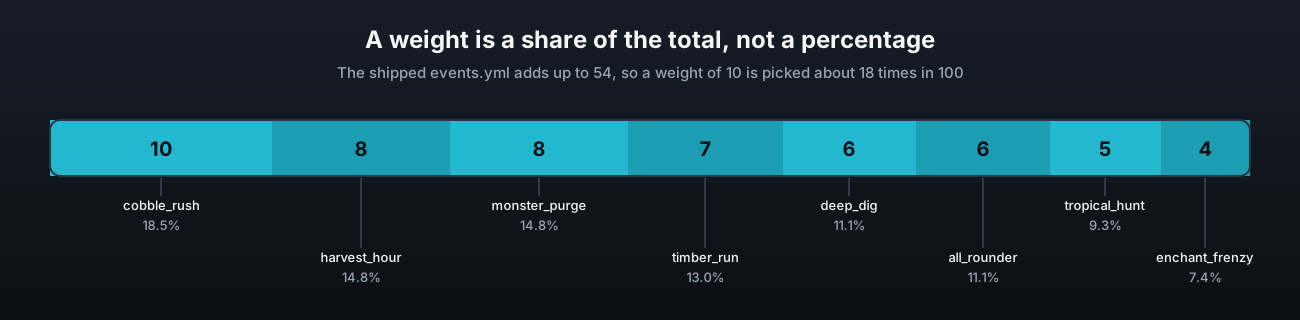
Set every weight the same and every event is equally likely. Set one to 1 and the rest to 10 and it becomes rare without being switched off.
No repeats
anti-repeat:
  remember-last: 3
The plugin remembers the last few events that ran and will not pick any of them again. With the default of 3, the same event cannot come up again until three other events have run. The list is stored in the database, so a restart does not wipe it.
If every enabled event is in the recent list, which happens when you have fewer events than remember-last, the oldest entries are dropped until something can run. Set remember-last to 0 to allow any event at any time.
Warnings before the end
event-defaults:
  warn-at:
    - 5m
    - 1m
    - 10s
At each of these times before the end, everyone with the notify permission gets the event.warn message and the warn sound. Add or remove entries freely.
Starting by hand
/event start <id> starts an event now, ignoring the wait, the player count and the blackout hours. /event skip drops the current wait and starts a fresh random pick straight away, still subject to the checks. Both need the admin permission. See Commands.