
Messages & language
Editing every message the plugin sends, switching between the shipped languages, adding a translation of your own, and the colour formats that work everywhere.
Every message the plugin sends lives in one file per language under lang/. English, French and Spanish ship inside the jar and are all written to the folder on every start, so you can see what is on offer and edit any of them without switching first.
Choosing a language
language: enconfig.yml names the file to read. en, es and fr are the shipped ones. To add your own, copy lang/en.yml to lang/de.yml, translate it, and set language: de.
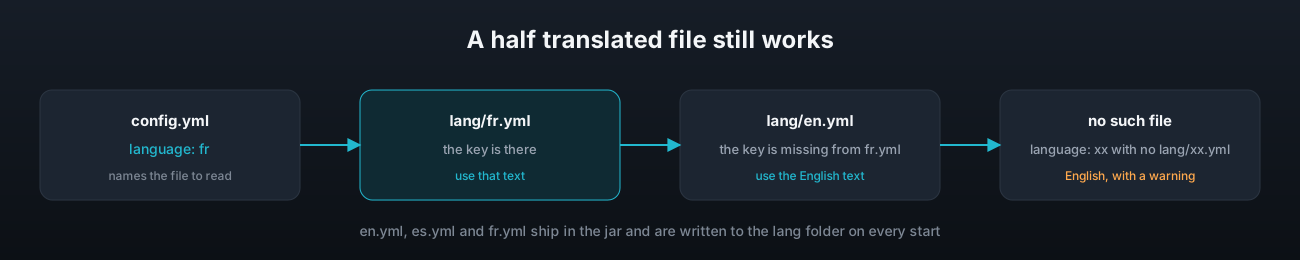
A key missing from the chosen file falls back to the English text, so a half finished translation still works and a message you delete comes back in English rather than as a blank line. A language with no file at all falls back to English entirely, with a console warning naming the file it looked for.
Editing messages
Open the file and change the text. Every message keeps the placeholders that make sense for it, and the header of the file lists them all. A message written as a list is sent as several lines, which is how the start and end broadcasts are laid out.
prefix: "&b&lEventPulse &8» &r"

event:
  start:
    - ""
    - "&b&lNEW EVENT &f%event%"
    - "&f%action%"
    - "&7You have &f%duration% &7to win."
    - ""
  warn: "&7The event ends in &f%time_left%&7."
place-line: "&f%position%. &b%name% &7- &f%score%"| Section | What is in it |
|---|---|
prefix | Put in front of command replies and player messages |
event | The start, warning and end broadcasts, the line per place, the not enough players message, the island gone name |
command | Every reply a command can give |
player | Messages sent to one player, such as the reward waiting notice |
stats and top | The output of those two commands |
word | Short words used inside other messages |
event.end is the end broadcast when somebody scored and %places% inside it expands to one place-line per place. event.end-empty is used instead when nobody scored, so a heading such as TOP 3 is never left standing over an empty list.
Placeholders in messages
These work inside any message where they make sense, without PlaceholderAPI.
%event% %action% %duration% %time% %time_left% %places% %position% %name% %score%
%player% %island% %wins% %participations% %farmpoints% %id% %type% %status%
%count% %needed%
Colours
Every string that reaches a player goes through the same colour engine, so all of these work in any message, board line, event name or reward message:
| Format | Example |
|---|---|
| Legacy codes | &b, &l, &r |
| Hex | B8CF or #{22B8CF} |
| Gradient | <GRADIENT:22B8CF>text</GRADIENT:FFD43B> |
| Rainbow | <RAINBOW1>text</RAINBOW>, the number is an id so several can share one line |
| Named palette | &t7 for coral, &q1 for violet, and over a hundred more short codes |
Format codes such as &l carry through inside a gradient or rainbow, and &r resets them.
Keep the contrast up. Dark grey text on the scoreboard is hard to read on most worlds.
Keeping the files up to date
The three shipped files carry a config-version key. On an upgrade, any message added since your version is written in with its comment, the wording you changed is kept, and a message the plugin no longer uses is taken out. A file of your own, such as de.yml, is never touched, so a message added in a later release falls back to English there until you add it. The changelog names every message key a release adds.
Reload
/event reload rereads the language files. A change of language in config.yml takes effect on the same reload.