 NovaFFA
Kits
Building a kit, giving it contents and an icon, and linking it to an arena
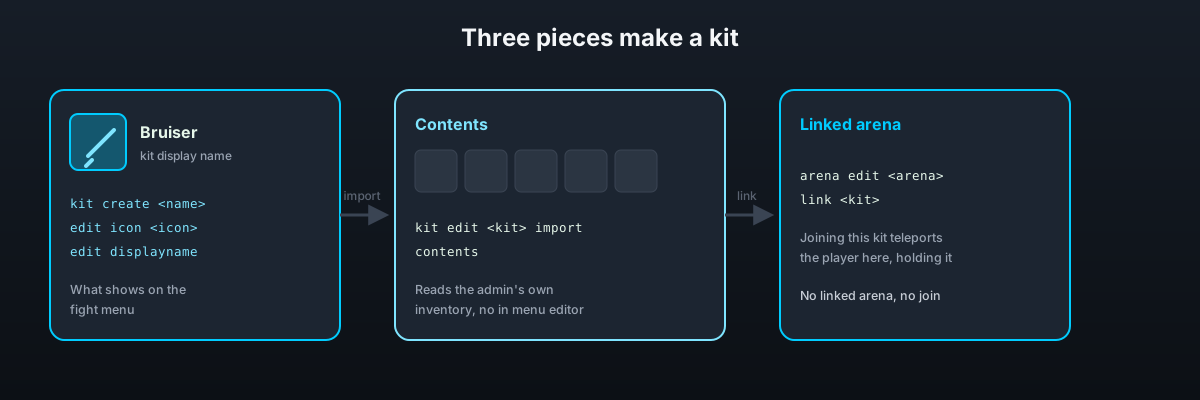
A kit is what a player fights with. It has a display name, a menu icon, a set of contents, and one linked arena. Joining a kit from the fight menu teleports the player into that arena holding that kit.
Creating a kit
/ffa kit create <name>The name is the kit's identifier everywhere else, arena links, commands, placeholders. When an admin runs this in game, NovaFFA immediately captures their full current inventory, including armour and off-hand, as the kit's default contents. A kit created from the console starts empty.
To replace the contents later:
/ffa kit edit <kit> inventory importThis updates the kit with whatever the admin is currently holding in their inventory and resets every player's saved layout for that kit. There is no in-menu item editor beyond that, build the loadout in your own inventory first, then import it.
An import from an empty inventory is turned down rather than carried out, since it would leave the kit with nothing to hand out. A kit created with nothing to capture, from the console or by an admin standing there empty handed, says so in the same breath as it says the kit was made, and names the import command to fill it.
Icon and display name
/ffa kit edit <kit> displayname <text>
/ffa kit edit <kit> icon <icon>
/ffa kit edit <kit> icon hand
The display name is what shows on the fight menu button. The icon is the item that represents the kit there, written the same way any menu item material is. A material name cannot say which potion a potion holds, so icon splash_potion shows an uncraftable potion. For a potion, a dyed item or anything else that needs more than its material, hold the item and run icon hand, which saves the whole item as the icon.
Where a kit sits in the menu
By default kits fill the fight menu in the order they were made, so making a new one moves every kit after it along a square. Pin a kit to hold it in one place:
/ffa kit edit <kit> slot <square>
/ffa kit edit <kit> slot auto
Squares are counted from 0 in the top left of the menu, and the square has to be one the fight menu actually draws kits into, between kit_button.start and kit_button.end and not already taken by the border or the toolbar. Anything else is turned down with a message rather than silently doing nothing. Tab completion lists the squares that are free.
auto unpins the kit again. /ffa kit info <kit> shows which square it is on.
The same job in game, without counting squares:
/ffa kit slotsClick a kit to pick it up, click a square to put it there, right click a kit to unpin it. Dropping a kit onto another swaps the two. Changes are saved as they are made. See Fight Menu.
A pinned kit is on its square on every page of the menu, not only the first one.
Linking an arena
A kit does nothing until it is linked to an arena:
/ffa arena edit <arena> link <kit>The link lives on the arena, not the kit, see Arenas and Regeneration. Joining a kit before it has a linked arena fails, there is nowhere to send the player.
In one arena mode links are ignored and every kit goes to the one arena, so no kit needs linking there.
Selling a kit
/ffa kit edit <kit> price <amount> puts a price on a kit. With Vault and an economy plugin installed the kit is locked until a player buys it, and 0 makes it free again. See Kit Prices and Rewards.
Giving a kit directly
/ffa kit give <kit>
/ffa kit give <kit> to <player>
Hands over the kit's contents without teleporting anyone, useful for testing a loadout or handing it out for a reason outside a normal fight.
Deleting a kit
/ffa kit delete <kit>This does not touch arenas linked to it, the arena is left with a link pointing at a kit that no longer exists until you link something else.
Inspecting a kit
/ffa kit info <kit>A kit literally named kit, arena, help, leave, lobby, stats or editkits cannot be joined by typing /ffa <that name>, the command literal wins over the kit name argument. It still works from the fight menu. Avoid those names if players are expected to type the join command directly.
Player layouts
Every player who touches a kit gets their own arrangement of it, see Kit Layout Editor. To wipe every player's saved layout for a kit and fall back to the kit's own default arrangement:
/ffa kit layouts <kit> delete all