 NovaFFA
Kit Layout Editor
Letting players rearrange their own copy of a kit
A kit's contents are set once by an admin, but every player who fights with it gets to rearrange their own copy. Nobody has to sort their inventory mid fight to get their sword back in the hotbar.
Opening it
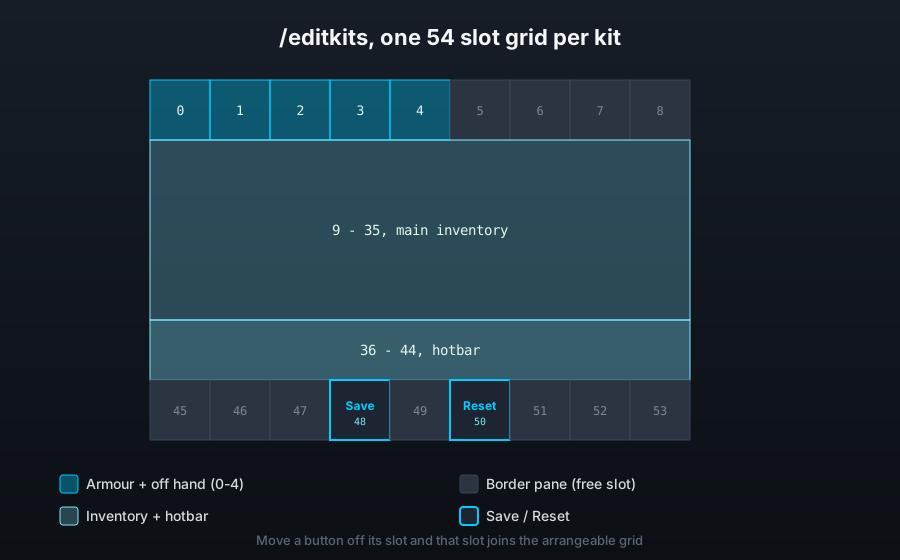
/editkitsAliased /kiteditor, /kitlayouts and /layouts. This opens kit_list.yml, a list of every kit the player can rearrange. Picking one opens kit_editor.yml, the 54 slot grid shown above.
How the grid maps to an inventory
The grid is shaped like a player inventory:
| Slots | What they hold |
|---|---|
| 0 to 4 | Armour and off hand |
| 9 to 35 | Main inventory |
| 36 to 44 | Hotbar |
Every other slot is free for a button, the shipped layout uses them for decorative border panes plus Save (slot 48) and Reset (slot 50). Moving a button off its slot turns that slot into part of the arrangeable grid, so keep custom buttons on rows outside the shape above if you add any.
Saving and resetting
Save closes the editor and keeps whatever was laid out. The layout is written either way, closing the menu any other way keeps it too, Save is just the tidy way out.
Reset throws away the player's arrangement and puts the kit back to the default layout the admin built it with. This cannot be undone.
Where a layout is stored
One file per player, plugins/NovaFFA/layouts/<uuid>.yml, with one section per kit that player has touched. A player who never opens the editor for a kit is simply handed that kit's default arrangement.
API
KitEditorListEvent fires once per kit as the list menu is built, hiding it leaves that kit off the list for that player. See Developer API.