
Display modes
The three ways NationCrest can draw a country, and which of them need a resource pack.
Why flag emojis do not work
A flag emoji is not one character. It is a pair of regional indicator characters that a font is expected to join into a flag. Those characters sit above U+FFFF, outside the vanilla Minecraft font's glyph coverage, and the vanilla font does no joining. What you get is missing character boxes.
This is not something a plugin can fix. It is the client font. NationCrest is built around that fact rather than pretending otherwise.
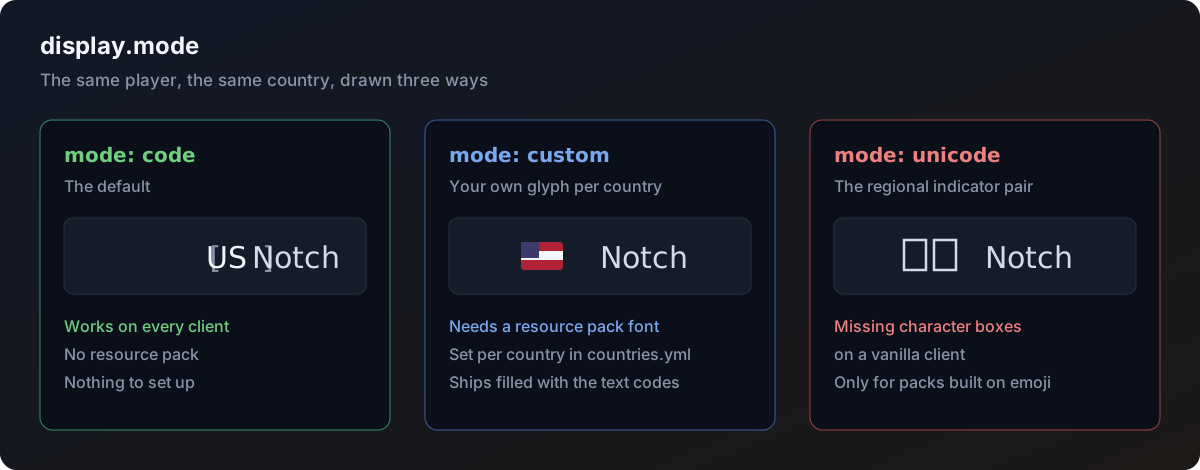
The three modes
Set with display.mode in config.yml.
| Mode | Output | Needs a resource pack |
|---|---|---|
code | US | No |
custom | Whatever you put in countries.yml | Yes, a flag font |
unicode | The regional indicator pair | Yes, a font covering regional indicators |
code
The default, and the only one that works everywhere. Outputs the two letter country code.
display:
  mode: code
There is nothing to set up and nothing for players to download. If you are not running a resource pack, this is your mode.
custom
Outputs the custom value set for each country in countries.yml. This is the mode for servers running a resource pack with a flag font, where you map each country to whichever character your pack uses.
display:
  mode: custom
It ships with the text codes already filled in, so switching to it without a pack still reads sensibly rather than breaking. Replace them one by one as you build your pack.
unicode
Outputs the regional indicator pair, which is what a flag emoji is made of.
display:
  mode: unicode
This shows missing character boxes on a vanilla client. It needs a resource pack font that covers regional indicators. Only use it if your pack is built around the standard emoji code points.
Formatting around the flag
display:
  format: '&7[{flag}&7]'
  default-colour: '&f'
  fallback: '&7??'
{flag} is the country as drawn by whichever mode you picked. Everything around it is yours.
default-colour is applied to the flag for any country that does not set a colour of its own in countries.yml.
fallback is what comes out when the country is not known or the player has hidden their flag. It is never empty, so a tab list format never collapses into a gap.
Colour syntax
All formatting in this plugin uses Prism syntax.
| Format | Example |
|---|---|
| Legacy codes | &aGreen &lBold |
| Hex | &#FF8800, #{FF8800}, <SOLID:FF8800> |
| Gradient | <GRADIENT:FF0000>text</GRADIENT:0000FF> |
| Rainbow | <RAINBOW>text</RAINBOW> |
| Named palette | &t7, &q1, 125 colours in total |
MiniMessage tags are not supported.
Placeholders inside NationCrest's own config and messages use curly brackets, {flag} and {player}, not angle brackets. Angle brackets belong to Prism's own tags and the two would get confused.
Per country colour
Any country can carry its own colour, which wins over default-colour:
countries:
  IN:
    name: 'India'
    code: IN
    custom: IN
    colour: '&6'
See Countries.