
Country detection
The two lookup providers, when the lookup runs, caching, and what happens behind a proxy.
When the lookup runs
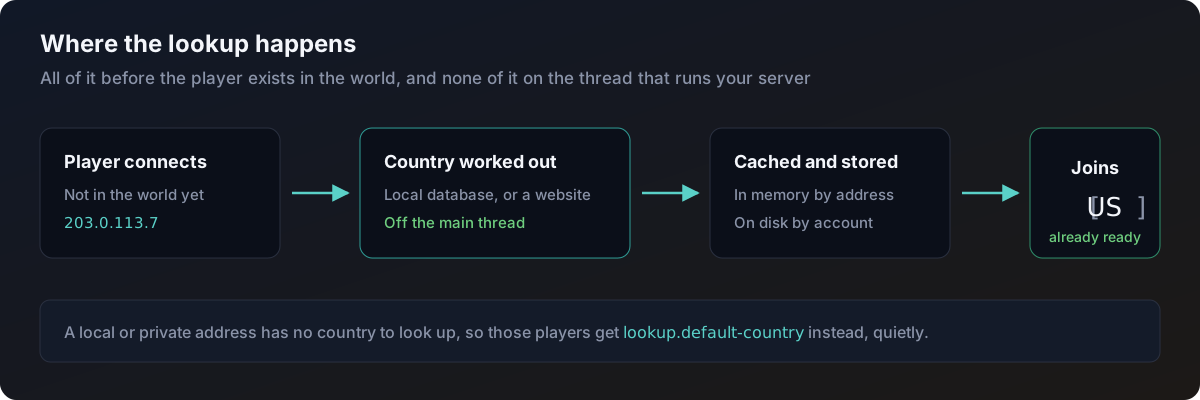
NationCrest works the country out while the player is still connecting, before they exist in the world. By the time they actually join, the answer is already known.
That means no scheduled task, no waiting, and nothing on the thread that runs your server. A join costs the same whether NationCrest is installed or not.
The two providers
maxmind
Reads a country database file kept on your own server. Fast, no rate limits, no internet needed while players are joining. Needs you to supply the file.
http
Asks a website for the country. Nothing to download, but slower and subject to that service's limits.
Set which one you want with provider in config.yml.
| Value | What it does |
|---|---|
auto | Use maxmind if a usable database is present, otherwise http. This is the default |
maxmind | Only the local database. If it is missing, players get the default country |
http | Only the website |
maxmind
This is the one to use if you can. See Installation for the three ways to get the database onto your server.
maxmind:
  licence-key: ''
  account-id: 0
  database-file: GeoLite2-Country.mmdb
  auto-download: true
  refresh-days: 3
With a licence key and an account ID set, the plugin downloads the database on first start and checks for a newer one every refresh-days days. MaxMind publish updates twice a week. Set refresh-days to 0 to never refresh after the first download.
Without a licence key, the plugin looks for database-file in its own folder and uses it if it is there.
http
http:
  url: 'https://ipapi.co/{ip}/json/'
  field: country_code
  connect-timeout-ms: 3000
  read-timeout-ms: 5000
  failure-threshold: 5
  cooldown-seconds: 300
{ip} in the URL is replaced with the address being looked up. field is the path to the two letter country code inside the JSON that comes back, with dots for nested fields, for example data.country.code.
The default URL is free for low volume but rate limits. Read that service's terms before you rely on it, or point this at a service you have an arrangement with.
After failure-threshold failures in a row the provider stops calling out for cooldown-seconds, so a service that is down or has cut you off is not hammered further. Players still get the default country during that window, joins are never held up. The failure count resets once the cooldown ends.
Caching
Two layers, and you do not have to think about either.
In memory, by address. A player reconnecting again and again does not trigger a fresh lookup every time. Controlled by lookup.cache-ttl-seconds, which is 900 seconds by default.
On disk, by account. The resolved country is written to data.yml against the player's account, so it is remembered between restarts and is still available for players who are not online. See Storage.
Local addresses
A player connecting from your own machine, or from your LAN, has no country. There is nothing to look up.
Those players get lookup.default-country from config.yml, quietly, with no error in your log. Set that to '' to leave them with no country at all instead.
Behind a proxy
If you run BungeeCord or Velocity and IP forwarding is not configured, every player looks like they are connecting from the proxy. NationCrest will give every one of them the same country, or the default country. This is the single most common problem people hit with this plugin.
NationCrest spots it for you. When several different players arrive from the same private address, it logs one clear warning explaining what is likely wrong, once per start, not once per join.
The fix is in your proxy and server configuration, not in this plugin. NationCrest will not try to guess it or work around it.
/flag debug shows you the address the plugin actually saw. If that address is the same for every player, forwarding is the problem.
Turn the warning off with lookup.proxy-warning: false if you know what you are doing and do not want it.