
Spawn locations
Saving the places a piñata can appear, either an exact spot or a random point inside a box.
Every named entry under locations in config.yml is a place /pp summon <name> can use. Names are not case sensitive.
The quick way
Stand where you want it and run:
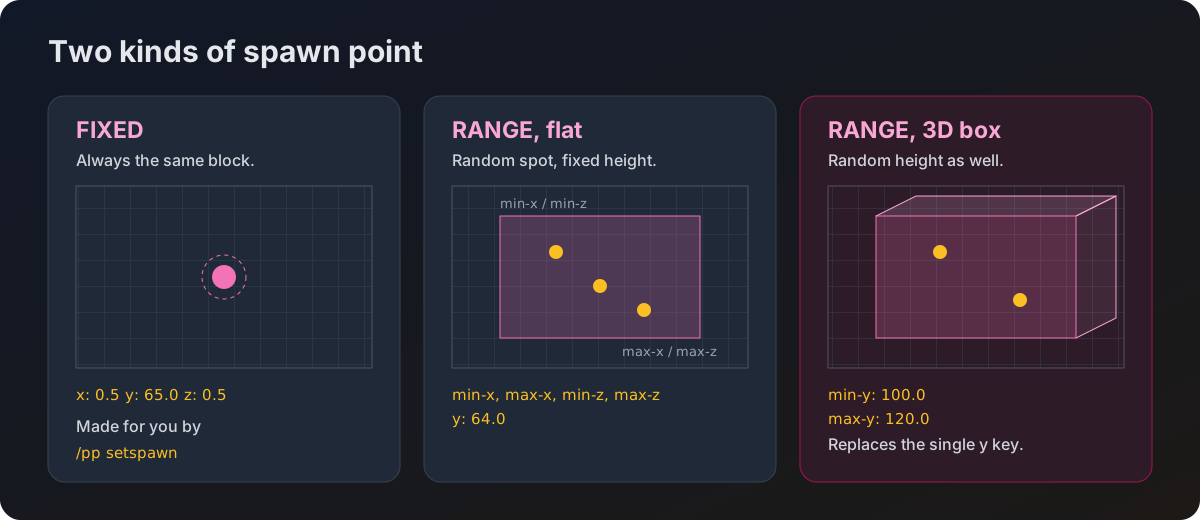
/pp setspawn arenaThat writes a FIXED entry named arena at your exact position, facing the way you are looking. You can then summon it with /pp summon arena.
Running /pp setspawn with a name that already exists overwrites it without asking.
FIXED
The piñata always appears on the same block.
locations:
  spawn1:
    type: FIXED
    world: "world"
    x: 0.5
    y: 65.0
    z: 0.5
    yaw: 0.0
pitch: 0.0| Key | What it is |
|---|---|
type | FIXED. Optional, since anything that is not RANGE is treated as fixed. |
world | The world name as your server knows it. |
x, y, z | Exact coordinates. |
yaw, pitch | Which way the piñata faces when it appears. |
RANGE with a fixed height
The piñata appears somewhere random inside a flat rectangle, always at the same height. Good for an arena floor where you want players to have to find it.
locations:
  arena_flat:
    type: RANGE
    world: "world"
    min-x: 100.0
    max-x: 150.0
    min-z: -50.0
    max-z: 50.0
    y: 64.0
RANGE with a random height too
Swap the single y for a pair and the height is randomised as well. Useful for flying mobs or an underwater arena.
locations:
  arena_sky:
    type: RANGE
    world: "world"
    min-x: 200.0
    max-x: 250.0
    min-z: 200.0
    max-z: 250.0
    min-y: 100.0
max-y: 120.0| Key | What it is |
|---|---|
min-x, max-x | The horizontal box, west to east. |
min-z, max-z | The horizontal box, north to south. |
y | One fixed height. Use this or the pair below, not both. |
min-y, max-y | A height range. If both are present they win over y. |
The order does not matter. Putting the larger number in min-x works fine, the plugin sorts them out. The facing is random every time.
Nothing checks that the spot is safe. A RANGE box over a ravine will drop the piñata into it, and a box inside solid stone will bury it. Pick a box you have actually looked at.
Editing by hand
You can add locations straight into config.yml and reload with /pp reload. If a world name does not match a loaded world, the location is skipped and a warning goes to the console.
Spawn points you add are kept when the plugin updates its config file, so an update never wipes your arenas.