
Languages and messages
Picking a language, editing the wording players see, and adding a translation of your own.
Every line the plugin says to a player lives in a language file. Four ship with the plugin, and you can add your own.
Picking one
language: en_US| Value | Language | File |
|---|---|---|
en_US | English | lang/en_US.yml |
fr_FR | French | lang/fr_FR.yml |
es_ES | Spanish | lang/es_ES.yml |
pt_BR | Brazilian Portuguese (translated by Zagreu) | lang/pt_BR.yml |
Plain names (english, french, spanish, portuguese) and bare codes (en, fr, es, pt) are understood too, so you do not have to remember the exact spelling.
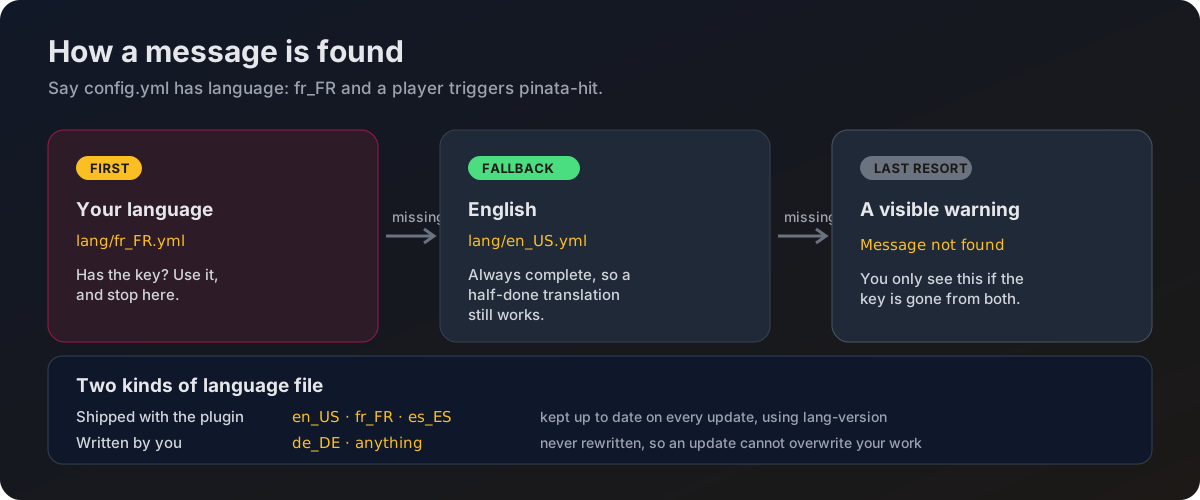
If the value does not match a file, the plugin logs a warning and uses English.
How a message is found
Editing the wording
Open the file for your language and change the text. Run /pp reload and the new wording is live, no restart needed.
pinata-hit: "%prefix% &aYou successfully hit the Pinata!"
pinata-hit-miss: "%prefix% &eYou missed the Pinata!"
Every value supports the full set of color options. See Colors and formatting.
Placeholders
%prefix% works in every message and pulls in the prefix value from the top of the file. The rest are per message.
| Placeholder | Where it works | Becomes |
|---|---|---|
%prefix% | Any message | The prefix line from the same file |
%location% | invalid-location, location-set, summon-success, pinata-spawned | The spawn point name |
%count%, %limit% | max-pinatas-reached | Piñatas running now, and the cap |
%time% | pinata-spawning.countdown | Seconds left on the countdown |
%player% | pinata-hit-broadcast | The player who hit |
%hits%, %total_hits% | pinata-hit-broadcast | Hits landed so far, and the total needed |
Every message
| Key | When it is shown |
|---|---|
prefix | Not a message on its own. Pulled in wherever %prefix% appears. |
no-permission | A player without pinataparty.admin runs /pp. |
reloaded | After /pp reload. |
unknown-command | A subcommand that does not exist, followed by the help text. |
invalid-location | /pp summon with a name that is not a saved spawn point. |
location-set | After /pp setspawn. |
pinata-not-active | /pp stop with no party running. |
pinata-spawn-failed | The configured mob type could not be spawned. |
pinata-stopped | Sent to whoever ran /pp stop. |
player-only | A console tries to run /pp summonhere or /pp setspawn. |
summon-success | Sent privately to whoever summoned the piñata. |
max-pinatas-reached | A summon is refused because pinata.limit is reached. |
help-message | A list, one entry per line. Shown by /pp and /pp help. |
| Key | When it is shown |
|---|---|
pinata-spawning.title | Big text on screen when the countdown starts. |
pinata-spawning.subtitle | Smaller text under it. |
pinata-spawning.countdown | Chat line on every second of the countdown. |
pinata-spawned | Broadcast when the piñata actually appears. |
pinata-despawned | Broadcast when /pp stop ends a party. |
| Key | When it is shown |
|---|---|
pinata-hit | To the player, on a hit that counts. |
pinata-hit-miss | To the player, when the hit chance roll fails. |
pinata-hit-cooldown | To the player, when they swing again too soon. |
pinata-hit-broadcast | Broadcast on every hit, but only when pinata.broadcast-hits is true in config.yml. |
| Key | When it is shown |
|---|---|
pinata-death.title | Big text on screen for everyone. |
pinata-death.subtitle | Smaller text under it. |
pinata-death.chat | Chat line for everyone. |
Adding your own language
Copy the English file
Copy lang/en_US.yml to lang/de_DE.yml, or whatever code suits.
Translate it
Change the text, leave the keys alone. Anything you do not translate falls back to the English wording, so a half-finished file still works and never shows a missing message.
Point the config at it
language: de_DEReload
/pp reload and you are done.
A language the plugin does not ship is treated as yours. The plugin never rewrites it, so an update cannot overwrite your translation. The trade-off is that new messages will not appear in it automatically, so check the English file after an update and copy across anything new.
Staying up to date
The three bundled files carry a lang-version at the top. When you update the plugin, new messages are added to your file and your own wording is kept, the same way config.yml is handled.
Do not edit lang-version by hand. The plugin uses it to work out what needs adding.
Coming from an older version
If you are upgrading from a version that used messages.yml, there is nothing to do. On the first start the plugin moves that file into lang/en_US.yml with all your wording intact, and leaves the old one behind as messages.yml.old in case you want it. You will see a line in the console saying so.