
Holograms
The floating text above the piñata, the six backends you can pick from, and what each one needs.
The hologram is the floating text above the piñata that counts down the hits left. It follows the piñata as it moves.
Turning it on and off
pinata:
  hologram:
    enabled: true
    height: 3
    provider: auto
    lines:
      - "&d&lPinata Party"
- "&fHits Left: &e%hits%"| Key | What it does |
|---|---|
enabled | Master switch. false means no hologram, whatever provider says. |
height | How many blocks above the piñata the text floats. |
provider | Which backend draws it. See below. |
lines | One list entry per line of text. |
%hits% in a line is replaced with the number of hits left. Color codes, hex colors and gradients all work, see Colors and formatting.
While a hologram is showing, the piñata's own name tag is hidden so the text is not doubled up. Turn the hologram off and the name tag comes back.
Picking a backend
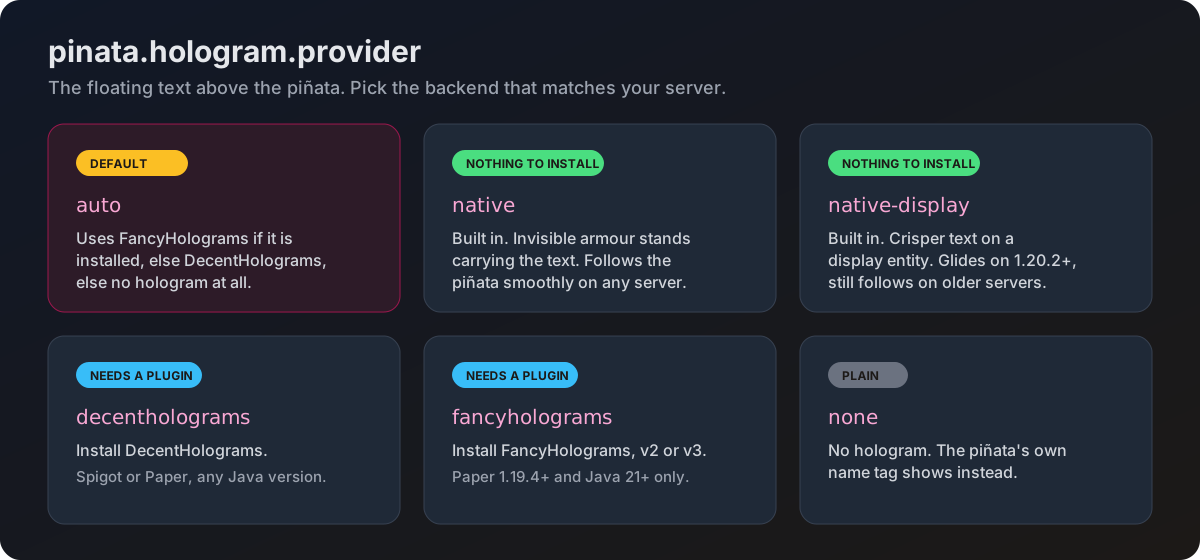
Uses FancyHolograms if that plugin is installed, otherwise DecentHolograms, otherwise no hologram at all.
auto never picks one of the built in backends. If you want those, name them.
Built into the plugin, nothing to install. Draws the text on invisible armour stands.
Works on any supported server and follows the piñata smoothly. This is the one to pick if you do not already run a hologram plugin.
Built into the plugin, nothing to install. Draws the text on a modern display entity, which looks crisper than armour stands.
On Minecraft 1.20.2 and newer the text glides between positions instead of stepping. On older versions it still follows, just without the glide.
Uses the DecentHolograms plugin, which you install separately.
Works on Spigot and Paper, on any Java version. A solid, stable choice if you already run it for other things.
Uses the FancyHolograms plugin, which you install separately. Version 2 and version 3 are both supported, and the plugin works out which one you have on its own.
Needs Paper and Java 21. On Java 17 the plugin refuses to load this backend and falls back to another one, on purpose, because loading it would crash.
The version 3 backend is experimental. It is built against an API that is still changing, so prefer DecentHolograms or one of the built in backends if you want something that will not surprise you.
No hologram, even if a hologram plugin is installed. The piñata's own name tag shows instead.
Which one should I use
- You do not run a hologram plugin, and want the nicest look:
native-display. - You do not run a hologram plugin, and want the safest option on an older server:
native. - You already run DecentHolograms:
decentholograms. - You already run FancyHolograms on Paper with Java 21:
fancyholograms.
Checking what it picked
The startup banner in your console prints the backend it chose on the line starting with Holograms:. If it says the no-op one, no backend was usable and you will see a warning just above explaining why.
Neither DecentHolograms nor FancyHolograms is required. If neither is installed and provider is left on auto, you get no hologram at all. Set provider to native or native-display instead.