
Colors and formatting
Every way to color text in AT-PinataParty, from plain codes to gradients, rainbows and the named palette.
Every piece of text the plugin shows goes through the same color engine. That means anything on this page works in your language file, in hologram lines, in the piñata's name, and in broadcast prefixes.
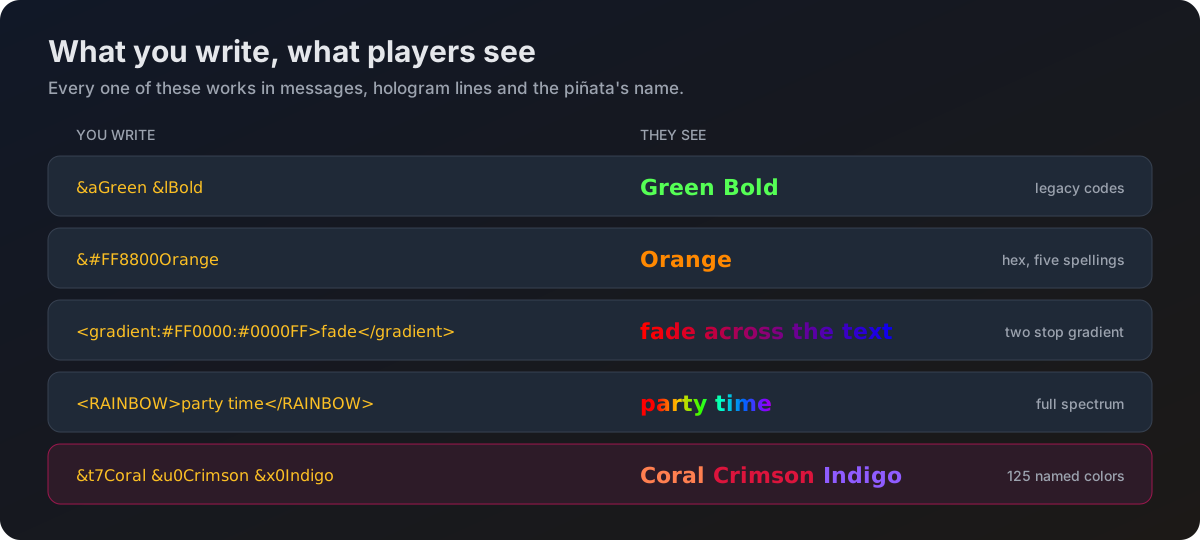
Quick reference
| Format | Example | What you get |
|---|---|---|
| Legacy codes | &aGreen &lBold | The classic Minecraft codes |
| Hex | &#FF8800Orange | One exact color |
| Hex, tag form | #{FF8800}Orange | The same, when a bare # is awkward |
| Hex, solid tag | <SOLID:FF8800>Orange | The same again |
| Hex, angle form | <#FF8800>Orange | The same again, for configs copied from elsewhere |
| Gradient | <gradient:#FF0000:#0000FF>fade</gradient> | A smooth fade between two colors |
| Gradient, second style | <GRADIENT:FF0000>fade</GRADIENT:0000FF> | Same result, colors split across both tags |
| Rainbow | <RAINBOW>party time</RAINBOW> | Every color of the spectrum across the text |
| Named palette | &t7Coral | One of 125 named colors |
Tags are not case sensitive, and the # in front of a hex value is optional everywhere. <gradient:#aaaaaa:#bbbbbb> and <GRADIENT:aaaaaa> are both fine.
Legacy codes
The codes you already know. An & followed by one character.
| Code | Color | Code | Color |
|---|---|---|---|
&0 | Black | &8 | Dark Gray |
&1 | Dark Blue | &9 | Blue |
&2 | Dark Green | &a | Green |
&3 | Dark Aqua | &b | Aqua |
&4 | Dark Red | &c | Red |
&5 | Dark Purple | &d | Light Purple |
&6 | Gold | &e | Yellow |
&7 | Gray | &f | White |
And the format codes:
| Code | Effect |
|---|---|
&l | Bold |
&o | Italic |
&n | Underline |
&m | Strikethrough |
&k | Obfuscated, the scrambling one |
&r | Reset everything back to normal |
Hex colors
Any color you like, written as six hex digits. Five spellings, all the same result:
pinata-hit: "&#FF8800You hit the Pinata!"
pinata-hit: "#FF8800You hit the Pinata!"
pinata-hit: "#{FF8800}You hit the Pinata!"
pinata-hit: "<SOLID:FF8800>You hit the Pinata!"
pinata-hit: "<#FF8800>You hit the Pinata!"
Pick whichever reads best to you. &#FF8800 and the bare #FF8800 are the oldest forms and still work everywhere they used to.
Gradients
A gradient fades between two colors across the text. There are two ways to write one, and they do the same thing.
Both colors live in the opening tag. This is the style used in the shipped files.
prefix: "<gradient:#005bff:#00fbff>&lPinata</gradient> &7»"Format codes inside a gradient carry through, so &l keeps the whole thing bold. A plain color code inside a gradient is ignored, because the gradient is deciding the color. &r clears the formatting from that point on.
Rainbow
pinata-death:
  title: "<RAINBOW>Pinata Party Over!</RAINBOW>"
The color walks the whole spectrum across the visible characters. Format codes behave the same as in a gradient.
Two rainbows on one line already work, and each one starts its spectrum over:
chat: "<RAINBOW>Winner</RAINBOW> &7- <RAINBOW>congratulations</RAINBOW>"A number on the opening tag, like <RAINBOW1>, is accepted and ignored. It exists so configs written for other plugins still render. You do not need it.
The named palette
125 colors with short codes, for when you want something specific without looking up a hex value.
summon-success: "%prefix% &t7A Pinata has been summoned at &u0%location%&t7."These use the same & prefix as legacy codes but are always a letter followed by a digit, like &t7. A code that is not in the list below is left alone, so &a1 still renders as green followed by the character 1.
| Code | Name | Hex |
|---|---|---|
&s0 | Absolute Zero | #0048BA |
&s1 | Acid Green | #B0BF1A |
&s2 | Aero | #7CB9E8 |
&s3 | Alice Blue | #F0F8FF |
&s4 | Antique White | #FAEBD7 |
&s5 | Amethyst | #9966CC |
&s6 | Aquamarine | #7FFFD4 |
&s7 | Azure | #F0FFFF |
&s8 | Beige | #F5F5DC |
&s9 | Bisque | #FFE4C4 |
&t0 | Blanched Almond | #FFEBCD |
&t1 | Blue Violet | #8A2BE2 |
&t2 | Brown | #A52A2A |
&t3 | Burlywood | #DEB887 |
&t4 | Cadet Blue | #5F9EA0 |
&t5 | Chartreuse | #7FFF00 |
&t6 | Chocolate | #D2691E |
&t7 | Coral | #FF7F50 |
&t8 | Cornflower Blue | #6495ED |
&t9 | Cornsilk | #FFF8DC |
&u0 | Crimson | #DC143C |
&u1 | Cyan | #00FFFF |
&u2 | Dark Cyan | #008B8B |
&u3 | Dark Goldenrod | #B8860B |
&u4 | Dark Khaki | #BDB76B |
&u5 | Dark Magenta | #8B008B |
&u6 | Dark Olive Green | #556B2F |
&u7 | Dark Orange | #FF8C00 |
&u8 | Dark Orchid | #9932CC |
&u9 | Dark Salmon | #E9967A |
&v0 | Dark Sea Green | #8FBC8F |
&v1 | Dark Slate Blue | #483D8B |
&v2 | Dark Slate Gray | #2F4F4F |
&v3 | Dark Turquoise | #00CED1 |
&v4 | Dark Violet | #9400D3 |
&v5 | Deep Pink | #FF1493 |
&v6 | Deep Skyblue | #00BFFF |
&v7 | Dim Gray | #696969 |
&v8 | Dodger Blue | #1E90FF |
&v9 | Firebrick | #B22222 |
&w0 | Floral White | #FFFAF0 |
&w1 | Forest Green | #228B22 |
&w2 | Fuchsia | #FF00FF |
&w3 | Gainsboro | #DCDCDC |
&w4 | Ghost White | #F8F8FF |
&w5 | Goldenrod | #DAA520 |
&w6 | Green Yellow | #ADFF2F |
&w7 | Honeydew | #F0FFF0 |
&w8 | Hot Pink | #FF69B4 |
&w9 | Indian Red | #CD5C5C |
&x0 | Indigo | #4B0082 |
&x1 | Ivory | #FFFFF0 |
&x2 | Khaki | #F0E68C |
&x3 | Lavender | #E6E6FA |
&x4 | Lavender Blush | #FFF0F5 |
&x5 | Lawn Green | #7CFC00 |
&x6 | Lemon Chiffon | #FFFACD |
&x7 | Light Blue | #ADD8E6 |
&x8 | Light Coral | #F08080 |
&x9 | Light Goldenrod Yellow | #FAFAD2 |
&y0 | Light Grey | #D3D3D3 |
&y1 | Light Pink | #FFB6C1 |
&y2 | Light Salmon | #FFA07A |
&y3 | Light Sea Green | #20B2AA |
&y4 | Light Sky Blue | #87CEFA |
&y5 | Light Slate Gray | #778899 |
&y6 | Light Steel Blue | #B0C4DE |
&y7 | Light Yellow | #FFFFE0 |
&y8 | Linen | #FAF0E6 |
&y9 | Maroon | #800000 |
&z0 | Medium Aquamarine | #66CDAA |
&z1 | Medium Blue | #0000CD |
&z2 | Medium Orchid | #BA55D3 |
&z3 | Medium Purple | #9370DB |
&z4 | Medium Sea Green | #3CB371 |
&z5 | Medium Spring Green | #00FA9A |
&z6 | Medium Turquoise | #48D1CC |
&z7 | Medium Violet Red | #C71585 |
&z8 | Midnight Blue | #191970 |
&z9 | Mintcream | #F5FFFA |
&h0 | Mistyrose | #FFE4E1 |
&h1 | Moccasin | #FFE4B5 |
&h2 | Navajo White | #FFDEAD |
&h3 | Navy | #000080 |
&h4 | Old Lace | #FDF5E6 |
&h5 | Olive | #808000 |
&h6 | Olive Drab | #6B8E23 |
&h7 | Orange | #FFA500 |
&h8 | Orangered | #FF4500 |
&h9 | Orchid | #DA70D6 |
&i0 | Pale Goldenrod | #EEE8AA |
&i1 | Pale Green | #98FB98 |
&i2 | Pale Turquoise | #AFEEEE |
&i3 | Pale Violetred | #DB7093 |
&i4 | Papayawhip | #FFEFD5 |
&i5 | Peach Puff | #FFDAB9 |
&i6 | Peru | #CD853F |
&i7 | Pink | #FFC0CB |
&i8 | Plum | #DDA0DD |
&i9 | Powder Blue | #B0E0E6 |
&j0 | Purple | #800080 |
&j1 | Rosy Brown | #BC8F8F |
&j2 | Royal Blue | #4169E1 |
&j3 | Saddle Brown | #8B4513 |
&j4 | Salmon | #FA8072 |
&j5 | Sandy Brown | #F4A460 |
&j6 | Sea Green | #2E8B57 |
&j7 | Sea Shell | #FFF5EE |
&j8 | Sienna | #A0522D |
&j9 | Silver | #C0C0C0 |
&p0 | Sky Blue | #87CEEB |
&p1 | Slate Blue | #6A5ACD |
&p2 | Slate Gray | #708090 |
&p3 | Snow | #FFFAFA |
&p4 | Spring Green | #00FF7F |
&p5 | Steel Blue | #4682B4 |
&p6 | Tan | #D2B48C |
&p7 | Teal | #008080 |
&p8 | Thistle | #D8BFD8 |
&p9 | Tomato | #FF6347 |
&q0 | Turquoise | #40E0D0 |
&q1 | Violet | #EE82EE |
&q2 | Wheat | #F5DEB3 |
&q3 | White Smoke | #F5F5F5 |
&q4 | Yellow Green | #9ACD32 |
Where you can use all this
Language files
Every message players see.
Holograms
The floating text above the piñata.
Broadcasts
Prize announcements sent by the plugin.
Configuration
The piñata's name tag, and more.
Tips
- Test a line in game before committing to it.
/pp reloadpicks up language changes without a restart. - Gradients look best on short text. Across a long sentence the two ends are so close together that the fade is hard to see.
- Rainbow on a whole chat line is a lot. It works well on a title or a single word.
- If a color is not showing, check you used
&and not§, and that the value is wrapped in quotes in the YAML file.