
Menus
How gui.yml builds every menu in the plugin, from slot layout to materials, lore and the full placeholder list.
Every menu in AT-AuctionHouse is built from gui.yml. No menu contains a hardcoded
material and no menu contains a hardcoded sentence. Move a button, change what it is made
of, rewrite its lore, or delete it entirely, and the plugin follows.
This is the file worth spending time in.
How a menu works
A menu has four parts.
| Part | What it is |
|---|---|
TITLE | The text at the top of the chest window |
STRUCTURE | A picture of the menu, one line per row, 9 characters each |
CHARS | Which character means which role |
ITEMS | What each role actually looks like |
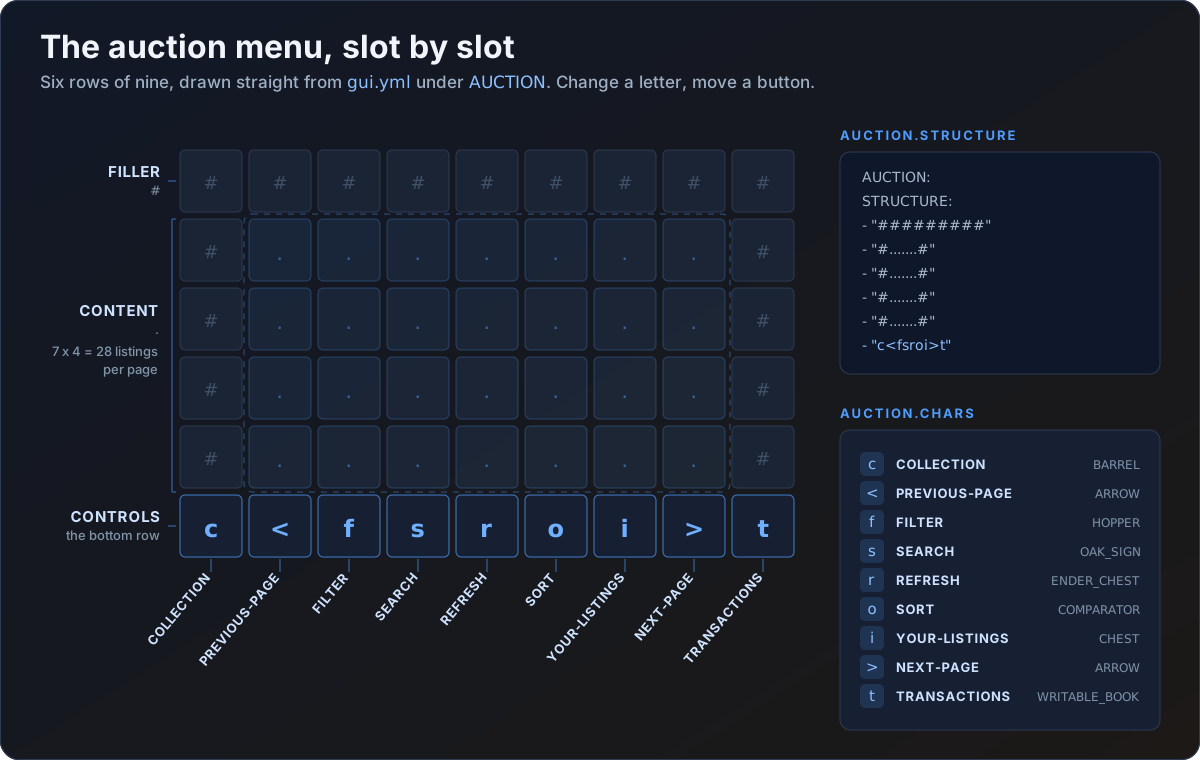
Here is the shipped main menu, cut down:
AUCTION:
  TITLE: "&8Auction"

  STRUCTURE:
    - "#########"
    - "#.......#"
    - "#.......#"
    - "#.......#"
    - "#.......#"
    - "c<fsroi>t"

  CHARS:
    CONTENT: "."
    PREVIOUS-PAGE: "<"
    NEXT-PAGE: ">"
    FILLER: "#"
    SORT: "o"
    FILTER: "f"
    SEARCH: "s"
    REFRESH: "r"
    YOUR-LISTINGS: "i"
    COLLECTION: "c"
    TRANSACTIONS: "t"
Row 1 is slots 0 to 8, row 2 is slots 9 to 17, and so on. CONTENT is the paginated area,
so the 28 dots above are 28 listings per page. Move a role's character anywhere you like,
or delete it to remove that button.
Rules for STRUCTURE
- 1 to 6 rows. A chest window cannot show more than 6, so extra rows are ignored and the plugin logs a warning naming the menu.
- Rows shorter than 9 characters are padded.
- Any character not listed in
CHARSbecomes filler. - More
CONTENTcharacters means more entries per page. - Roles are matched without regard to case, so
next-page:works as well asNEXT-PAGE:.
Two roles cannot share a character. CHARS maps a role to a character, so writing the
same character twice means the last one wins and the other button disappears.
The ITEMS block
ITEMS:
  SORT:
    MATERIAL: COMPARATOR
    NAME: "&9Sort: &f{sort}"
    LORE:
      - "&7Click to change sorting"
    AMOUNT: 1
    GLOW: false
MODEL-DATA: 0| Field | What it does | If you leave it out |
|---|---|---|
MATERIAL | Any material name valid for your Minecraft version | The caller's default is used |
NAME | The item's display name | The item keeps its vanilla name |
LORE | A list of lore lines | No lore is added |
AMOUNT | Stack size shown on the item, clamped to 1 to 64 | 1 |
GLOW | Enchantment shimmer | false |
MODEL-DATA | Custom model data. 0 means none | 0 |
An unknown MATERIAL falls back to STONE and logs one warning naming the exact route,
so a typo is easy to find and never breaks the menu.
Two small tricks:
MATERIAL: AIRleaves the slot genuinely empty. Set it onFILLERfor an empty border.LORE: []means no lore at all, as opposed to leavingLOREout, which means the same thing for a template item but leaves an existing item's own lore untouched.
FILLER
FILLER:
  MATERIAL: GRAY_STAINED_GLASS_PANE
  NAME: " "
  LORE: []
Drawn in every FILLER slot, and in every slot whose character is not listed in that
menu's CHARS. It is defined once, at the top of the file, and applies to every menu.
Free-form lore blocks
Some things a menu draws are not template items. A listed diamond sword is a real diamond
sword with its real enchantments, and the plugin only adds lore underneath it. Those extra
lines come from free-form blocks that sit alongside ITEMS.
| Block | Menu | Applied to |
|---|---|---|
LISTING.LORE | AUCTION, YOUR-ITEMS | Every listed item |
LISTING.SHULKER-LORE | AUCTION, YOUR-ITEMS | Extra lines, only when the listing is a shulker box |
PAYOUT.LORE | COLLECTION | Every item owed to the player |
ENTRY.LORE | TRANSACTIONS | Every history entry |
PREVIEW.LORE | CONFIRM, BUY-CONFIRM | The item being listed or bought |
AUCTION:
  LISTING:
    LORE:
      - "&7Price: &a{price}"
      - "&7Seller: &f{seller}"
      - "&7Time Left: &b{time-left}"
      - ""
      - "&bClick to buy!"
    SHULKER-LORE:
      - "&7Shift + Left Click to view contents"
The item keeps its own name, enchantment lines and attribute lines. Only these lines are added, underneath.
TRANSACTIONS also has two plain strings rather than lists:
TRANSACTIONS:
  ENTRY:
    LORE:
      - "{type}"
      - "&7Price: &a{price}"
    TYPE-BOUGHT: "&aBought"
    TYPE-SOLD: "&9Sold"
{type} resolves to one or the other.
The toggle menus
FILTER and SORT are the odd ones out. Their buttons do not live under ITEMS. They
live under CATEGORIES and ORDERS, one sub-block per option, and each carries a second
name for when it is the active one.
FILTER:
  STATE:
    SELECTED-LORE:
      - "&a<checkmark> Selected"
    UNSELECTED-LORE:
      - "&7Click to select"
    GLOW-SELECTED: true

  CATEGORIES:
    ALL:
      MATERIAL: CHEST
      NAME: "&bAll Items"
SELECTED-NAME: "&a&lAll Items"| Key | What it does |
|---|---|
STATE.SELECTED-LORE | Lore on the active option. Written once, applies to every option |
STATE.UNSELECTED-LORE | Lore on every other option |
STATE.GLOW-SELECTED | Add the enchantment shimmer to the active option. Defaults to true |
SELECTED-NAME | Name used when this option is active. Optional, leave it out if you only want the glow |
Each option also accepts MATERIAL, NAME, AMOUNT, GLOW and MODEL-DATA, the same
as any other item.
<checkmark> is a token that becomes a real tick mark. It is written as a token because a
raw tick in a YAML file is a reliable way to get mojibake the first time somebody opens the
file in an editor that is not using UTF-8.
Buttons appear in file order, not in some internal order. Reorder the blocks to reorder the buttons. Delete a block to hide that option entirely.
Valid category keys are ALL, BLOCKS, TOOLS, FOOD, COMBAT, POTIONS, BOOKS,
INGREDIENTS and UTILITIES. Valid sort keys are RECENTLY_LISTED, LAST_LISTED,
HIGHEST_PRICE and LOWEST_PRICE. A key that names neither is skipped with one warning
listing the valid ones.
Placeholders
Anything the plugin knows is exposed as {a-placeholder}. Put it in a name, in a lore
line, in both, or leave it out.
Available in every menu
| Placeholder | What it is |
|---|---|
{page} | Current page, starting at 1 |
{total-pages} | Number of pages |
{player} | The viewer's name |
Listing items
Available on AUCTION and YOUR-ITEMS content slots.
| Placeholder | What it is | Example |
|---|---|---|
{price} | Formatted price. The symbol and the suffixes come from FORMATTING | $12.5K |
{price-raw} | The plain number, with no symbol and no suffix | 12500.0 |
{seller} | Seller's name | Steve |
{time-left} | Countdown. The unit labels come from the TIME block in your language file | 2h 13m 40s |
{id} | Internal listing id | 42 |
{category} | The item's auto-detected category | Combat |
{server} | Server the item was listed on | survival |
{item} | The item's display name | Diamond Sword |
Both price formats are configurable. FORMATTING.CURRENCY-SYMBOL and
FORMATTING.MAGNITUDE-SUFFIXES in config.yml decide what {price} looks like, and
{price-raw} is never touched by either. See
Configuration.
The countdown is translatable rather than configured, because nothing ever reads a
duration back from a player. Edit the TIME block in your language file to change what
{time-left} writes after each number. See Languages.
Menu specific
| Placeholder | Where | What it is |
|---|---|---|
{sort} | AUCTION sort button, SORT menu | Current sort mode name |
{category} | AUCTION filter button, FILTER menu | Current filter name |
{query} | AUCTION search button, SEARCH-ANVIL | Text typed so far |
{slots} | YOUR-ITEMS | The viewer's own listing allowance |
{type} | TRANSACTIONS | Resolves to ENTRY.TYPE-BOUGHT or ENTRY.TYPE-SOLD |
{party} | TRANSACTIONS | The other player in the trade |
{date} | TRANSACTIONS | When it happened |
{reason} | COLLECTION | Why the item is owed |
On the confirm and preview screens
| Menu | Placeholders it supplies |
|---|---|
CONFIRM | {price}, {price-raw}, {item} |
BUY-CONFIRM | The full listing set, so {price}, {seller}, {time-left}, {id}, {category}, {server}, {item} |
TRANSACTIONS | {price}, {price-raw}, {item}, {type}, {party}, {date} |
SHULKER-VIEW | {item} only, on top of the always-available set |
A placeholder with no value in the current context is left in the text rather than
blanked. A visible {sellr} tells you that you typed it wrong. A silent gap does not.
Minecraft fixes a menu's title when the window opens, so {page} and {total-pages}
inside a TITLE show the page the menu was opened on and do not update as the player
pages through. Put them in lore instead.
The menus
The main /ah menu.
Roles: CONTENT, PREVIOUS-PAGE, NEXT-PAGE, SORT, FILTER, SEARCH, REFRESH,
YOUR-LISTINGS, COLLECTION, TRANSACTIONS, FILLER.
Free-form blocks: LISTING.LORE, LISTING.SHULKER-LORE.
A player's own active listings, where they cancel them.
Roles: CONTENT, PREVIOUS-PAGE, NEXT-PAGE, RETURN, FILLER.
Free-form blocks: LISTING.LORE, LISTING.SHULKER-LORE.
This menu also has an ITEMS.LOCKED entry with no character in STRUCTURE. It is drawn
in every content slot past the viewer's listing allowance, and {slots} inside it is that
viewer's own allowance rather than the config default. See
Selling.
Items owed to a player.
Roles: CONTENT, PREVIOUS-PAGE, NEXT-PAGE, RETURN, COLLECT-ALL, FILLER.
Free-form blocks: PAYOUT.LORE, which is where {reason} belongs.
Remove COLLECT-ALL from CHARS to make players collect one item at a time.
Buy and sell history, up to the last 200 entries.
Roles: CONTENT, PREVIOUS-PAGE, NEXT-PAGE, RETURN, REFRESH, FILLER.
Free-form blocks: ENTRY.LORE, ENTRY.TYPE-BOUGHT, ENTRY.TYPE-SOLD.
The category picker.
Roles: CONTENT, RETURN, FILLER. One button per entry under CATEGORIES is placed
into the CONTENT slots, in file order.
Free-form blocks: STATE.SELECTED-LORE, STATE.UNSELECTED-LORE, STATE.GLOW-SELECTED.
The sort-order picker. Same shape as FILTER, with ORDERS instead of CATEGORIES.
Keep ORDERS.LAST_LISTED.NAME in step with what you call it elsewhere. Out of the box it
is "Oldest First", and it is the label the sort button shows too.
Step 1 of selling: the player drops an item into the insert slot.
Roles: INSERT, FILLER. INSERT is the single slot a player may put something into.
Everything else is locked.
ITEMS.INSERT ships with MATERIAL: AIR, which leaves the slot blank. Give it a real
material and it becomes a visual hint. NAME and LORE only render in that case. The
hint can never be taken, listed or duplicated, and it is not handed back to the player
when the menu closes.
Step 2 of selling: confirm the listing.
Roles: CONFIRM, PREVIEW, CANCEL, FILLER. PREVIEW is a slot role with no ITEMS
entry, because the item being listed goes there. PREVIEW.LORE decorates it.
The purchase confirmation, used only when AUCTION.BUY-CONFIRMATION is true in
config.yml.
Roles: CONFIRM, PREVIEW, CANCEL, FILLER. Same shape as CONFIRM, with the full
listing placeholder set available.
A read-only peek inside a listed shulker box.
Roles: CONTENT, RETURN, FILLER. The top 27 slots mirror the box's contents and
cannot be taken from, so only the bottom row is really yours. The title supports {item}.
The anvil search bar, used when SEARCH.METHOD is ANVIL.
An anvil has a fixed three-slot layout, so STRUCTURE and CHARS do not apply. Only
TITLE and two items do.
ITEMS.INPUT is the paper the player types over. Its NAME seeds the text field, which
is why it ships as a single space: the field then looks empty but the item still has a
name to edit.
ITEMS.CONFIRM is the result slot, and clicking it runs the search. It has an extra
LORE-TYPING list which replaces LORE wholesale once the player has typed something.
That is the list that gets to use {query}.
Applying changes
/ah reloadre-reads gui.yml along with the other two files. Every open menu is closed first, and
any item a player had handed to a menu is given back before anything is re-read. That is
deliberate: a menu holds an inventory sized from the layout it was opened with, so
redrawing it after you added a row would write past the end of it, and a moved button
could turn a cancel click into a confirm click.
If gui.yml is missing a menu block entirely, the plugin logs a warning naming it and
falls back to a plain single row. Restore the block, or delete gui.yml and restart to
regenerate the whole file.