
Auction house
Browsing listings, the eight categories, the four sort orders and the three ways to search.
/ah opens the auction house. Every active listing on the server is in there, newest
first, and clicking one buys it.
The main menu is the AUCTION block in gui.yml. Everything below describes what each
button does. Where it sits, what it is made of and what it says are all yours to change,
see Menus.
Browsing
The middle of the menu is the paginated listing area. Each listing shows the real item, with its real name, enchantments and attribute lines, plus the extra lore lines you configured. By default that is the price, the seller and the time left.
| Button | What it does |
|---|---|
| Previous page / Next page | Page through the results |
| Filter | Open the category picker |
| Sort | Open the sort picker |
| Search | Ask for a search term |
| Refresh | Re-pull every active listing from the database |
| Your Listings | Your own active listings, where you can cancel them |
| Collection Box | Items waiting for you, see Collection box |
| Transactions | Your last 200 buys and sells |
Refresh does a real database read, not a cache read. It is the button to press if you suspect another server on the network has sold something and your menu has not caught up yet.
Shulker preview
Shift-click a listed shulker box and a read-only view of its contents opens. You cannot take anything out of it. Closing it puts you back exactly where you were, with your page, filter, sort and search still applied.
Listings that are shulker boxes get an extra lore line so players know the preview is there.
Viewing one player's listings
/ah <player> shows only that player's active listings. The name has to belong to
somebody who currently has a listing up. Anything else is treated as a search term
instead.
Categories
Every listing is sorted into a category automatically from its material. There is nothing to tag and nothing to configure per item.
| Category | Roughly what lands here |
|---|---|
| All | Every listing, the default |
| Blocks | Placeable blocks that did not match anything more specific |
| Tools | Pickaxes, axes, shovels, hoes, shears, fishing rods, compasses, clocks, name tags and similar |
| Food | Anything edible |
| Combat | Swords, armour, bows, crossbows, tridents, shields, arrows, elytra, totems |
| Potions | Potions, splash and lingering potions, tipped arrows, experience bottles, dragon's breath |
| Books | Books, enchanted books, writable and written books |
| Ingredients | Ingots, nuggets, dusts, dyes, scraps, and the usual crafting materials |
| Utilities | Chests, furnaces, redstone components, shulker boxes, minecarts, boats, beds, banners, spawn eggs |
Classification runs in priority order and the first match wins. That is why an enchanted book is Books rather than Ingredients, and why a cooked steak is Food rather than Ingredients. Anything that matches nothing at all and is not a block falls into Ingredients.
The category picker draws one button per entry under FILTER.CATEGORIES in gui.yml, in
file order. Delete an entry to hide that category from the menu.
Sorting
| Sort | Order |
|---|---|
RECENTLY_LISTED | Newest listing first. This is the default |
LAST_LISTED | Oldest listing first |
HIGHEST_PRICE | Most expensive first |
LOWEST_PRICE | Cheapest first |
The sort picker draws one button per entry under SORT.ORDERS in gui.yml, in file
order.
Searching
A search matches against two things: the item's display name and its material name with
underscores turned into spaces. So diamond sword finds a Diamond Sword even if the
seller renamed it, and a renamed sword called "Bane" is found by typing bane.
Searches combine with the category filter and the sort order. All three stay applied while you page through.
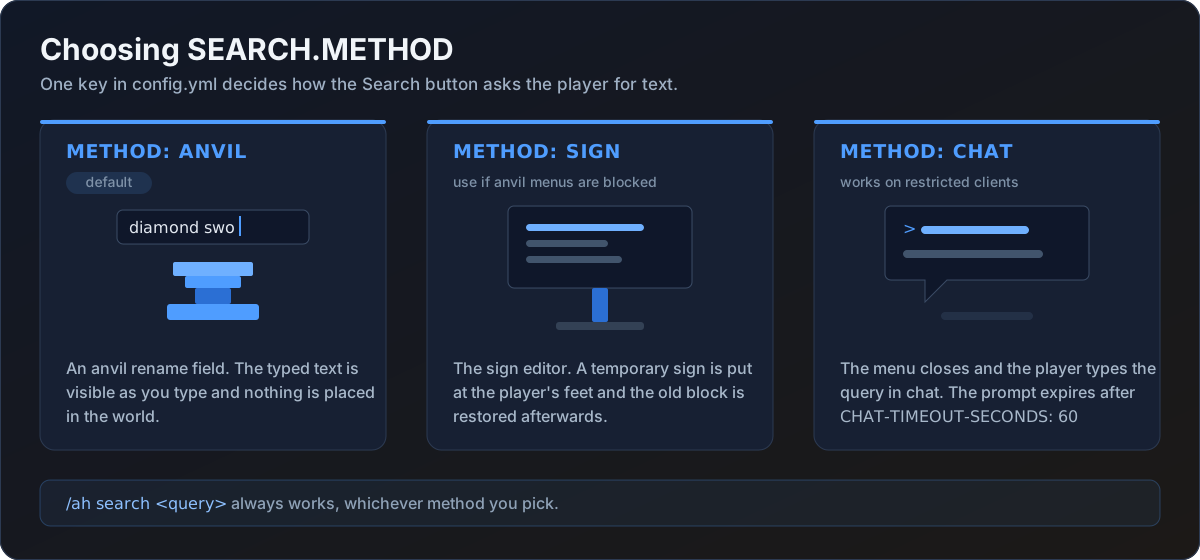
SEARCH.METHOD in config.yml decides what the Search button does. /ah search <query>
always works regardless of the setting.
SEARCH:
  METHOD: ANVIL
An anvil rename field opens. The player types into it and the text is visible as they go. The result slot doubles as the Search button, and its lore switches to a second block once there is text to show, so the player can read back what they typed before committing.
Nothing is placed in the world and no chat is intercepted. This is the default and the right choice for almost every server.
The menu is the SEARCH-ANVIL block in gui.yml. An anvil has a fixed three-slot
layout, so only the title and the two items apply.
Clearing a search
Searching with an empty term clears the filter and shows everything again.
Where the listings come from
The menu renders from an in-memory cache of active listings, which is why paging and filtering are instant. The database stays the single source of truth. The cache is refreshed when a listing is created, sold, cancelled or expires, when a player presses Refresh, and on a cross-server invalidation message.