
Collection box
What lands in the collection box, why it lands there and how players get it out.
The collection box is where anything the plugin could not hand over goes. It exists so that no item and no payment is ever lost, no matter what the player's inventory looks like or whether they are online.
/ah collectThere is also a Collection Box button in the main auction house menu.
What lands there
| Reason shown | Why it is there |
|---|---|
| Sale | Money from a sale that happened while you were offline |
| Expired | An item from a listing that ran out of time |
| Cancelled | An item from a listing you cancelled, or that an admin removed |
| Inventory Full | An item that had nowhere to go at delivery time |
| Shutdown | An item recovered from a sell flow that was interrupted by a server restart |
The reason is available on each item as {reason} in COLLECTION.PAYOUT.LORE, see
Menus.
Money payouts never appear as items in the box. They are deposited into your account automatically the next time you are seen, with a chat message saying how much you got.
Why it exists
The plugin's single hard rule is that an item is never destroyed. Some points in a transaction cannot be undone: once money has moved and a listing is marked sold, the item is owed to the buyer whatever happens next.
If at that moment the buyer has a full inventory, has logged out, or the server is going down, there is nowhere to put the item. The collection box is the answer to all three.
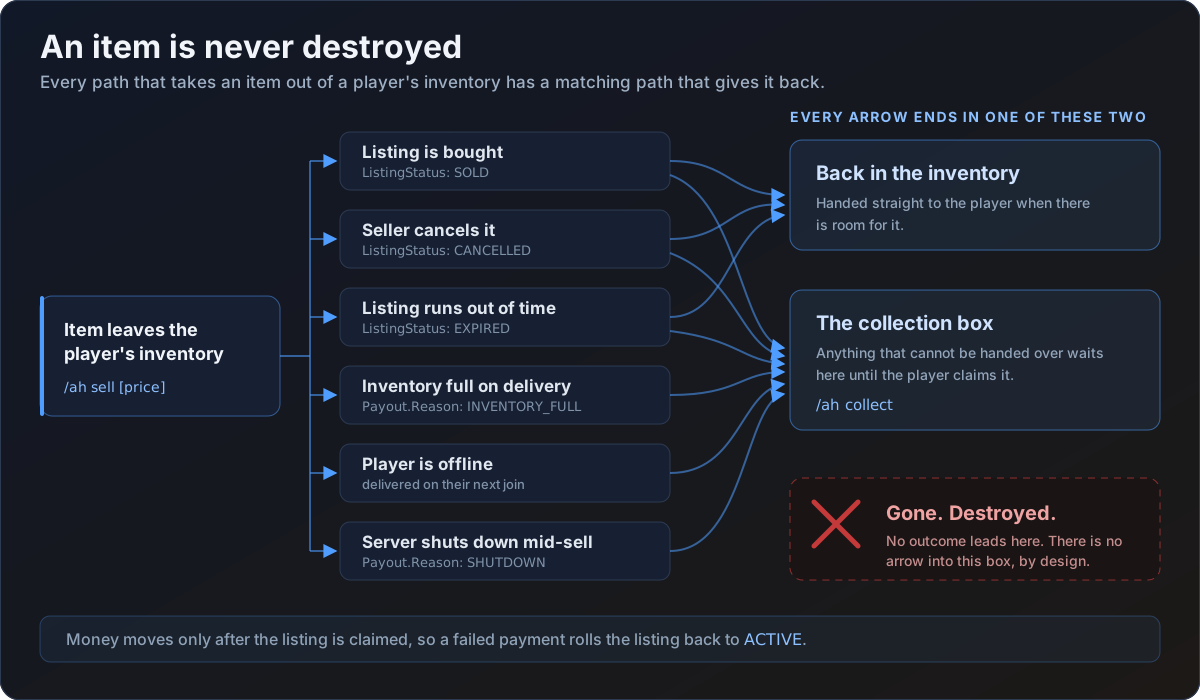
This is also why the plugin recovers items at shutdown. If the server stops while a player has an item sitting in the sell menu or is halfway through the chat price prompt, that item is written to their collection box before anything else is torn down.
Collecting
Click an item in the collection box and it goes into your inventory. The menu reloads so you can see what is left.
Each item can be collected exactly once. The claim is a single conditional database update, so two clicks in quick succession, or two servers on a network trying at the same time, cannot produce two copies.
Automatic delivery
You do not have to remember the collection box for money. Payouts are delivered automatically:
- when you log in
- when you run
/ah - when you run
/ah collect
Items still need collecting by hand, because the plugin will not force them into an inventory you may want to keep clear.
On a cross-server network with CROSS-SERVER.SYNC.PAYOUTS on, a
payout created on one server is delivered the moment you are seen on any server, rather
than waiting for your next login on the one that created it.
Configuring it
The menu is the COLLECTION block in gui.yml. Its buttons are PREVIOUS-PAGE,
NEXT-PAGE, RETURN and COLLECT-ALL, and the lore appended to each owed item comes
from COLLECTION.PAYOUT.LORE. Remove COLLECT-ALL from CHARS if you want players to
collect one at a time.
The messages are COLLECTION.* in your language file:
| Key | When it is sent |
|---|---|
COLLECTION.COLLECTED | You took a single item out |
COLLECTION.ITEMS-RECEIVED | Pending items were delivered to you |
COLLECTION.MONEY-RECEIVED | Pending money was deposited |
COLLECTION.INVENTORY-FULL | Something went to the box instead of your inventory |
The LISTING-COLLECT entry under SOUNDS plays when an item is taken out.