
Buying
The buy confirmation, what happens when your inventory is full and the notification the seller gets.
Every listing is buy-it-now. Click it, pay the price, get the item. There is no bidding and nothing to wait for.
The confirmation screen
AUCTION:
  BUY-CONFIRMATION: true
With BUY-CONFIRMATION on, clicking a listing opens a confirm screen showing the item,
the price, the seller and the time left. Confirm buys it, cancel puts you back on the
page you came from with your filter, sort and search intact.
Turn it off and a click buys immediately.
Leave this on. Without it a single misclick buys whatever is under the cursor, and there is no undo for a completed sale.
The screen is the BUY-CONFIRM block in gui.yml. See Menus.
What you cannot buy
| Situation | What you see |
|---|---|
| You cannot afford it | A message with the price, and nothing is charged |
| Somebody else bought it first | A message saying the listing is no longer available, and the menu refreshes |
| It is your own listing | A message telling you to cancel it instead |
You cannot buy your own listing. Cancel it from "Your Listings" and the item comes back for free.
How a purchase is carried out
The order matters, because it is what stops a race between two buyers from producing two items or two charges.
Funds check
The plugin checks you can afford it before touching the listing.
Claim the listing
The listing is flipped from active to sold with a single conditional database update. Exactly one buyer wins that. Everyone else is told the listing is gone.
Take the money
If the withdrawal fails, the claim is rolled back and the listing goes back on sale. No money and no item have moved at that point.
Pay the seller
If the seller is online they are paid directly. If they are offline, or the deposit fails, the money is queued as a payout and lands the next time they are seen.
Record it and hand the item over
The sale is written to your transaction history and the seller's, the listing leaves the cache, and the item is delivered.
All economy calls are serialised onto one thread on purpose. It is the only guarantee that a Vault provider which is not thread-safe is never called concurrently, and it is what makes the plugin correct on Folia.
When your inventory is full
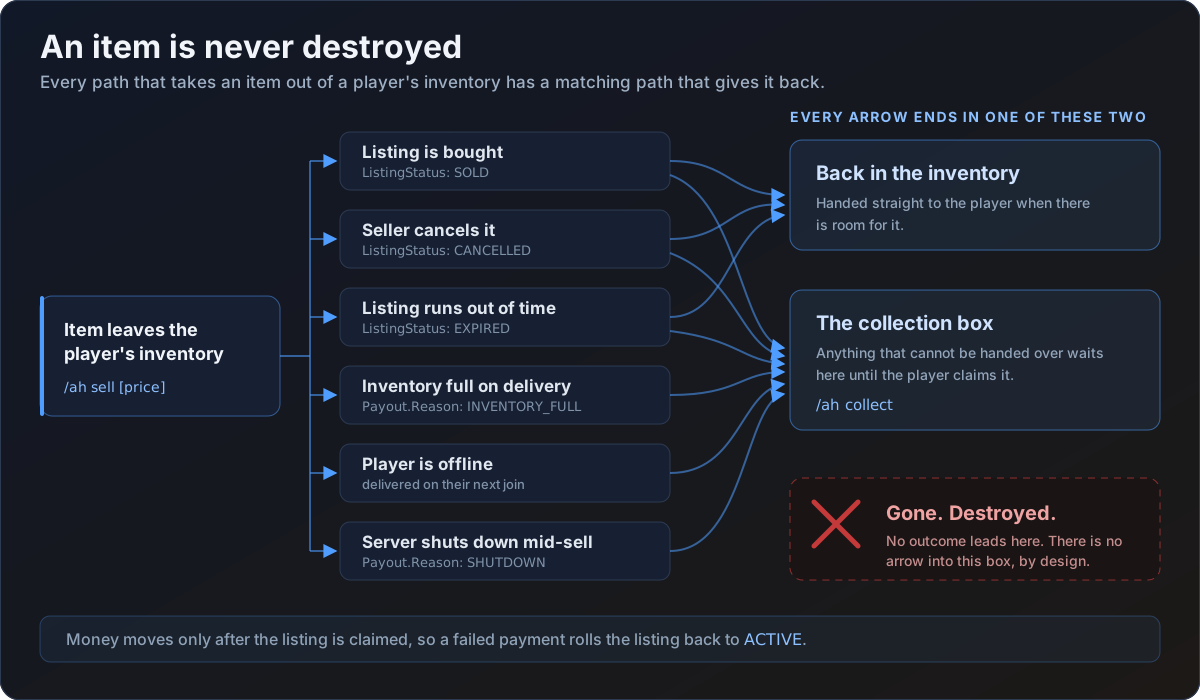
Anything that does not fit goes to your collection box. It is never dropped on the floor and never destroyed.
If part of a stack fits, that part goes into your inventory and only the remainder goes to the collection box. You get a message telling you where to find it.
The same applies if you log out between paying and receiving. By that point the money has moved and the listing is sold, so the item is owed unconditionally. It is written to your collection box and waits for you.
The seller notification
The moment an item sells, the seller gets a chat message naming the item, the price and
the buyer, plus a sound. That is the BUY.SOLD-NOTIFY message in your language file and
the SALE-NOTIFY entry under SOUNDS.
If the seller is offline the notification is skipped. On a cross-server network the notification is published over Redis instead, so a seller who is online on a different server still hears about the sale straight away.
An offline seller's money is queued as a payout and is deposited the next time they log in or open the auction house. Nothing is lost.
Sounds
| Event | Config key | Default |
|---|---|---|
| Purchase completed | SOUNDS.BUY-SUCCESS | ENTITY_EXPERIENCE_ORB_PICKUP |
| Your item sold | SOUNDS.SALE-NOTIFY | ENTITY_PLAYER_LEVELUP |
| Refused, for example no funds | SOUNDS.ERROR-SOUND | ENTITY_VILLAGER_NO |
Set any of them to "" to play nothing. See Configuration.
Transaction history
/ah transactions (or /ah history) shows your last 200 buys and sells, newest first,
with the price, the other player and the date. It is the TRANSACTIONS block in
gui.yml, and each entry is labelled Bought or Sold from ENTRY.TYPE-BOUGHT and
ENTRY.TYPE-SOLD.