
AT-AuctionHouse
A player-to-player auction house for Paper and Folia with fixed buy-it-now prices, fully configurable menus and optional cross-server support.

Players list items at a fixed price. Other players click and buy them. Money and item swap hands straight away. There is no bidding and no waiting.
Everything a player sees is yours to change. The menus come out of gui.yml, the chat
text comes out of lang/, and neither has a hardcoded material or a hardcoded sentence
behind it.
New here? Start with Installation. It covers the requirements, the install steps and what the first run writes to disk. If you do not have the jar yet, Download is the page you want first.
Quick facts
| Server software | Paper or Folia |
| Minecraft | 1.21.1 and newer, including the 26.x line |
| Java | 21 on 1.21.x, 25 on 26.x |
| Required | Vault plus an economy plugin |
| Optional | Redis and MySQL or MongoDB, for cross-server mode |
| Storage | SQLite, MySQL or MongoDB |
| Languages | English, Spanish, French, Japanese, plus your own |
| Author | zArrowTan |
One jar covers the whole version range, with no NMS and no per-version builds. See Installation for the detail on why, and for the one caveat that applies on Folia.
Getting started
Download
Where to buy AT-AuctionHouse, what is included and what to do once you have the jar.
Installation
Requirements, the install steps, the first run and what the plugin folder looks like afterwards.
Features
Auction house
Browse listings, filter by one of eight auto-detected categories, sort four ways and search by name from an anvil, a sign or chat.
Selling
List the item in your hand with one command, or drop it into the sell menu. Slot limits are permission-driven and there is a confirm screen either way.
Buying
Fixed buy-it-now prices, an optional confirm screen, and a purchase that goes through even when your inventory is full.
Collection box
Anything that could not be handed over lands here. Collect one item at a time or take the lot.
Cross-server
Point several servers at one database and one Redis and they share a single auction house, with menus updating within about a second of a sale.
Configuration
Configuration
A walk through config.yml section by section, plus how the self-updating version keys
work.
Menus
Layout, materials, names, lore, stack size, glint and model data, all from gui.yml,
with the full placeholder list.
Languages
Pick a language, edit the messages, or add a translation of your own. Missing keys fall back to English.
Permissions
Every permission node, and how the permission-driven listing slot system decides how many slots a rank gets.
Storage
Choosing between SQLite, MySQL and MongoDB, what tables get created and what you need to back up.
Reference and help
Commands
Every command, split into player and admin, with the permission each one needs.
FAQ
The questions that come up most often about installing, configuring and running the plugin.
Support
Where to get help and what to include so you get an answer on the first reply.
Item safety
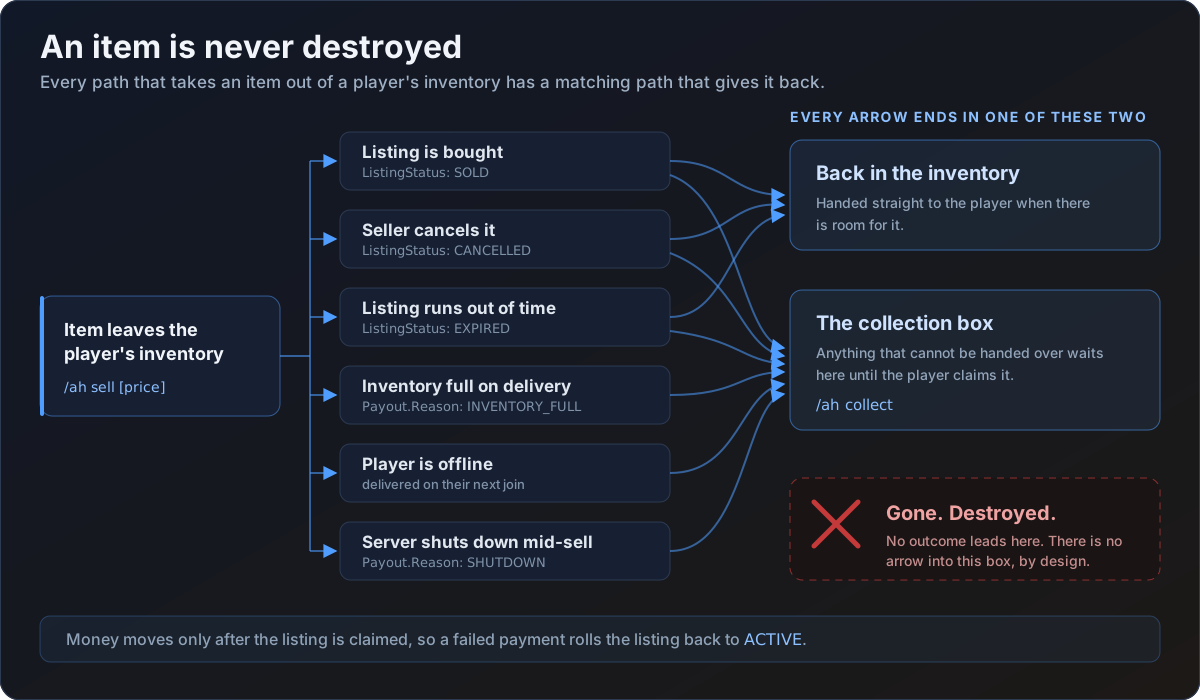
The plugin has one rule it never breaks: an item is never destroyed. Every path that takes an item out of a player's inventory has a matching path that gives it back. That covers a failed listing, a cancelled listing, an expired listing, a full inventory, a player logging out mid-flow, and a clean server shutdown. Anything that cannot be handed over right now is written to the collection box instead.
Configs that update themselves
When a new release adds a setting, your file gains it along with its explanation, and every value you already set stays exactly as you left it. There is nothing to diff and nothing to regenerate. Every section of every shipped file is commented, so the file itself is the reference.