
Rewards
How reward chances work, the difference between item rewards and command rewards, and how to pay out money.
Every pouch has a rewards block. Each entry in it is one possible payout: some items,
some commands, or both, plus a chance that decides how often it comes up.
    reward-amount: 2
    rewards:
      0:
        chance: 100
        items:
          - "DIAMOND:3"
        commands:
          - "give %deluxepouches_player% minecraft:emerald 2"
      1:
        chance: 25
        commands:
          - "give %deluxepouches_player% minecraft:elytra 1"
The numbers 0, 1, 2 are just labels. Any unique key works, numbering is simply
tidy.
chance is a weight, not a percentage
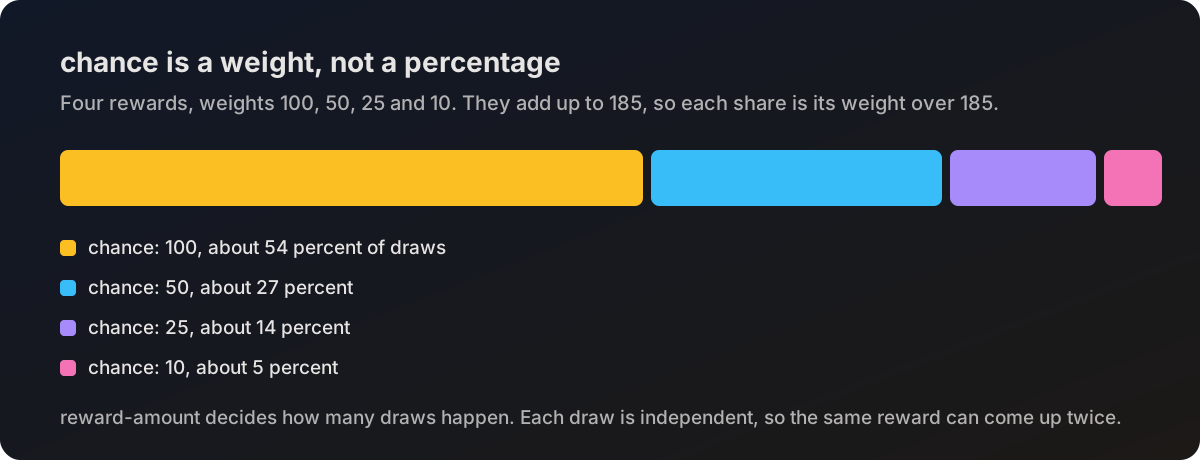
The plugin adds up the chance of every reward, then picks one at random with each
reward taking a share of the total. A reward with chance: 100 in a pouch whose
chances add up to 185 comes up about 54 percent of the time, not 100 percent.
That means:
- The values do not have to add up to 100.
10,5,1behaves the same as100,50,10. - Making one reward rarer automatically makes the others more common.
chance: 0removes a reward from the draw completely.
The pouch menu shows these values with a percent sign next to them. That label is cosmetic. The maths is always the weighted share described above.
reward-amount
reward-amount is how many draws happen when the pouch opens. Each draw is
independent, so with reward-amount: 3 a player can get the same reward twice.
If a pouch has fewer rewards than reward-amount, the number of draws is capped at
the number of rewards that have a chance above zero.
Want a guaranteed payout plus a random extra? Give the guaranteed line a very large chance compared to the others, or split the pouch into two pouches and hand out both.
Item rewards
items is a list of item strings.
| Format | Meaning |
|---|---|
DIAMOND | One diamond |
DIAMOND:5 | Five diamonds |
nexo:ruby | A Nexo item, see Custom items |
itemsadder:myns:ruby | An ItemsAdder item |
      0:
        chance: 100
        items:
          - "DIAMOND:5"
          - "GOLDEN_APPLE:2"
Items go straight into the inventory. If the inventory is full they drop on the ground at the player's feet, so nothing is lost.
Item rewards are plain items: a material and an amount. For enchanted, named or NBT
heavy rewards, use a command reward instead and let the vanilla give command or
your own plugin build the item.
Command rewards
commands is a list of commands run from console when the reward lands.
      1:
        chance: 40
        commands:
          - "give %deluxepouches_player% minecraft:diamond_block 3"
          - "lp user %deluxepouches_player% parent add vip"
          - "broadcast &e%deluxepouches_player% &7hit the jackpot!"
Points worth knowing:
- Do not put a slash in front of the command.
%deluxepouches_player%is replaced with the player's name. See Placeholders.- Commands starting with
giveget a little help: the plugin forces the target to the opening player and adds theminecraft:namespace to the item if you left it off. Writegive %deluxepouches_player% minecraft:diamond 1to stay explicit. - Anything the console can run works, which is how you reach other plugins.
Item components in commands
Modern give syntax works, since it is vanilla running the command:
        commands:
          - 'minecraft:give %deluxepouches_player% minecraft:enchanted_book[stored_enchantments={"minecraft:fortune":2}] 1'
Wrap those lines in single quotes in YAML, the square brackets and double quotes upset the parser otherwise.
Money rewards
Pay money out with your economy plugin's own command:
      0:
        chance: 100
        commands:
          - "eco give %deluxepouches_player% 1000"
Use whatever command your economy plugin provides, for example eco give, money give
or points give.
DeluxePouches detects Vault and lists it in /dp version, but rewards are paid out
through commands like the one above. There is no separate money reward type.
Testing a reward table
- Set
reward-amounthigh for a moment, say5, and reload. - Open a handful of pouches and watch what comes out.
- Run
/dp debug toggleto log every reward and command to console while you test. - Put
reward-amountback and reload.