
Pouch menu
What players see in the pouch menu, what admins see, and how to rename it.
/dp gui opens a menu listing every pouch on the server. Players use it to grab a
pouch they are allowed to have, admins use it to check how a pouch is configured
without opening a file.
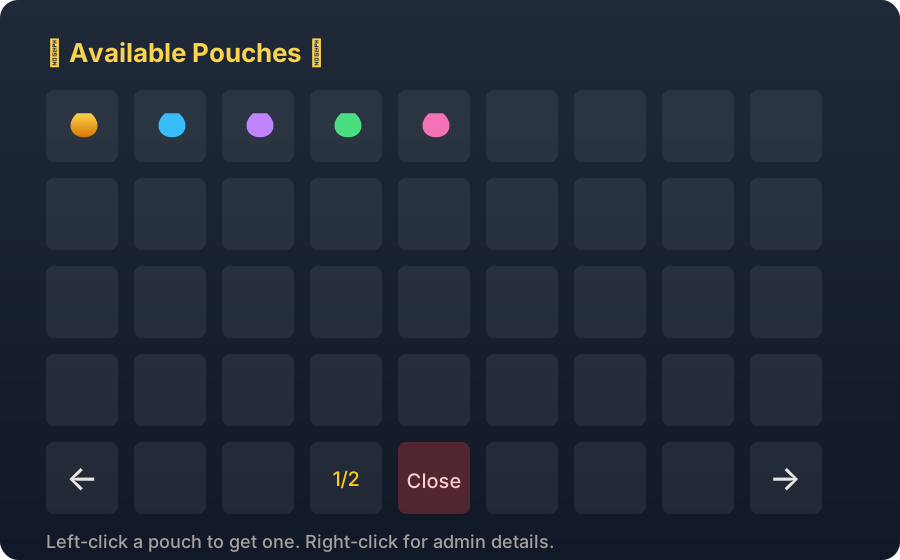
Layout
Five rows. Pouches fill the top four and the bottom row holds the controls:
| Slot | Item |
|---|---|
| Bottom left | Previous page, only when there is more than one page |
| Bottom middle left | Page number |
| Bottom middle | Close |
| Bottom right | Next page, only when there is more than one page |
| The rest | Grey glass filler |
Clicking a pouch
| Click | Who | What happens |
|---|---|---|
| Left-click | Anyone with deluxepouches.use | One of that pouch goes into their inventory, with a sound and a confirmation message |
| Right-click | Anyone with deluxepouches.admin.debug | Prints the pouch's setup in chat instead of giving it |
Without deluxepouches.use the click is refused with the no permission message. Items
in the menu cannot be dragged out, every other click is cancelled.
What the lore shows
Each pouch in the menu carries a summary built from its config:
- Pouch id, animation and effect
- Reward slots (
reward-amount) and how many rewards exist - Up to four rewards with their chance values, then a count of the rest
- Cooldown, required permission, and whether a hologram is set
That lore is a straight dump of the configuration, including the pouch id and the
reward list. Anyone who can run /dp gui sees it. Keep deluxepouches.gui.open for
staff if you do not want players reading the odds.
Renaming the menu
settings:
  pouches-menu:
    gui-name: "&8✦ &6&lAvailable &e&lPouches &8✦"
Colour codes work. Run /dp reload after changing it.
The other keys under settings.pouches-menu (next-page, previous-page,
show-preview, show-info, info-button-name, get-button-name) and the top level
gui: block are not read. Only gui-name changes the menu.
Opening it for someone else
The command takes no arguments, each player runs /dp gui themselves. To hand a
specific pouch to a specific player, use /dp give instead, see
Commands.