
Requirements
Extra conditions a player must meet on top of the quests before claiming a rank.
Requirements sit next to the quests in ranks.yml. A player can finish every quest, but the Claim Rank button only turns green once every requirement passes too. Each one shows up in the button's text with a green check or red cross and the player's current value.
requirements:
  money:
    type: MONEY
    amount: 25000
    take: true
  votes:
    type: PLACEHOLDER
    placeholder: "%votingplugin_points%"
    amount: 20
    display: "&7Have &e20 &7vote points"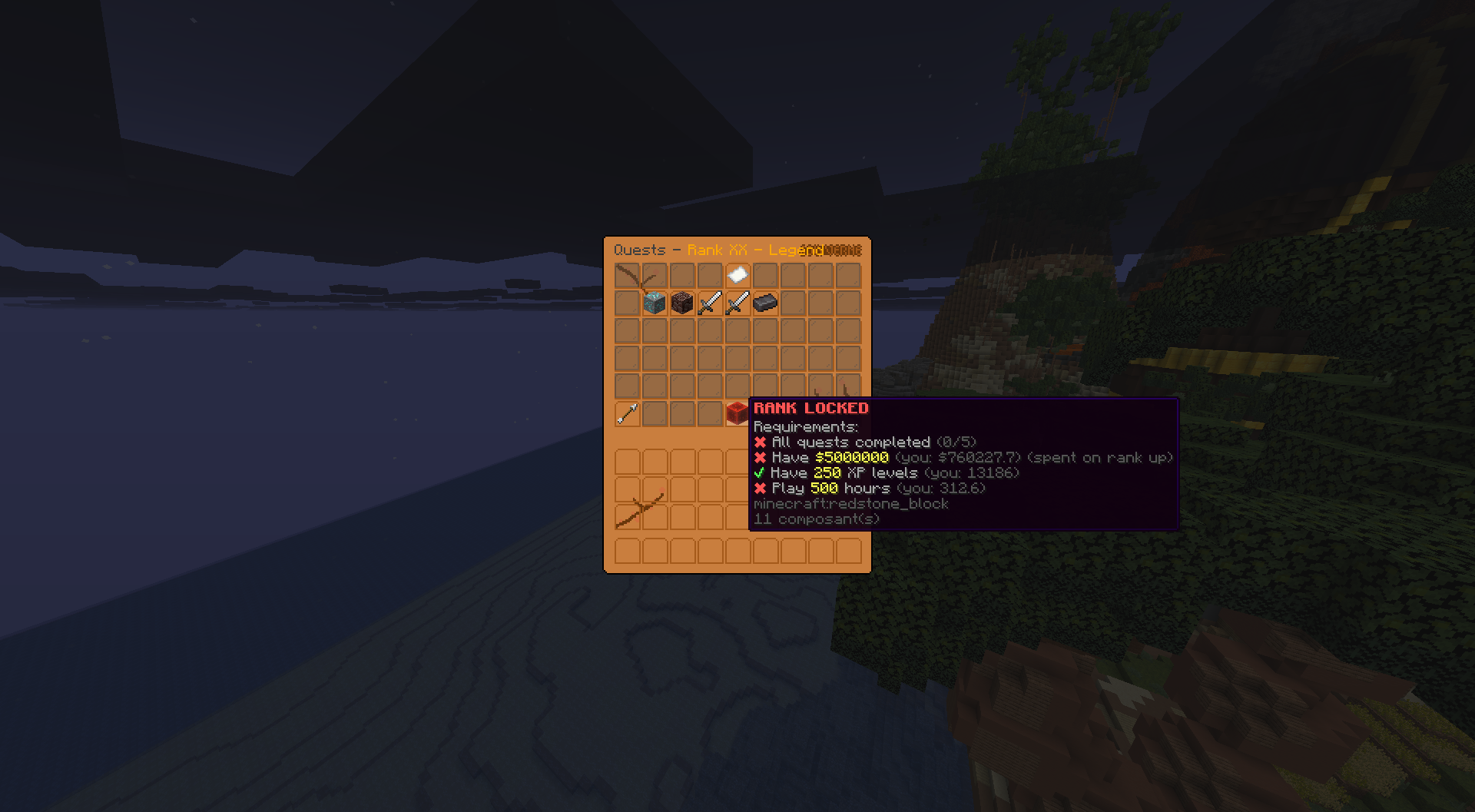
Requirement types
| Type | Passes when | Needs |
|---|---|---|
MONEY | Vault balance is at least amount | Vault + an economy plugin |
XP_LEVEL | Vanilla XP level is at least amount | nothing |
PLAYTIME_HOURS | Hours played on this server reach amount (read from the server's own statistics) | nothing |
PERMISSION | The player has the node in permission | a permissions plugin |
PLACEHOLDER | A numeric PlaceholderAPI value reaches amount | PlaceholderAPI + the providing plugin |
TOWER_FLOOR | The player cleared floor amount of the tower in tower this season | TowerTrials |
TOWER_CLEARS | Floors cleared this season in tower (repeats counted) reach amount | TowerTrials |
Optional keys
| Key | What it does |
|---|---|
display | Custom text shown for this requirement on the Claim Rank button. Supports {amount} (the target) and {current} (the player's live value) |
take | MONEY and XP_LEVEL only. true = the amount is spent when the rank is claimed. Default false = the player only needs to have it |
tower | TOWER_FLOOR and TOWER_CLEARS only. The TowerTrials tower id, the id line in its file under plugins/TowerTrials/towers/ |
votes:
  type: PLACEHOLDER
  placeholder: "%votingplugin_points%"
  amount: 20
  display: "&7Vote &e{amount} &7times &8(you: {current})"
Requirements with take: true show a "(spent on rank up)" tag on the Claim Rank button, so players know it is a cost and you can see the setting is active. The tag text is editable in the language files.
take: true only works on MONEY and XP_LEVEL. Votes, playtime, island level, and other placeholder values are only checked, never taken. If you put take: true on one of those, the console warns at startup and ignores it.
PLACEHOLDER examples
The PLACEHOLDER type covers everything other plugins can count. A few ready-to-paste examples:
Island level (SuperiorSkyblock2):
island:
  type: PLACEHOLDER
  placeholder: "%superior_island_level_raw%"
  amount: 100
  display: "&7Island level &e100"
Use the _raw variant: the plain one formats big numbers with commas.
Vote points (VotingPlugin):
votes:
  type: PLACEHOLDER
  placeholder: "%votingplugin_points%"
  amount: 20
  display: "&7Have &e20 &7vote points"
Job level (EcoJobs):
job:
  type: PLACEHOLDER
  placeholder: "%ecojobs_miner%"
  amount: 10
  display: "&7Miner job level &e10"
More placeholder names are collected on the Placeholders page. Always verify one in game with /papi parse me <placeholder> before putting it in a rank.
TowerTrials examples
Built against TowerTrials 1.0.0-9. Without TowerTrials installed these two never pass, like a placeholder requirement without PlaceholderAPI.
requirements:
  # Must have cleared floor 15 of the Ashen Spire this season
  spire:
    type: TOWER_FLOOR
    tower: ashen-spire
    amount: 15
  # Must have cleared 30 floors in total this season, repeats counted
  climbing:
    type: TOWER_CLEARS
    tower: ashen-spire
    amount: 30
    display: "&7Clear &e{amount} &7tower floors &8(you: {current})"
Both read the player's current season. When a TowerTrials season resets everyone's tower progress goes back to zero, so a player who has not claimed the rank yet has to climb again. Players who already claimed keep their rank, nothing is taken back.
Permission-gated ranks
PERMISSION lets you gate a rank behind anything that grants permissions: a donor rank, a crate unlock, a manual staff approval.
vip:
  type: PERMISSION
  permission: "myserver.rank.vip"
  display: "&7Be a &6VIP"