
Quests
All twelve quest types, multiple materials and tags, world filters, custom lore, and per-quest rewards.
Each rank holds any number of quests, defined in ranks.yml under that rank's quests: section. A quest is a small block of keys:
quests:
  cobblestone:
    type: BREAK_BLOCK
    material: COBBLESTONE
    amount: 300
There is no limit on quests per rank. The quest menu shows them on the slots from gui.quest-slots and adds pages on its own when a rank has more quests than slots, with previous / next arrows (see Configuration).
Quest keys
| Key | What it does | Required |
|---|---|---|
type | One of the quest types below | yes |
amount | The target number | yes |
material / materials | Block or item for break, place, harvest, craft, deliver, and fish quests. One or several, see several materials | depends on type |
output | SMELT_ITEM: what comes out of the furnace (same formats as material) | for that type |
input | SMELT_ITEM: what has to go in. Optional | no |
entity / entities | Mob(s) for KILL_MOB, default ANY. Vanilla types, mythicmobs:<name> or itemsadder:namespace:id | no |
heads | FIND_HEAD: which heads from heads.yml count. Leave out for all of them, ANY for every player head | no |
worlds | Only count progress made in these worlds, see world filters | no |
placeholder | The PlaceholderAPI placeholder for PLACEHOLDER quests | for that type |
tower | TowerTrials tower id for TOWER_FLOOR and TOWER_CLEAR quests | for TOWER_FLOOR |
floor | TOWER_FLOOR: the floor to clear. TOWER_CLEAR: only clears of that floor count | for TOWER_FLOOR |
first-clear | TOWER_CLEAR: true counts only floors cleared for the first time this season | no |
display-name | Custom objective text shown in the menu (this is the icon title) | no |
description | Extra lines shown under the title, see below | no |
icon | Custom menu icon (defaults to the quest material). Takes a material, MATERIAL:custommodeldata, or itemsadder:namespace:id, see icon formats | no |
lore | Custom menu text for this one quest, see below | no |
rewards | Rewards given the moment this quest completes, see below | no |
Several materials, tags and custom items
Every material can be more than one thing, and any of them counts (OR logic). Four spellings, mix them as you like:
material: DIRT                          # one material
materials: [DIRT, GRASS_BLOCK]          # a list, any of them counts
material: "DIRT, GRASS_BLOCK"           # same thing on one line
material: "#minecraft:logs"             # a vanilla tag: every log type
material: itemsadder:myitems:ruby_ore   # an ItemsAdder custom block or item
Tags save a lot of typing. Handy ones: #minecraft:logs, #minecraft:coal_ores, #minecraft:iron_ores, #minecraft:diamond_ores, #minecraft:dirt, #minecraft:leaves, #minecraft:planks, #minecraft:fishes, #minecraft:wool. Any block or item tag the server knows works, the minecraft: part is optional.
ItemsAdder custom blocks and items are matched by their id, and only by their id: a custom "ruby ore" never counts as the note block it is built on, and a custom item never counts as the paper it is based on. The same itemsadder: spelling works in entity for ItemsAdder custom mobs.
When a quest names one vanilla material, Paper players see its name in their own game language in the menu. A quest with several materials or a tag shows the English names ("Dirt, Grass Block", "Logs"), so for those give the quest a display-name if you want it in another language.
Quest types
BREAK_BLOCK
Break blocks of the given material. Covers mining, chopping logs, breaking leaves, anything that breaks.
coal:
  type: BREAK_BLOCK
  material: COAL_ORE
  amount: 100

logs:
  type: BREAK_BLOCK
  material: "#minecraft:logs"
  amount: 200
  icon: OAK_LOG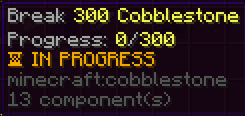
Anti-cheese: blocks placed by players do not count when broken again, so nobody farms a quest by placing and re-breaking the same block. Toggle with progression.anti-place-cheese in config.yml. The placed-block tracking resets on a server restart.
PLACE_BLOCK
Place blocks of the given material. What counts is the block that ends up in the world, so cocoa beans placed on a jungle log count as COCOA, seeds as WHEAT, a bucket of water as WATER. Naming the item instead works just as well (COCOA_BEANS, WHEAT_SEEDS), both spellings match.
dirt:
  type: PLACE_BLOCK
  materials: [DIRT, GRASS_BLOCK]
  amount: 500

cocoa:
  type: PLACE_BLOCK
  material: COCOA
  amount: 256
  icon: COCOA_BEANS
Anti-abuse: every spot in the world counts once. Placing a block, breaking it and placing it again on the same spot does not count a second time. Toggle with progression.anti-replace-cheese in config.yml; the tracking resets on a server restart.
HARVEST
Break fully-grown crops of the given material (wheat, carrots, potatoes, and so on). Baby crops do not count, so players cannot spam-break seedlings.
wheat:
  type: HARVEST
  material: WHEAT
  amount: 500
KILL_MOB
Kill mobs. entity: ANY counts every mob, or set one type like ZOMBIE or SKELETON. Several types at once with entities. Player kills never count.
zombies:
  type: KILL_MOB
  entity: ZOMBIE
  amount: 150

undead:
  type: KILL_MOB
  entities: [ZOMBIE, HUSK, DROWNED, ZOMBIE_VILLAGER]
  amount: 300
MythicMobs mobs are named with mythicmobs: followed by the mob's internal name (the name of its file in plugins/MythicMobs/Mobs). Needs MythicMobs installed, 4.x or 5.x both work.
boss:
  type: KILL_MOB
  entity: mythicmobs:SkeletonKing
  amount: 1
  display-name: "&7Slay the &cSkeleton King"
  icon: WITHER_SKELETON_SKULL
Not sure of the exact internal name? Turn on general.debug: true and kill the mob once, the console prints MythicMobs mob <name> died, killed by <player> with the name to copy.
ItemsAdder custom mobs work the same way with entity: itemsadder:namespace:id.
entity: ANY also counts MythicMobs and ItemsAdder mobs, they are mobs after all. A quest that names a mythicmobs: mob only counts that mob.
CRAFT_ITEM
Craft items of the given material. Shift-click crafting is counted correctly: a full batch counts as the whole batch, not as one craft.
bread:
  type: CRAFT_ITEM
  material: BREAD
  amount: 100
SMELT_ITEM
Cook or smelt items in a furnace, blast furnace, smoker or campfire. output is what comes out, the optional input is what has to go in.
porkchops:
  type: SMELT_ITEM
  input: PORKCHOP
  output: COOKED_PORKCHOP
  amount: 256

iron:
  type: SMELT_ITEM
  output: IRON_INGOT
  inputs: [RAW_IRON]        # ingots from ore blocks would not count
  amount: 64
How it counts:
- Furnaces, blast furnaces and smokers count the moment the player takes the result out, by a normal click, a right click, a shift-click or a hotbar key, and whole stacks count as whole stacks. Taking a batch out bit by bit counts every bit. Whoever takes the items gets the progress, hoppers pulling items out count for nobody.
- Campfires count when the food finishes cooking, for the player who put it on.
- Only items the plugin watched being cooked count. Cooked items that were already waiting in the result slot, for example stock left over from before a restart or a furnace someone else filled, give no progress when they are picked up (since 1.4.2).
- With an
inputset, the plugin remembers which raw item each result came from while the server runs. - Leave
inputout and any raw item that gives the output counts.
DELIVER_ITEM
Bring items back to the quest menu. The player clicks the quest icon and the items are consumed from their inventory; progress is stored, so it can be turned in across several trips.
seeds:
  type: DELIVER_ITEM
  material: WHEAT_SEEDS
  amount: 256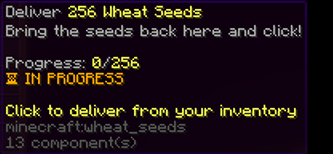
FISH
Catch things with a fishing rod. Without a material, every catch counts. With one, only that exact catch counts.
fishing:
  type: FISH
  amount: 50

salmon:
  type: FISH
  material: SALMON
  amount: 20
The menu icon defaults to a fishing rod.
FIND_HEAD
A treasure hunt built in. Hide player heads around your world and let a quest count the ones a player finds by right-clicking them. Every head spot counts once per player per quest, so clicking the same head twice, or breaking it and placing it back, does nothing.
The heads that may count live in heads.yml, one entry per head with a name of your choice and either the head's skin texture or a player name:
heads:
  egg-blue:
    texture: "eyJ0ZXh0dXJlcyI6ey..."   # the base64 "Value" from a head site
  egg-pink:
    texture: "http://textures.minecraft.net/texture/<hash>"   # or the URL, or just the hash
  notch:
    player: Notch
Then in ranks.yml:
easter:
  type: FIND_HEAD
  amount: 10
  heads: [egg-blue, egg-pink]   # only these two

treasure:
  type: FIND_HEAD
  amount: 5                     # no "heads" line = every head listed in heads.yml

any-head:
  type: FIND_HEAD
  amount: 5
  heads: ANY                    # every player head in the world, listed or not
heads.yml is yours, the plugin writes it once and never touches it again. Edits are picked up automatically a few seconds after saving, like ranks.yml.
Running the AdvancedHunt plugin for your hunts? Use a PLACEHOLDER quest with %advancedhunt_found_count% (treasures found across all hunts) or %advancedhunt_found_treasures_<collection>% (one hunt) instead, see Placeholders.
Each quest can point at its own AdvancedHunt collection, and only treasures found in that collection count:
hunt-spawn:
  type: PLACEHOLDER
  placeholder: "%advancedhunt_found_treasures_7a849b47-e0cf-47f3-b5a5-78b9d71e1a26%"
  amount: 5
  display-name: "&eFind 5 treasures at spawn"
<collection> is the collection's UUID (safest) or its name. A wrong UUID makes AdvancedHunt answer 0, so the quest just stays at 0: check it with /rank admin placeholder <placeholder> <player>. The count is everything that player ever found in that collection, including before they reached the rank.
TOWER_FLOOR
Completes when the player has cleared a floor of a TowerTrials tower this season.
spire:
  type: TOWER_FLOOR
  tower: ashen-spire
  floor: 10
  icon: LADDER
  display-name: "&7Clear floor &e10 &7of the &6Ashen Spire"
tower is the tower id, which is the id: line in its file under plugins/TowerTrials/towers/, not its display name. Floors count from 1, the same numbers the portals carry.
The menu shows their highest cleared floor out of the target, so a player on floor 3 of a "clear floor 10" quest sees 3/10. Clearing a higher floor counts too, and a floor cleared before the quest ever existed counts as well, because the number is read straight from TowerTrials instead of being counted by us.
TOWER_CLEAR
Counts cleared floors as they happen, so it is the "keep climbing" kind of quest.
climber:
  type: TOWER_CLEAR
  tower: ashen-spire     # optional, leave it out and every tower counts
  amount: 25
  first-clear: true      # optional, only floors cleared for the first time this season
Add floor: 5 to count only clears of that one floor. With first-clear: true a player cannot farm the same easy floor over and over, because only the first clear of each floor this season counts.
TowerTrials quests
Both tower types need the TowerTrials plugin on the server. zQuestRank is built against TowerTrials 1.0.0-9 (API version 1) and talks to it without a hard dependency, so:
- No TowerTrials installed? Tower quests simply stay at 0 instead of erroring, exactly like a placeholder quest without PlaceholderAPI.
- A wrong tower id is reported in the console at startup, with a note to check the
idinplugins/TowerTrials/towers/. towertrials.enabled: falseinconfig.ymlturns the whole link off, see Configuration.
Tower progress belongs to the tower's current season. When a season resets everyone goes back to floor 0, but quests already completed stay completed, they are never taken back.
You can also close tower floors until players reach a rank, see rank gates.
PLACEHOLDER
Completes when a numeric PlaceholderAPI value reaches amount. This is the bridge to every other plugin: job levels, vote counts, island levels, quest counts, treasures found, anything that can be read as a number.
job-level:
  type: PLACEHOLDER
  placeholder: "%ecojobs_miner%"
  amount: 5
  display-name: "&7Reach Miner job level &e5"
  icon: IRON_PICKAXE
The value is read live, and once it reaches the target the completion is saved, so it stays completed even if the value later drops. See Placeholders for known-good placeholder names, and test any placeholder in game with /papi parse me <placeholder> first.
If PlaceholderAPI or the plugin providing the value is missing, the quest simply stays at 0, and the console warns once about the unresolved placeholder.
World filters
Any quest can be limited to certain worlds, for example a player's island world on a skyblock server. Progress made anywhere else is ignored.
island-dirt:
  type: PLACE_BLOCK
  materials: [DIRT, GRASS_BLOCK]
  amount: 500
  worlds: [island_world]
A worlds list on the rank itself applies to every quest of that rank that has no list of its own:
rank-3:
  display-name: "&dRank III"
  worlds: [island_world, island_world_nether]
  quests:
    ...
Quests with a world filter show an "Only counts in: ..." line in the menu (wording under quest.lore.worlds in the language file). Delivery quests use the world the player is standing in when they click.
Quest description
The quest icon's title is the objective (for example "Craft 20 Golden Apples"). By default the icon shows just that title, the progress line, and the status, nothing repeated. If you want to explain the quest in your own words, add a description: list and those lines show up right under the title.
golden_apples:
  type: CRAFT_ITEM
  material: GOLDEN_APPLE
  amount: 20
  description:
    - "&7Craft golden apples at a"
    - "&7crafting table to progress."
The same {objective}, {progress}, {target} and {status} placeholders (see the table below) work inside description lines too. To change the title itself, use display-name. For full control over the whole icon text, use lore instead (below), which replaces everything.
Custom lore per quest
By default a quest icon shows the objective, the progress line, and the status. To write your own text for one specific quest, give it a lore: list. It fully replaces the default text for that quest.
The icon title is already the objective, so don't put {objective} as your first lore line or it shows up twice. Just write the extra text you want under the title.
These placeholders work inside the lines:
| Placeholder | Becomes |
|---|---|
{objective} | The quest's objective text |
{progress} | Current progress number |
{target} | The quest's amount |
{status} | The IN PROGRESS or COMPLETED line |
seeds:
  type: DELIVER_ITEM
  material: WHEAT_SEEDS
  amount: 256
  lore:
    - "&7Bring the seeds back here and click!"
    - ""
    - "&7Progress: &e{progress}&7/&e{target}"
    - "{status}"
Color codes (&a style and &#rrggbb hex, see Colors) work everywhere, and with PlaceholderAPI any %...% placeholder or emoji works in names, lore and description too (see Placeholders). The icon's name stays the objective; use display-name to change that.
Per-quest rewards
A quest can pay out on its own, the moment it completes, separate from the rank rewards. Add a rewards: block with any of money, xp-levels, items, and commands:
seeds:
  type: DELIVER_ITEM
  material: WHEAT_SEEDS
  amount: 256
  rewards:
    money: 500
    items:
      - "BREAD:16"
    commands:
      - "crates give {player} vote 1"
The reward fires exactly once per completion and arrives together with the quest-completed chat message. The options are described in full on the Rewards page.
Progress rules worth knowing
- Progress always belongs to the player's current rank. Claiming a rank starts the next rank's quests from zero.
- Progress is saved per player and survives relogs and restarts. See Storage.
- The moment a quest reaches its target, the player gets a chat message (toggle with
progression.notify-on-quest-completeinconfig.yml).