
Rank menu
The rank ladder GUI and the per-rank quest menu, explained.
/rank opens the rank menu: one icon per rank, in the order they appear in ranks.yml. From there the player clicks their current rank to open its quest menu.
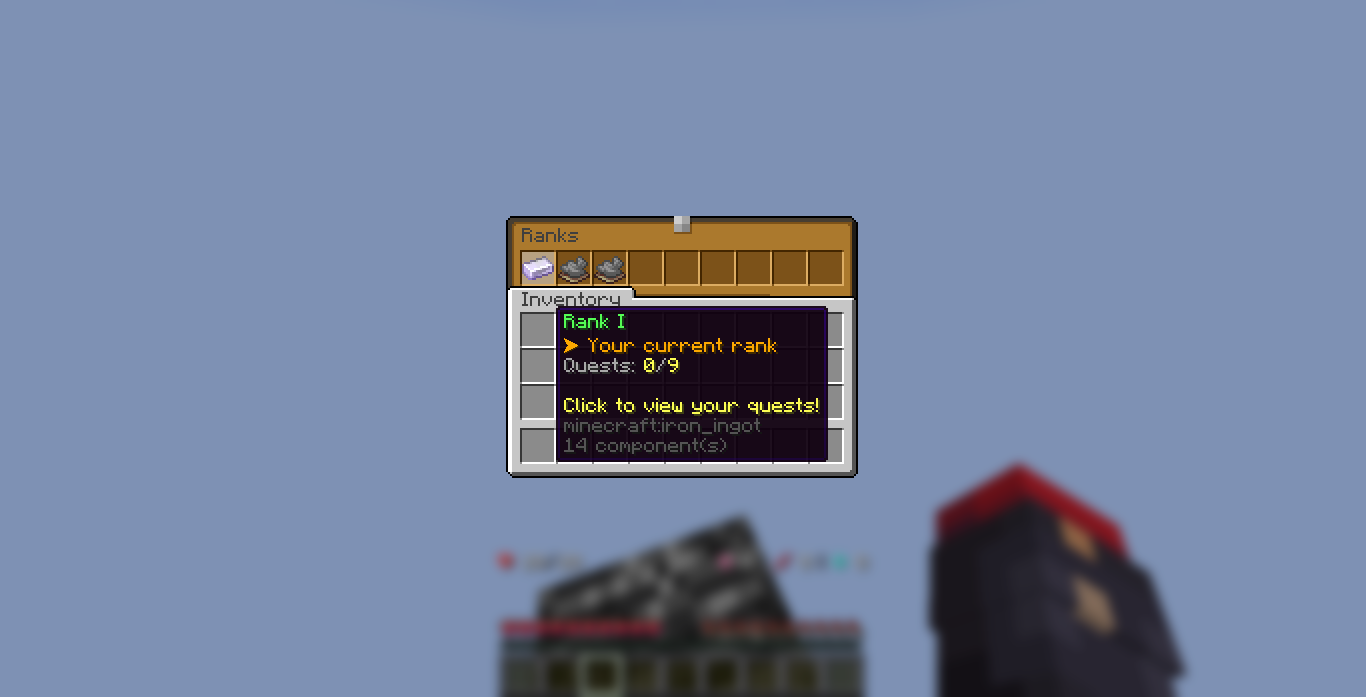
Rank states
| State | Look | Click |
|---|---|---|
| Completed | The completed icon (lime dye by default) | Just a "you already completed this" message |
| Current | The rank's own icon, glowing, with live quest progress | Opens the quest menu |
| Locked | The locked icon (gray dye by default) | "Complete your current rank first" |
Only the current rank is playable. Past ranks stay visible so players can see how far they came, and future ranks are locked until it is their turn.
Every button and filler in the menus comes from config.yml under gui (back, page arrows, and the claim button included), and each accepts vanilla materials, custom model data, or ItemsAdder items. See Configuration.
If you have more than 45 ranks, the menu paginates with previous and next page arrows.
Opening /rank always lands on the page holding the player's current rank, so a player never has to page across to find where they are.
Menu layout: auto or manual
config.yml has gui.rank-menu-mode, with two options:
auto(default): ranks fill the menu automatically, one icon per slot, inranks.ymlorder. Nothing else to configure. This is the classic behaviour.manual: you place every rank yourself. On each rank inranks.ymlyou add two keys:menu-page- which page the rank shows on (1= first page).menu-slots- the list of slots the rank fills on that page. Slots count from0at the top-left, left to right, row by row.
In manual mode a rank can cover a whole block of slots, and every slot in the list opens that rank. This is exactly how a DeluxeMenus-style frame works: point the rank's icon at an ItemsAdder image and list all the slots it should span. Ranks with no menu-slots do not appear, so you stay in full control.
Three ranks side by side (each 3 columns wide, 6 rows tall) on the first page:
ranks:
  rank-1:            # left panel
    menu-page: 1
    menu-slots: [0,1,2, 9,10,11, 18,19,20, 27,28,29, 36,37,38, 45,46,47]
  rank-2:            # middle panel
    menu-page: 1
    menu-slots: [3,4,5, 12,13,14, 21,22,23, 30,31,32, 39,40,41, 48,49,50]
  rank-3:            # right panel
    menu-page: 1
    menu-slots: [6,7,8, 15,16,17, 24,25,26, 33,34,35, 42,43,44, 51,52,53]
Extra manual-mode settings live next to the switch: gui.rank-menu-rows (menu height, 1 to 6, default 6) and gui.previous-page-slots / gui.next-page-slots (lists of slots the page arrows sit in, so one arrow can repeat down a whole edge of a frame; empty list [] hides it). See Configuration.
The next-page arrow only shows while there is a page after the one you are on. The last page that holds a rank is the end of the menu, so no arrow there, that is normal and not a broken config. Want the arrow to keep showing because more ranks are coming? Set gui.rank-menu-pages to the page count you want (a decoration placed on a later page pushes the count up too).
A different title image per page
The rank menu title comes from menu.rank-title in your language file. To give a page its own title, or its own ItemsAdder title image, add a menu.rank-title-<page number> key: rank-title-1 for the first page, rank-title-2 for the second, and so on. Any page you do not list falls back to the plain rank-title. See Messages.
The quest menu does the same per rank with menu.quest-title-<rank number> or menu.quest-title-<rank key>, and the page arrows can carry their own text and lore per page with menu.next-page-<page number> and menu.next-page-lore-<page number>. All of it is on the Messages page.
Per-rank icons for each state
Each rank shows a different icon depending on the player's progress: locked, current, or completed. The current-rank icon is the rank's own icon. The locked and completed icons default to the shared gui.locked-item / gui.completed-item, but any rank can override them with icon-locked and icon-completed:
ranks:
  rank-4:
    icon: itemsadder-myframes:rank4_current       # while it is the current rank
    icon-locked: itemsadder-myframes:rank4_locked     # while still locked
    icon-completed: itemsadder-myframes:rank4_done    # once surpassed
Leave either new key out and that rank uses the shared config default. See Creating ranks.
Decoration items (slots that are not a rank)
Sometimes you want a slot in the rank menu that is not a rank at all: a title, a short explanation, server info, or a row of glass to separate things. That is what gui.decorations in config.yml is for. A decoration is a plain item with a name and lore that just sits there. Clicking it does nothing, it never opens a quest menu and never shows a locked or completed message.
gui:
  decorations:
    - slots: [4]
      page: all
      icon: OAK_SIGN
      name: "&6&lServer Ranks"
      lore:
        - "&7Complete the quests of your"
        - "&7current rank to move up."
        - ""
        - "&eYou are &f%zquestrank_rank_name%"
    - slots: [45, 46, 47, 48, 49, 50, 51, 52, 53]
      icon: BLACK_STAINED_GLASS_PANE
Add as many as you like. Each entry is one item in the list (the lines starting with -) and takes:
| Key | What it does |
|---|---|
slots | The slots the item fills, counting from 0 at the top-left. The same item is drawn in every slot you list. slot: 4 works too for a single one. |
page | Which page it shows on, 1 being the first page. Default 1. Write all to put it on every page, or list several with pages: [1, 3]. |
icon | The item to show. Same three formats as every other icon: OAK_SIGN, OAK_SIGN:1234 or itemsadder:namespace:id. Default PAPER. |
name | The display name. & and &#rrggbb colors work, and so do PlaceholderAPI placeholders (including our own %zquestrank_...% ones). Leave it out for a nameless item. |
lore | The text lines under the name, same colors and placeholders. An empty line "" gives you a blank gap. |
Named blocks instead of a list
If you find the - list fiddly, write each decoration as a named block instead. Both forms behave exactly the same, the names are yours and are only there so you can tell them apart:
gui:
  decorations:
    title:
      slots: [4]
      page: all
      icon: OAK_SIGN
      name: "&6&lServer Ranks"
    bottom-row:
      slots: [45, 46, 47, 48, 49, 50, 51, 52, 53]
      icon: BLACK_STAINED_GLASS_PANE
Things worth knowing:
- When you switch decorations on, delete the
decorations: []line that shipped in the file. Leaving it there means the file has the key twice and the empty one at the end wins, so nothing shows up. - Decorations are drawn on top of the ranks. In
manualmode just pick slots you did not hand to a rank. Inautomode the ranks fill the slots in order, so a decoration on slot 4 covers the fifth rank and that rank can no longer be clicked. Put decorations after the last rank, or switch tomanualmode. - The page arrows are always drawn last, so a decoration can never cover one and leave a player stuck on a page.
- Two decorations on the same slot of the same page: only the last one shows. The console says which two clashed, and it also warns when a slot sits outside the menu (a slot past
gui.rank-menu-rowsin manual mode, for example). The startup log prints how many decorations loaded, so you can check the count matches your file. - ItemsAdder images work in
nameandlore, even inside%zquestrank_rank_name%when your rank names carry an image placeholder.
Menu refreshes on rank change
If a player's rank changes while they have the menu open - because you granted or removed a rank permission, or because they just claimed a rank - the open menu redraws itself onto the new rank. No need to close and reopen it by hand.
The quest menu
Clicking the current rank opens its quest menu:
- One icon per quest, placed on the slots from
gui.quest-slotsinconfig.yml. Add more slots there if a rank has more quests. - Each quest shows its objective, live progress (like
345/500), and an IN PROGRESS or COMPLETED status. You can replace this text per quest, see custom lore. - An info item at the top shows the rank and how many quests are done. Its icon is
gui.quest-info-iteminconfig.yml(or a rank's ownmenu-icon). Set it toNONEto hide that slot, which is what you want when your rank icon is an invisible ItemsAdder image so it does not leave an empty gap. - A back arrow returns to the rank menu.
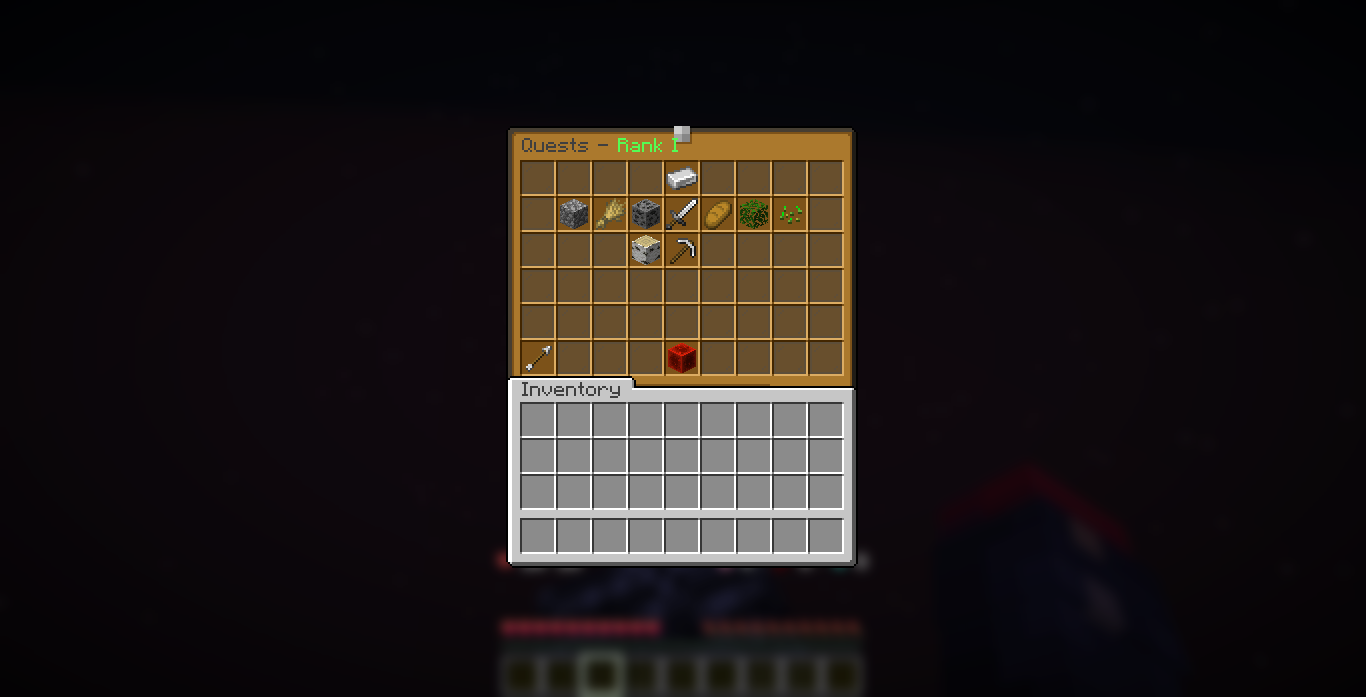
Delivery quests
A DELIVER_ITEM quest is turned in right here: the player brings the items in their inventory, clicks the quest icon, and the items are consumed and counted. See Quests.
The Claim Rank button
The big button at the bottom lists everything the rank still needs:
- All quests completed, with the count.
- Every extra requirement, each with a green check or red cross and the player's current value.
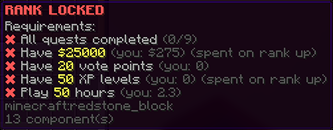
While something is missing the button is a red block. When everything passes it turns into a glowing green block; clicking it claims the rank, runs the rewards, and unlocks the next rank. An optional server-wide broadcast announces the promotion.