 HoeWars
Stats and Leaderboards
The stats HoeWars tracks per player, the in-game menus, and the top lists.
HoeWars records how every player performs and ranks them against each other. Players can check their own stats, view a leaderboard menu, or print a quick top list in chat.
Tracked stats
For each player, HoeWars keeps:
| Stat | Meaning |
|---|---|
| Wins | Matches won |
| Losses | Matches lost |
| Matches played | Total matches finished |
| Win rate | Wins as a percentage of matches |
| Rank | Current rank tier (see Ranks and ELO) |
| ELO | Hidden skill rating, Ranked only |
| Top 3 finishes | Times you placed in the top three |
| Highest occupation | Best single-match floor share, as a percentage |
| Total blocks claimed | Lifetime blocks painted |
Stats menu
Run /hoe stats to open your own stats in a menu, or /hoe stats <player> to view someone else. The target must have played before, otherwise you get a "no stats found" message.
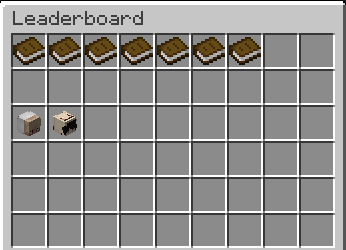
Leaderboard menu
Run /hoe leaderboard to open the leaderboard menu and browse top players.
Quick chat top list
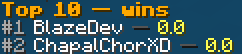
Run /hoe top <stat> to print the top ten for a single stat straight into chat. This is handy when you do not want to open a menu. If you do not name a stat, it defaults to wins.
/hoe top wins
/hoe top elo
/hoe top losses
The output is a numbered list headed by the stat you asked for:
Leaderboard freshness
Leaderboards are served from a cache that refreshes on a timer (45 seconds by default) rather than querying the database on every request. This keeps things fast on busy servers. The refresh interval is configurable. See Configuration.
Stats in scoreboards and tab
Every tracked stat is available as a PlaceholderAPI placeholder, plus leaderboard-position placeholders like "the name of the player in first place by wins". See Placeholders.
Resetting a player
Admins can wipe a single player's stats with /hoe resetstats <player>. See Commands.